How to Complete a Waho Top Up via UID on XPTopup
Topping up your Waho account on XPTopup is direct, automated, and requires only your public account ID. Follow these steps to get your coins loaded without sharing personal login details:
- Select Your Package: Choose the coin denomination you want to purchase from the live denomination selector above.
- Enter Your Waho UID: Paste your numeric User ID into the UID field.
- Confirm Account Details: Double-check the numbers to ensure the coins are sent to the correct profile.
- Complete Checkout: Choose your preferred payment method and finalize the order.
- Receive Your Coins: Once payment processes, the coins are credited directly to your in-app Waho balance. Reopen or refresh your app to see your updated total.
Step-by-Step Guide: How to Find Your Waho UID
Note: This guide applies to the Waho voice chat and social live entertainment mobile app, not fitness equipment.
Finding your User ID inside the Waho application takes only a few seconds:
- Open the Waho app on your iOS or Android smartphone.
- Tap the Profile / Me icon located in the bottom navigation menu.
- Look beneath your avatar and display name on your profile dashboard.
- Locate the ID string (a sequence of numbers).
- Tap the Copy icon next to the number to place it directly onto your device clipboard.
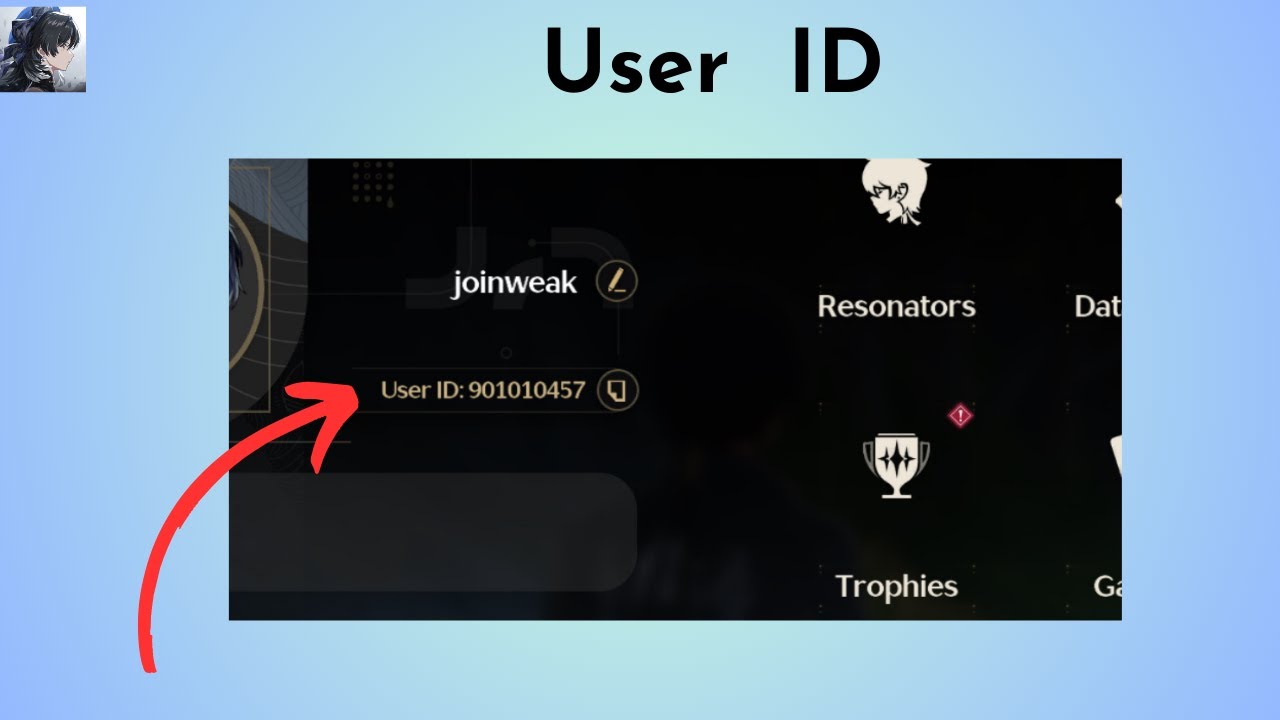
Always use the in-app copy function rather than typing digits manually. This prevents mistyping similar-looking numbers and ensures your recharge credits go straight to your account.
What Are Waho Coins and What Can You Use Them For?
Waho is a popular voice community and live social chat platform where users connect in audio rooms, participate in PK challenges, host events, and build interactive fan bases. Waho coins serve as the central in-app currency that drives engagement and unlocks exclusive room privileges.
| Feature / Utility | Description | Main Advantage |
|---|---|---|
| Virtual Gifting | Send animated presents like luxury cars, crowns, and flowers to room hosts. | Support your favorite creators and gain recognition in live rooms. |
| Mic Battles & PK Support | Cast gift votes during competitive room battles. | Boost your team or host to victory on live leaderboards. |
| Entrance Effects | Unlock exclusive vehicles and arrival banners. | Announce your presence with custom animations when joining a voice room. |
| Chat Bubbles & Frames | Equip styled avatar borders and highlighted message themes. | Stand out in active group chat feeds. |
| VIP Privileges | Access private rooms, priority seat queues, and status tags. | Enjoy enhanced profile visibility and room management options. |
Keeping your coin balance loaded ensures you never miss a chance to back your favorite broadcasters during timed events or special community celebrations.
Safe Waho Recharge: Why You Never Need to Share Your Password
Account safety is essential when buying in-app currencies online. Legitimate recharges never require direct access to your private profile.
- No Login Credentials Needed: XPTopup processes Waho orders strictly using your public UID. We never ask for your account password, email access, phone verification codes, or social media logins.
- Zero Risk of Account Hijacking: Because you never reveal your login details, your profile data, chat history, and personal connections remain entirely under your control.
- Direct In-App Delivery: The coins land directly inside your game wallet through standard platform transfer mechanisms.
- Encrypted Checkout: Payment channels on XPTopup are protected with industry-standard encryption, keeping your billing details safe throughout the checkout process.
Never share your password or temporary verification codes with anyone claiming to offer top-up services.
Waho Coin Pricing and Payment Options in 2026
Coin costs fluctuate depending on selected package size and regional pricing rules. You can find real-time costs, available bundle sizes, and currency conversions directly on the live XPTopup product catalog above.
XPTopup provides access to multiple localized and international payment options, allowing you to complete transactions in your local currency without hidden conversion fees. Once you finish your payment, your order updates automatically, giving you clear tracking from payment confirmation to coin delivery.
Troubleshooting Common Waho Top-Up Issues
If your coins do not appear immediately or you run into an issue during the checkout process, use the following checklist to resolve the problem quickly:
1. Delivery Lag or App Cache Delay
In most instances, transactions process within moments. If your coins do not reflect immediately:- Force close the Waho application.- Check your internet connection and reopen the app.- Open your profile wallet to trigger a fresh balance sync.
2. Typo in the User ID (UID)
- If you entered an incorrect UID that does not exist on the platform, the transaction will fail to credit, and our customer support team can assist in updating your details.
- If you entered an active UID belonging to another user, the coins will be delivered to that account permanently once the platform executes the transfer. Always double-check your UID before finalizing payment.
3. Payment Completed but Order Shows Pending
- Occasionally, banking providers take an extra moment to confirm funds. Check your order tracking screen on XPTopup for real-time status updates.
- If your payment succeeded but the order has not moved forward, have your transaction receipt and order ID ready and contact XPTopup 24/7 customer support for rapid assistance.
Frequently Asked Questions About Waho Top Up
What is Waho and what are Waho coins used for?
Waho is a mobile social voice chat and entertainment platform. Waho coins are the in-app currency used to send virtual gifts to room hosts, activate entrance animations, purchase avatar frames, and participate in interactive room games and PK battles.
How do I find my Waho UID for top up?
Open the Waho app, tap the profile icon in the bottom menu, and locate the numeric ID displayed under your avatar. Tap the copy icon next to the number to copy your exact UID.
Do I need to share my Waho password to recharge coins?
No. Recharging on XPTopup requires only your Waho UID. You should never share your password, SMS codes, or account login credentials.
How quickly do Waho coins reflect in my account after topup?
Coins are credited directly to your account immediately after payment verification. Simply reopen or refresh your Waho app to view your new balance.
What should I do if I enter the wrong UID during top up?
If you realize you submitted an incorrect UID, contact XPTopup support immediately with your order reference. If the order has not yet been processed by the system, our support staff will help correct the destination ID.
Which payment methods can I use to buy Waho credits on XPTopup?
XPTopup supports a wide selection of international and local payment methods, including major credit/debit cards, digital wallets, and region-specific payment channels available on the checkout page.
Current package prices
Current package prices are shown below. Prices exclude Tax. Tax, payment fees and applicable coupons are shown at checkout.
| Package | Price |
|---|---|
| Waho - Waho*15000 | USD 1.35 |
| Waho - Waho*20000 | USD 1.80 |
| Waho - Waho*25000 | USD 2.25 |
| Waho - Waho*50000 | USD 4.50 |
| Waho - Waho*100000 | USD 9.00 |
| Waho - Waho*500000 | USD 45.00 |
| Waho - Waho*1000000 | USD 90.01 |
| Waho - Waho*10000 | USD 0.90 |