Once Human Top Up: Crystgin and Passes on XPTopup
Acquiring Crystgin and seasonal passes allows you to access exclusive cosmetics, territory decor, weapon skins, and premium reward tracks in Once Human. XPTopup provides a direct recharge service that requires only your User ID (UID), Server ID, and Server Region. You never need to provide your account password or third-party login details.
How to Top Up Once Human on XPTopup
- Select the desired Once Human Crystgin package, Battle Pass, or Meta Pass tier from the product list.
- Enter your in-game UID, Server ID, and Server Region accurately in the designated input fields.
- Verify your order details and proceed to the live checkout page.
- Select your preferred local payment method and complete the payment.
- Once the transaction processes, the purchased Crystgin or pass is credited directly to your Once Human account.
Step-by-Step Guide to Finding Your UID, Server ID, and Server Region
To ensure your recharge reaches your character without delay, you must provide the exact account identifiers from your game client.
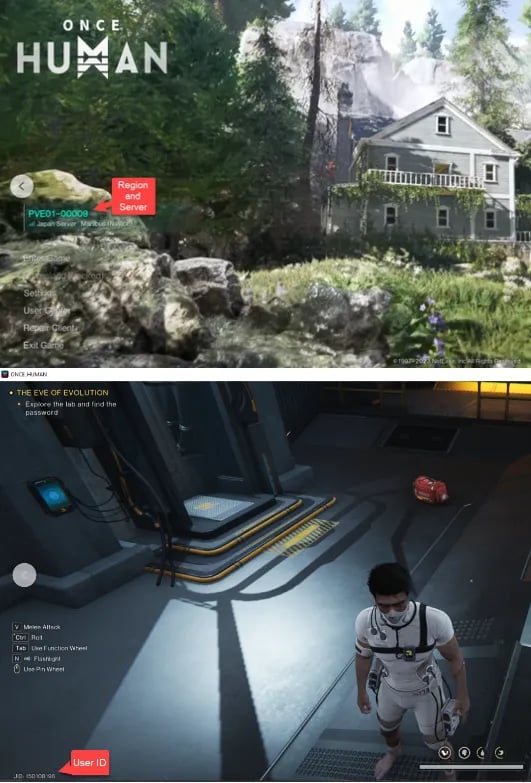
Finding Your UID
- Launch Once Human and log into your character.
- Press Esc on PC or tap the main menu icon on mobile to open the game dashboard.
- Look at the bottom-left corner of the screen or open your Profile/Character Card.
- Your UID is the multi-digit number displayed alongside your character name.
Finding Your Server ID and Server Region
- On the main login screen before entering the world, check the active server banner.
- The Server Region indicates your global zone (such as North America, Europe, Asia, South America, or Southeast Asia).
- The Server ID is the specific server identifier or scenario world tag (for example, Manibus 01-0005 or Evolution's Call 01-0002).
- You can also view this information in the top-left section of your in-game settings menu.
Overview of Once Human Currencies: Crystgin, Battle Pass, and Meta Pass
Once Human separates operational gameplay progression from aesthetic customization. Premium items do not provide combat power advantages, keeping gameplay balanced across both PvE and PvP scenarios.
| Item / Pass Type | In-Game Purpose | Primary Content Obtained |
|---|---|---|
| Crystgin Packs | Premium store currency | Lightforge Loot Crates, weapon skins, outfit sets, territory decor |
| Standard Meta Pass / Battle Pass | Seasonal progression track | Exclusive character outfits, weapon patterns, vehicle cosmetics, Mitsuko's Marks |
| Premium / Advanced Meta Pass | Accelerated seasonal pass track | Instant 20-level boost, exclusive seasonal avatar frame, bonus thematic decor |
Crystgin
Crystgin is the direct premium currency in Once Human. It is used in the in-game shop to unlock cosmetic bundles, specialty building kits, vehicle paint jobs, and Lightforge Crates. Crystgin cannot be used to purchase raw player stats, ensuring cosmetic variety without pay-to-win mechanics.
Meta Pass & Battle Pass
The seasonal Meta Pass offers structured reward progression as you complete weekly journey tasks and seasonal goals. Upgrading to the premium pass tier unlocks premium-only cosmetic tiers, furniture blueprints, and Mitsuko's Marks, which can be exchanged in the seasonal shop for legacy cosmetics.
Account Safety: Why UID-Only Top-Up Keeps Your Account Secure
XPTopup uses direct server-side API crediting using your character identifiers. This system maintains the highest standard of account protection:
- No Passwords Required: You never share your Steam, Epic Games, NetEase, Google, or Apple login credentials.
- No Account Access: No third party logs into your account, preventing unauthorized actions, inventory alterations, or IP flag triggers.
- Safe Transaction Protocol: Purchases are mapped strictly to your character's public UID and server destination.
Live Payment Options and Delivery Verification for Once Human
Real-time pricing, regional currency conversions, and available payment methods are displayed dynamically at the live checkout page on XPTopup.
Verifying Your Delivery
- Keep your game client open or relaunch the game after payment confirmation.
- For Crystgin, check your account balance in the top-right corner of the in-game Shop menu (F3 on PC).
- For Meta Pass / Battle Pass, open the seasonal pass screen to verify that the premium track shows as unlocked.
- Some bonus bundle items may arrive via the in-game mailbox; open your mail menu to claim any attached reward tokens.
Troubleshooting Missing or Delayed Once Human Crystgin Deliveries
If your order has completed on XPTopup but your items have not appeared in-game, check the following troubleshooting steps:
- Restart the Client: Log out to the main menu and log back in to force a server synchronization of your wallet balance.
- Check Server and Character Selection: Ensure you logged into the exact Server Region and Server ID provided during checkout. Crystgin balances and passes are character- and server-bound.
- Verify UID Accuracy: Compare the UID submitted on your XPTopup order confirmation receipt against your in-game profile number.
- Check In-Game Mail: System messages carrying promotional bundle components often require manual collection from your mailbox.
- Contact Support: If the balance does not reflect after restarting, submit your order number and character details to XPTopup customer support for verification.
Frequently Asked Questions
Where can I buy Once Human Crystgin and Battle Pass?
You can purchase Once Human Crystgin packs and Battle Pass upgrades directly on XPTopup by providing your UID, Server ID, and Server Region. Current pricing and payment options are displayed at checkout.
How do I find my Once Human UID, Server ID, and Server Region?
Your UID is displayed in the bottom-left corner of the main HUD and inside your profile screen. Your Server Region and Server ID are visible on the login screen before world selection and inside the in-game escape settings menu.
Do I need to share my game account password to top up Once Human?
No. XPTopup only requires your UID, Server ID, and Server Region. You never need to provide your password or give anyone direct access to your game account.
What is Crystgin used for in Once Human?
Crystgin is used to purchase cosmetic items, Lightforge Loot Crates, weapon skins, character apparel, vehicle cosmetics, and territory architectural packs in the in-game shop.
Is Once Human pay to win?
No. The developer maintains a cosmetic-only monetization model for Crystgin and the Meta Pass. Premium currencies and paid tracks do not offer combat advantages or character stat boosts.
What should I do if my Once Human top-up does not appear immediately?
First, restart your Once Human game client to refresh server data. Check your in-game mailbox for bundle attachments. If your balance still does not update, check your order receipt on XPTopup to confirm your UID and server details were submitted correctly, then contact customer support.
Which platforms are supported for Once Human top-ups in 2026?
Top-ups through XPTopup support Once Human players across all active PC and mobile clients in 2026. Because delivery is handled directly via your character's global UID and server routing, purchases credit to your designated character regardless of the device you use to play.
Current package prices
Current package prices are shown below. Prices exclude Tax. Tax, payment fees and applicable coupons are shown at checkout.
| Package | Price |
|---|---|
| 62 Crystgin | USD 0.84 |
| 339 Crystgin | USD 4.20 |
| Meta Pass (30 Days) | USD 4.22 |
| Battle Pass Advanced Edition | USD 8.45 |
| 1120 Crystgin | USD 12.66 |
| 2340 Crystgin | USD 25.25 |
| 3979 Crystgin | USD 42.08 |
| Battle Pass Deluxe Edition | USD 57.77 |
| 8075 Crystgin | USD 84.16 |