Yula Top Up: Instant Account Credit Recharge
Topping up your Yula account gives you immediate access to in-app credits, premium features, digital items, and exclusive experiences. Whether you need credits to support in-app interactions, acquire special virtual goods, or boost your profile activity, acquiring credits through a direct ID-based system is the most efficient solution.
XPTopup offers a direct, password-free transaction process designed to credit your profile without requiring sensitive login credentials. By entering your numerical Player ID and selecting your preferred denomination, your balance updates through an automated delivery system.
How to Top Up Yula Credits Online Using Player ID
Completing a recharge takes only a few moments. Follow this step-by-step process to ensure your order completes without errors:
- Enter Your Player ID: Input your exact Yula Player ID in the designated field at the top of this page. Double-check the numbers to prevent misdirected orders.
- Select Your Credit Package: Choose the credit denomination that matches your requirements. Current rates and pack sizes display directly on the product menu.
- Select Your Payment Channel: Pick your preferred regional or international payment method from the available checkout options.
- Confirm and Pay: Click the buy button and complete your transaction through the secure payment portal.
- Check Your Account: Open the Yula app and refresh your profile screen to verify your updated credit balance.
| Step | Action | Key Verification |
|---|---|---|
| 1. Identification | Enter Player ID | Verify numerical digits from your in-app profile |
| 2. Selection | Pick Credit Pack | Confirm denomination on live checkout |
| 3. Payment | Complete Transaction | Review order summary and finalize payment |
| 4. Delivery | Verify Balance | Re-open the app to view refreshed credits |
Available Yula Credit Pack Options and Denominations
Yula credits serve as the universal in-app currency for microtransactions, virtual gifts, profile upgrades, and premium communication tools. Different activities demand different credit amounts, which is why XPTopup hosts multiple package tiers.
- Starter Bundles: Ideal for quick one-off purchases, basic interactions, or test recharges.
- Standard Packs: Designed for regular users who participate in ongoing in-app activities and live engagement.
- Value Bundles: Suited for frequent users seeking maximum credits in a single order to avoid repeated checkouts.
Live pricing, active bundle promotions, and regional currency conversions are calculated in real time on the order selection grid above. Because promotional packages and base rates adjust over time, refer to the live checkout selector for current values.
Step-by-Step Guide to Finding Your Yula Player ID
Your Player ID is the unique numerical identifier assigned to your personal account. You do not need to provide your registered phone number, email address, or social login credentials—only this identifier is required to route your credits accurately.
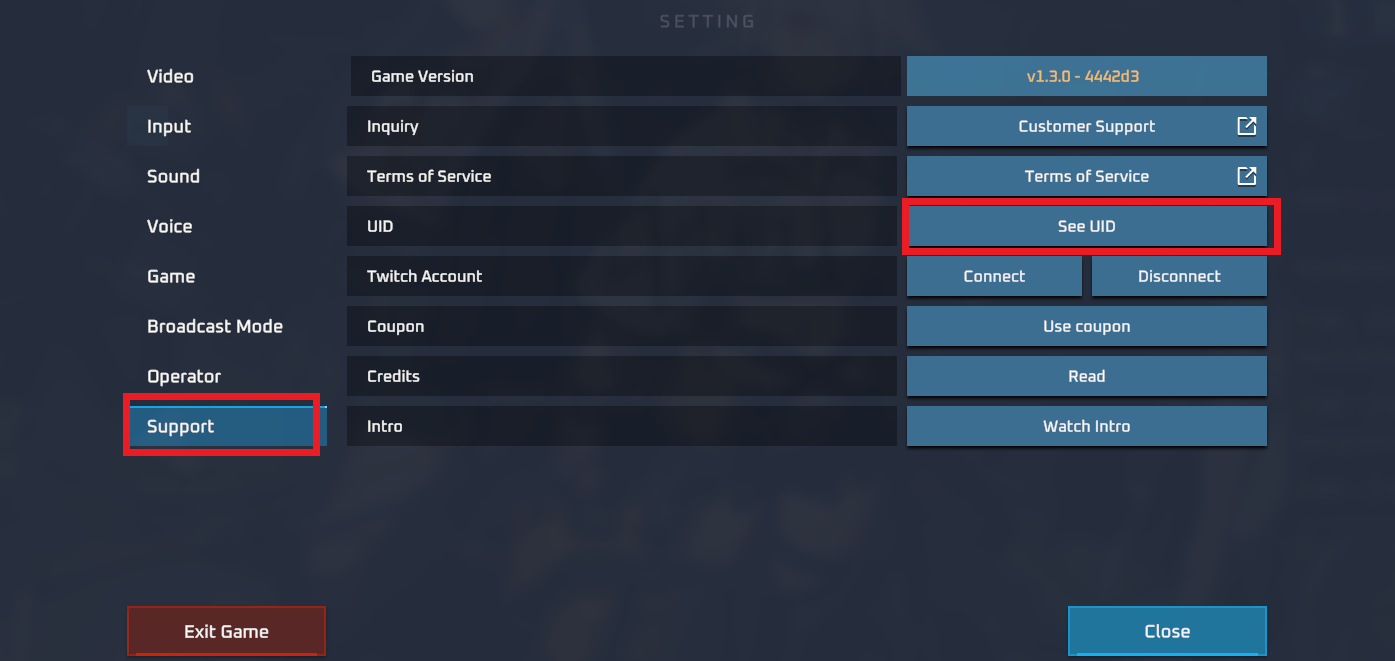
To locate your Player ID inside the application:
- Launch the Yula app on your mobile device.
- Log into your active account.
- Tap your Profile or My Account tab located in the navigation bar.
- View your profile information banner beneath your avatar.
- Locate the ID field consisting of unique numerical digits.
- Tap the copy icon next to your ID or note the numbers carefully for checkout.
Always copy and paste your ID directly from the app interface whenever possible. This prevents typos and eliminates accidental transfer to unintended accounts.
Safe and Secure Payment Methods for Yula Top Up
Account safety is a core requirement when purchasing digital credits online. Traditional third-party top-ups sometimes ask for user login credentials, exposing accounts to unauthorized access or security flags.
XPTopup operates on a strict Direct ID model:
- Zero Passwords Required: You never share your account password, security questions, or linked social media details.
- No Account Sharing: The recharge process injects credits directly to the server side using public account IDs, keeping your login private.
- Encrypted Checkout: All financial transactions run through industry-standard encryption protocols to protect your billing information.
- Trusted Payment Providers: Select from a wide variety of localized bank transfers, digital wallets, and credit cards supported on our platform.
Instant Delivery and Order Processing Details on XPTopup
When you buy credits online, speed and reliability matter. XPTopup utilizes an automated order processing pipeline connected directly to digital fulfillment channels.
- Automated Dispatch: Once payment confirmation completes, our system routes the credit bundle to the targeted Player ID immediately.
- Live Order Tracking: You can monitor your purchase status from payment submission through to final delivery completion.
- Multi-Device Compatibility: Recharge your account from any desktop browser, mobile phone, or tablet without needing the app installed on your checkout device.
- Dedicated Support Assistance: If your order encounters any network-related delay, our customer service team is available around the clock to review your transaction logs.
Troubleshooting Common Yula Recharge Issues and Delivery Verification
If your credits do not appear immediately after completing payment, review the following troubleshooting steps:
- Restart the Application: Close the Yula app completely from your device task manager and relaunch it. This forces the app to query the game server for fresh balance data.
- Verify Your Payment Receipt: Check your email or payment provider account to confirm that your transaction completed successfully and was not marked as pending.
- Confirm the Submitted Player ID: Review the order confirmation details sent to your email to verify that the entered ID matches your active in-app account.
- Check Server Maintenance: Periodically, app servers undergo scheduled maintenance or high-traffic updates that can briefly postpone data synchronization.
- Contact Support with Order Details: If your balance does not update within a standard timeframe, open a support ticket on XPTopup including your Order ID, the submitted Player ID, and proof of payment.
Frequently Asked Questions About Yula Top Up
What is a Yula top up and how does it work?
A Yula top up is an online purchase that adds virtual credits directly to your in-app account balance. By entering your numerical Player ID and completing checkout on XPTopup, the selected credit package is credited to your profile without requiring manual voucher redemptions.
How do I find my Yula Player ID for recharging?
Open the Yula app, go to your Profile section, and locate the numerical ID displayed beneath your profile name and avatar. Tap the copy icon next to the number to paste it directly into the XPTopup checkout field.
Do I need to share my Yula account password to top up credits?
No. You never need to provide your password, authentication codes, or linked social accounts. Top-ups on XPTopup require only your public Player ID.
How long does it take for Yula credits to arrive in my account?
Credits process through an automated direct-delivery pipeline. In most cases, credits reflect on your profile balance shortly after payment verification. Reopening the app refreshes your total.
What should I do if I entered the wrong Player ID during checkout?
Because orders process automatically upon payment confirmation, credits sent to a valid, existing third-party ID cannot be reversed. If you notice an error before the order completes or if you entered an invalid ID, contact XPTopup customer support immediately with your Order ID for assistance.
What payment methods are supported for Yula recharges on XPTopup?
XPTopup supports a wide selection of payment solutions, including major credit and debit cards, digital e-wallets, and regional online banking channels. Available methods for your region appear on the live checkout screen.
Current package prices
Current package prices are shown below. Prices exclude Tax. Tax, payment fees and applicable coupons are shown at checkout.
| Package | Price |
|---|---|
| Yula - Yula*50000 | USD 0.95 |
| Yula - Yula*70000 | USD 1.32 |
| Yula - Yula*100000 | USD 1.89 |
| Yula - Yula*200000 | USD 3.78 |
| Yula - Yula*500000 | USD 9.45 |
| Yula - Yula*700000 | USD 13.22 |
| Yula - Yula*1000000 | USD 18.89 |
| Yula - Yula*2000000 | USD 37.78 |
| Yula - Yula*5000000 | USD 94.46 |
| Yula - Yula*10000000 | USD 188.91 |