Binmo Top Up: Voice Chat Credits and Room Rewards
Binmo is a popular interactive group voice chat application designed for mobile users worldwide. Within the platform, users join voice chat rooms, listen to live audio broadcasts, sing karaoke, play casual party games, and interact with room hosts and friends in real time.
To participate fully in Binmo voice rooms, in-app credits serve as the core virtual currency. Credits allow you to send animated virtual gifts to room hosts, purchase premium entry entrance effects, display custom profile badges, and activate exclusive room microphone frames. Sending gifts also raises your user wealth level, earning you higher standing in room rankings and community leaderboards.
Clearing Up Brand Confusion: Binmo vs. Binomo
Search engines sometimes confuse Binmo with Binomo due to the similar spelling. Binmo is exclusively a social voice chat and entertainment platform built for community interactions, audio rooms, and virtual gifting. Binomo is an unrelated online trading and financial platform. When you buy a recharge here on XPTopup, you are purchasing in-app credits exclusively for the Binmo voice chat app.
How to Find Your Binmo UID Profile Number
Every Binmo account possesses a unique numeric user ID (UID). Because XPTopup processes your order directly to your account using this identifier, finding and copying the exact number ensures your credits arrive instantly without error.
Follow these steps to locate your Binmo UID:
- Launch the Binmo app on your mobile device.
- Tap the Profile or Me icon located in the bottom-right corner of the main screen.
- View your profile header at the top of the screen.
- Locate the numeric string labeled ID or UID printed directly below your profile name and avatar.
- Tap the copy icon next to the number or write the digits down carefully.
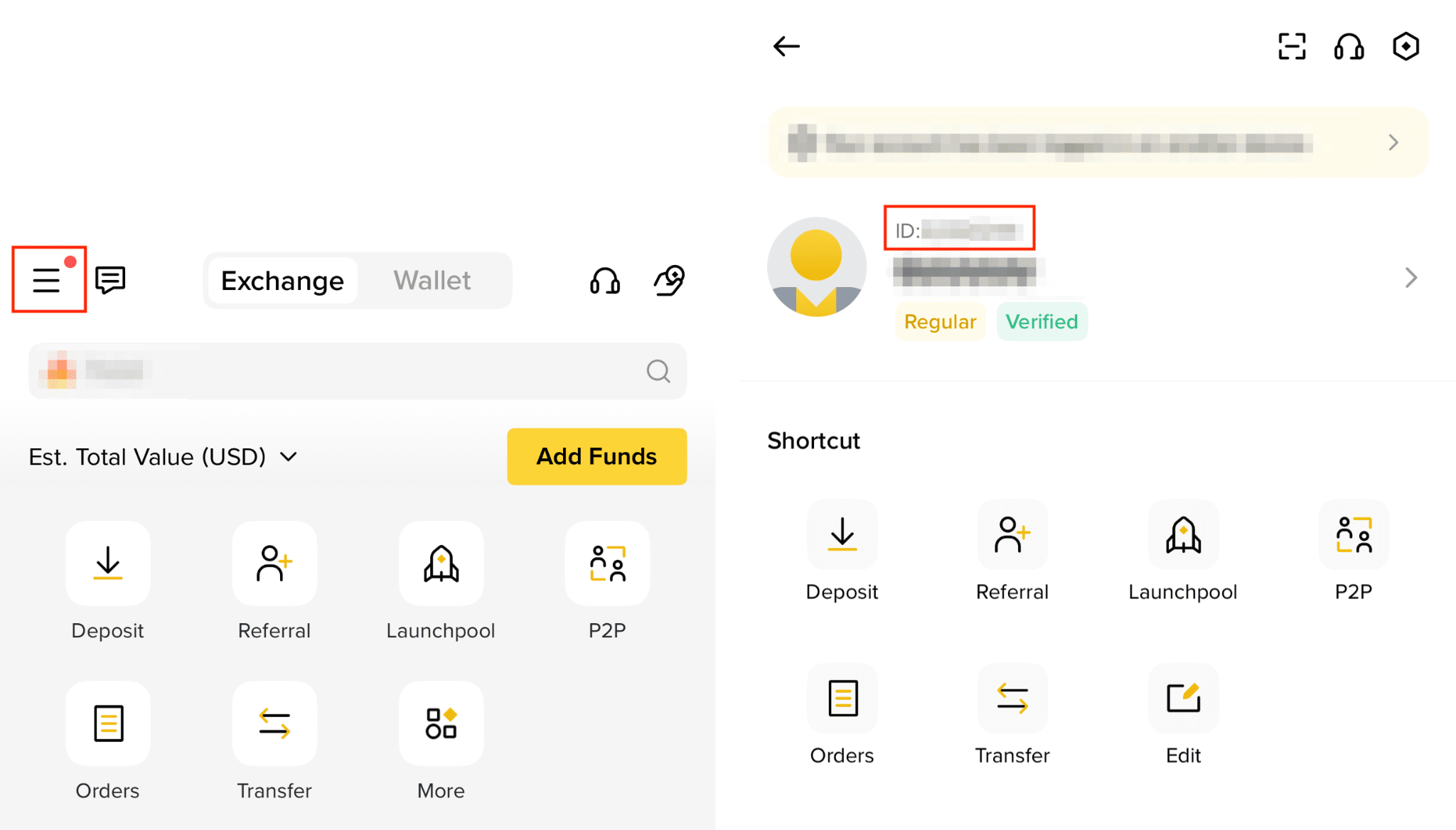
Note: Do not submit your display nickname or room ID. Only your personal numeric UID routes credits to your personal wallet.
Step-by-Step Guide to Binmo Top Up with UID
Recharging your Binmo wallet on XPTopup is straightforward and requires no complex logins. Follow this quick guide to complete your order:
- Select Your Credit Amount: Review the available Binmo credit packages on this page and pick the option that matches your needs.
- Enter Your Binmo UID: Input your numeric account ID in the designated
UIDfield. Make sure there are no accidental spaces or missing digits. - Select Your Payment Channel: Choose from the available regional payment options displayed on the checkout screen.
- Confirm Your Order: Verify the account details and click the checkout button to complete the transaction.
- Check Your In-App Balance: Open Binmo, head to your profile wallet, and verify your updated credit balance.
| Order Detail | Requirement | Notes |
|---|---|---|
| Target Account Identifier | Numeric Binmo UID | Found in the profile header under the "Me" tab |
| Account Password | Never Required | Secure, direct UID-based deposit |
| Pricing & Packages | Live on Checkout | Select your preferred tier directly on XPTopup |
| Delivery Method | Direct Wallet Credit | Synchronizes automatically with the mobile app |
Safety Guarantee: Why UID-Only Checkout Protects Your Account
Account safety is a top priority when purchasing digital credits online. Traditional top-up methods that require your account login credentials expose you to potential password theft, account recovery issues, and unauthorized access.
XPTopup uses a UID-only direct fulfillment method. This guarantees complete security for your Binmo account:
- Zero Password Exposure: You never provide your password, recovery email, phone verification code, or social login credentials.
- No Account Sharing: Your personal voice room messages, friend lists, and private settings remain completely untouched.
- Protection Against Account Bans: Direct UID top-ups utilize standard app recharge mechanisms, keeping your account fully compliant with platform terms of service.
Accepted Payment Methods and Currency Support on XPTopup
XPTopup provides a localized checkout experience for Binmo users across different regions. When you proceed to the checkout screen, the platform automatically displays supported local payment options, including major credit cards, debit cards, digital e-wallets, and regional online banking channels.
All package pricing, exchange rates, and available denominations are updated in real time directly on the product selection menu. Review the live catalog above to view exact package tiers and complete your order in your preferred currency.
Common Top-Up Mistakes and How to Prevent Failed Recharges
To ensure your Binmo recharge processes without delay, keep these best practices in mind:
- Double-Check the UID Before Submitting: The most common cause of delayed delivery is an incorrect numeric UID. Always use the in-app copy button instead of typing the number manually.
- Do Not Enter Room IDs: A room ID is the temporary number assigned to an active voice channel. Entering a room ID will cause the recharge to fail or credit the wrong account. Use your personal profile UID.
- Avoid App Name Mix-Ups: Confirm you are topping up for the Binmo social voice app and not an unrelated financial or gaming service.
- Stable Internet Connection: Ensure your internet connection is stable during payment processing to prevent duplicate pending authorizations.
Order Status Tracking and Troubleshooting
If you have completed your payment but do not see your credits immediately, follow these troubleshooting steps:
- Completely Close and Reopen Binmo: Force-quit the Binmo app on your mobile device and reopen it to refresh your wallet balance.
- Check Your Order History on XPTopup: View your order status in your XPTopup account dashboard to confirm payment completion.
- Contact XPTopup Customer Support: If your balance does not update within a few minutes, reach out to XPTopup support with your order number and Binmo UID for fast verification.
Frequently Asked Questions About Binmo Top Up
Where can I find my Binmo UID?
Open the Binmo application, tap the Me tab in the bottom-right corner, and look directly beneath your username and profile photo. Your numeric UID is displayed there with a convenient copy button next to it.
Do I need to share my Binmo password to top up credits?
No. XPTopup only requires your numeric Binmo UID. You should never share your account password, SMS verification codes, or login details with anyone.
How long does it take for Binmo credits to appear after purchase?
Recharges sent through XPTopup are processed automatically upon payment confirmation. In most cases, the credits appear in your in-app wallet within minutes.
Can I top up Binmo credits for a friend using their UID?
Yes. As long as you have your friend's correct numeric Binmo UID, you can enter their ID at checkout on XPTopup. The credits will be deposited directly into their in-app wallet.
What should I do if I entered the wrong UID during checkout?
Because digital recharges process automatically once submitted, it is vital to check your UID before paying. If you notice an error immediately after placing the order, contact XPTopup customer support right away with your transaction details.
Is Binmo the same app as Binomo?
No. Binmo is a social audio entertainment and group voice room app. Binomo is an unrelated online trading platform. This page provides top-ups exclusively for the Binmo voice chat app.
Current package prices
Current package prices are shown below. Prices exclude Tax. Tax, payment fees and applicable coupons are shown at checkout.
| Package | Price |
|---|---|
| Binmo - Binmo*10000 | USD 3.55 |
| Binmo - Binmo*15000 | USD 5.32 |
| Binmo - Binmo*20000 | USD 7.10 |
| Binmo - Binmo*25000 | USD 8.87 |
| Binmo - Binmo*50000 | USD 17.74 |
| Binmo - Binmo*100000 | USD 35.49 |
| Binmo - Binmo*500000 | USD 177.43 |
| Binmo - Binmo*1000000 | USD 354.85 |
| Binmo - Binmo*5000 | USD 1.77 |