300 Delta Coins

Total

USD 3.39

Skip to main content
XPTopup
Search...
Quick answer

To top up Delta Force Delta Coins, pick a package, enter your Player ID and pay at checkout. It is credited to that account after payment is confirmed — no password needed.

Product specs
GameDelta Force Delta Coins
PlatformsPCMobileConsole
Product typeDirect top-up to your game account
Account details neededPlayer ID
Packages7
DeliveryAutomatic after payment is confirmed, usually within minutes
PaymentCards, e-wallets, local methods and crypto — options depend on your country

Delta Force top up on XPTopup puts Delta Coins on your account using nothing but your Player ID. Eight pack sizes run from 60 to 6480 Delta Coins; once payment is confirmed the order is delivered automatically, normally inside a few minutes, and your password never leaves your hands.

Delta Coins order specs

  • Game: Delta Force
  • Currency: Delta Coins
  • Packs: 60, 300, 420, 680, 1280, 1680, 3280 and 6480 Delta Coins
  • Required: Player ID (one field)
  • Region: account region as shown at checkout
  • Delivery: automatic, usually within minutes of confirmed payment
  • Login needed: no

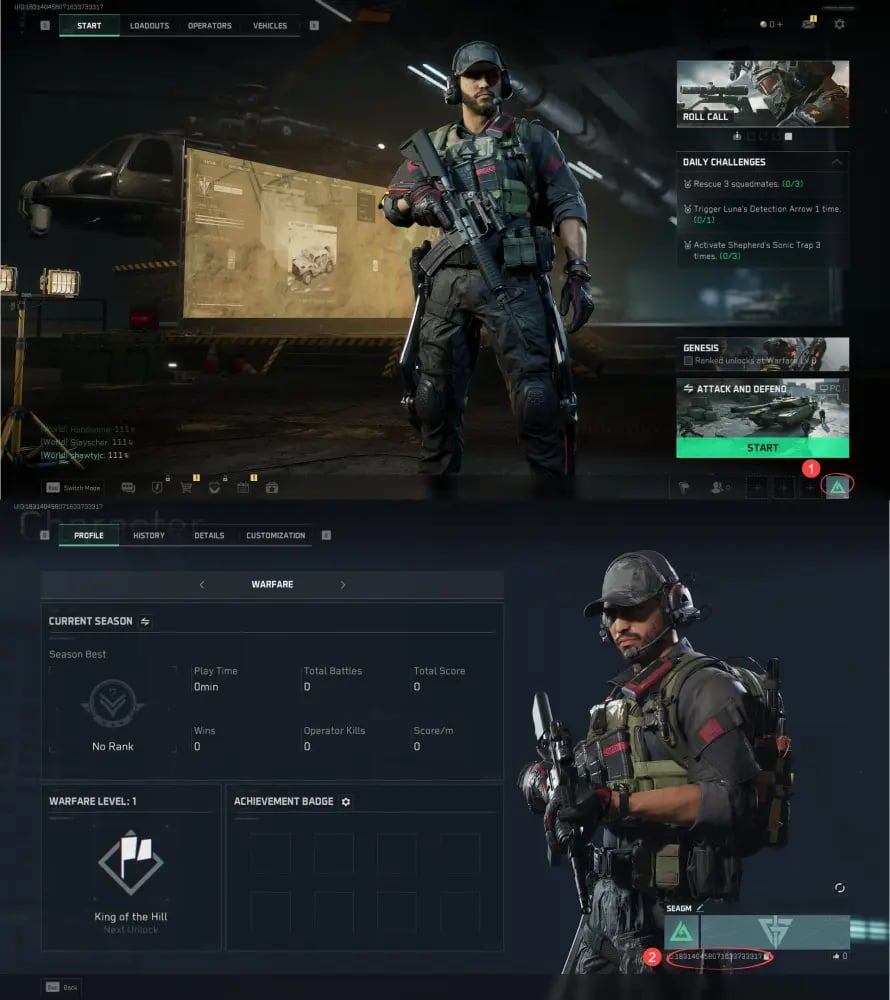
Locating your Delta Force Player ID

Delta Force identifies every account by a numeric ID, and that number is exactly what the Player ID field expects.

  1. Launch Delta Force and wait for the main lobby to load.
  2. Open your profile by clicking or tapping your avatar or name card.
  3. Find the numeric ID on the profile card; most versions show a copy button beside it.
  4. Paste it into the Player ID field and check the last four digits against the game.

Two easy slips: typing your in-game name instead of the number, and copying a squadmate's ID from a friend list or post-match screen. Both send the Delta Coins somewhere you did not intend, and delivered value cannot be pulled back.

Sizing your Delta Coins order

Delta Coins are the premium currency of the Delta Force in-game store, spent on things like battle pass upgrades and cosmetic bundles such as operator and weapon skins. Store and pass costs are set in-game and change from season to season, so check the number you need first and buy to that target instead of guessing.

  • 60 Delta Coins: the smallest step, for closing a tiny gap. Need 120? Two orders of 60 add up, because Delta Coins stack in one balance.
  • 300 and 420 Delta Coins: a single cosmetic or a partial top-up toward a pass.
  • 680 and 1280 Delta Coins: the middle of the ladder, for a season's planned purchases.
  • 1680 and 3280 Delta Coins: bigger bundles you have already priced in the store.
  • 6480 Delta Coins: the largest single pack on the page.

Current prices for all eight sizes are in the live price table below.

Delta Coins not showing yet?

Work through these checks in order before you reach out:

  1. Open the order page and read the status. If it is still processing, delivery is running; give it a few more minutes.
  2. If it says delivered, return to the lobby or restart the game so the store balance refreshes.
  3. Compare the Player ID on the order with the one on your profile, digit by digit.
  4. Still missing? Contact support with your order number. If an order fails, it is refunded to the original payment method.
Delta Force Top Up guide image

Recharge Process

Top-up Procedures

  1. 1

    Place Your Order & Check Out

    Complete your purchase securely through our checkout process.

  2. 2

    Instant Auto-Delivery to Your UID

    Once your payment is confirmed, your top-up is automatically delivered to the UID you entered — fast, 100% secure, and no account login required.

Delta Force Delta Coins FAQ

01

How do I top up Delta Force by Player ID?

Choose a Delta Coins pack on this page, paste your numeric Player ID and pay. Delivery to that ID starts on its own once payment is confirmed, and the order page shows when it is complete.

02

Is there a 120 Delta Coins pack?

Not on this listing. The sizes are 60, 300, 420, 680, 1280, 1680, 3280 and 6480. For 120, place two orders of 60; both land in the same Delta Coins balance.

03

Is the Player ID the same as my in-game name?

No. The name can be changed and is not unique, while the Player ID is the fixed number tied to your account. Only the number works in the checkout field.

04

Do I have to log in or give my password?

No. This Delta Force recharge needs only the Player ID. No password, platform login or verification code is requested at any point.

05

How fast do Delta Coins arrive?

Delivery is automatic and normally completes a few minutes after payment is confirmed. If the order shows delivered but the store balance is unchanged, a game restart usually refreshes it.

06

Can I buy Delta Coins for a squadmate?

Yes. Put your squadmate's Player ID in the field and the coins land on their account; nothing else is needed from them.

07

Do purchases here count toward in-game top-up events?

Event rules and rewards are set by the game's publisher. Check the event page inside Delta Force to see what qualifies before counting on a reward.

Delta Force Delta Coins
Delta Force Top Up

Delta Force Delta Coins

PCMobileConsole4.1ksold

Prices exclude Tax. Tax is shown at checkout.

Payment Support

SBP (Faster Payments System)Credit / debit cardBLIKBank card (Belarus)Bank card (Kazakhstan)SPEIPayUBoostOctopusGate PayBinance PayTouch 'n Go eWalletBancontactFPSApple PayGoogle PayCredit / debit cardTrustlypaysafecardMyBankMultibancoXPTopup wallet balanceEps