Elelive Top Up: Fast Elecoins Delivery with Your EleLive ID
Elelive is a leading live video streaming platform built for interactive entertainment, connecting viewers with talented hosts, video jockeys (VJs), singers, and performers across Southeast Asia and beyond. To interact with your favorite broadcasters, send dynamic digital gifts, and participate in competitive room battles, you need Elecoins—the official in-app currency of Elelive.
XPTopup provides a direct Elelive top up service that credits Elecoins straight to your account using only your EleLive ID. You never have to share login passwords or link sensitive social media profiles. Choose your desired Elecoins package, provide your account ID, and enjoy real-time balance fulfillment to keep your live stream interactions going uninterrupted.
What is Elelive and What are Elecoins Used For
Elelive is a mobile live streaming hub popular across Malaysia, Singapore, Taiwan, and Indonesia. Broadcasters stream daily talent shows, music performances, gaming sessions, and interactive talk shows. The platform focuses on high-engagement features where viewers directly influence stream activities.
Elecoins act as the primary medium of exchange across all live rooms in Elelive. Here is what you can do with Elecoins:
- Send Virtual Gifts: Send animated gifts ranging from simple flowers and applause to luxury yachts, castles, and custom screen takeovers to reward hosts.
- Boost Host Rankings: During live broadcast PK battles, gifting Elecoins contributes directly to a creator's points, helping them win rounds and climb regional leaderboards.
- Unlock VIP Badges and Entrance Effects: Active gifters receive exclusive chat badges, premium username colors, and customized entrance animations when entering broadcast rooms.
- Play In-Room Mini-Games: Use Elecoins to join interactive room activities and seasonal events hosted by broadcasters.
How to Find Your EleLive ID in the Mobile App
To complete an Elelive top up on XPTopup, you only need your unique numeric EleLive ID. Follow these steps to find it inside your mobile app:
- Open the Elelive app on your iOS or Android device.
- Tap the Me (Profile) tab located in the bottom-right corner of the main screen.
- Look at the top section under your profile picture and nickname.
- Find the number sequence labeled ID or EleLive ID.
- Note down this ID or tap to copy it directly.
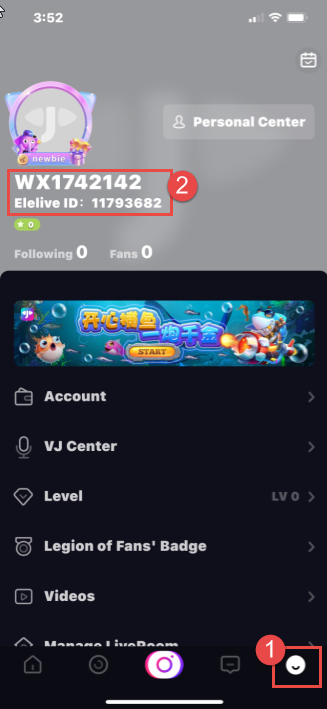
Double-check your ID before proceeding to payment to ensure your Elecoins are routed to the correct account.
How to Top Up Elecoins on Elelive Using EleLive ID
Recharging on XPTopup is straightforward and requires zero account login sharing. Follow this step-by-step guide:
- Select Package: Choose the denomination of Elecoins you wish to purchase from the product catalog.
- Enter EleLive ID: Paste your numeric ID into the player field labeled EleLive ID.
- Review Order: Confirm that your entered ID is accurate.
- Proceed to Checkout: Select your preferred local or international payment option. Real-time pricing is displayed transparently on the checkout screen.
- Receive Elecoins: Once payment processing finishes, your Elecoins are credited directly to your in-app balance. Open your Elelive wallet to confirm your new total.
Secure Recharge: Why Password-Free UID Top-Up Protects Your Account
Account safety is essential when purchasing digital currency online. Many unofficial third-party services ask for login credentials, phone verification codes, or linked Facebook/Google logins to process recharges. Sharing sensitive login details exposes your profile to unauthorized access, account theft, or loss of existing virtual items.
XPTopup uses a direct ID recharge mechanism:
- Zero Password Requirements: You only supply your public EleLive ID.
- No Account Access: Customer service or automated systems never touch your private messages, follower lists, or personal profile settings.
- Protected Payment Gateways: All checkout transactions run through encrypted payment processing protocols.
- Safe for Official Guidelines: Direct top-ups comply with standard user safety practices, ensuring your account remains in good standing.
Supported Regional Payment Options for Elelive Recharges
Elelive maintains dedicated user communities across several Asian territories and international markets. XPTopup supports localized purchasing paths so you can complete your top up without currency exchange friction.
| Region | Community Focus | Account Identifier Needed | Primary In-App Currency Utility |
|---|---|---|---|
| Malaysia | Local talent, music, and bilingual VJ streams | EleLive ID | Virtual gifts, VIP entrance effects, PK battles |
| Singapore | Lifestyle streams, gaming, and creator events | EleLive ID | Exclusive stream badges, leaderboard gifting |
| Taiwan | Music, variety shows, and competitive PK broadcasts | EleLive ID | Room mini-games, dynamic screen gifts |
| Indonesia & Global | International talent streams and cross-border rooms | EleLive ID | Broadcaster support, room rank upgrades |
All package pricing, currency conversions, and regional payment methods are updated live on the XPTopup checkout screen.
Troubleshooting Common Elelive Top Up and Balance Issues
If you experience any delay or issue after placing your order, use the following troubleshooting steps:
1. In-App Balance Has Not Refreshed
Live stream wallets sometimes experience a brief synchronization delay. Close the Elelive app completely from your device app switcher and relaunch it. Go to Me > Wallet to verify your updated balance.
2. Typo in EleLive ID
If you entered an incorrect ID during checkout, the system may deliver the coins to the account matching the submitted ID. Always double-check your ID before payment. If an order fails to process due to a non-existent ID, contact XPTopup support immediately with your transaction order number.
3. Payment Completed but Order Pending
Network confirmation times can vary depending on your chosen payment channel. Keep your order confirmation email and invoice number handy. If your order status does not update within a few minutes, reach out to XPTopup customer assistance for rapid verification.
Frequently Asked Questions About Elelive Top Up
What is the Elelive app?
Elelive is a mobile live streaming platform popular in Southeast Asia where users watch live broadcasts, interact directly with content creators and VJs, participate in interactive talent shows, and send animated virtual gifts in real time.
How do I find my EleLive ID for a top up?
Open the Elelive app, tap the Me icon in the bottom-right corner, and locate the numeric ID displayed under your profile avatar and username. Enter this exact number into the EleLive ID field on XPTopup.
What can I purchase with Elecoins on Elelive?
Elecoins allow you to purchase virtual gifts for streamers, participate in live PK battles, unlock special entrance animations, acquire VIP chat badges, and take part in interactive room games.
Do I need to share my Elelive account password to recharge?
No. XPTopup only requires your numeric EleLive ID. You should never share your account password, email login, or verification codes with anyone.
How quickly will Elecoins be credited to my Elelive account?
Top-ups are processed automatically upon successful payment. In most cases, Elecoins appear in your in-app wallet shortly after checkout completion.
What happens if I enter the wrong EleLive ID during checkout?
Top-ups sent to a valid but incorrect ID cannot be reversed once processed on the network. Always verify your EleLive ID from the app profile screen before confirming payment on XPTopup.
Current package prices
Current package prices are shown below. Prices exclude Tax. Tax, payment fees and applicable coupons are shown at checkout.
| Package | Price |
|---|---|
| Elelive Top Up - 60 Elecoins | USD 1.22 |
| Elelive Top Up - 320 Elecoins | USD 5.75 |
| Elelive Top Up - 650 Elecoins | USD 11.53 |
| Elelive Top Up - 1320 Elecoins | USD 23.28 |
| Elelive Top Up - 3350 Elecoins | USD 56.91 |
| Elelive Top Up - 6800 Elecoins | USD 113.42 |
| Elelive Top Up - 18000 Elecoins | USD 267.89 |