Eparty Top Up: Fast, Direct Credit Recharge
Eparty is a popular social entertainment and interactive party platform where users join live voice chat rooms, play casual games, interact with streamers, and build online communities. Credits are the primary in-app currency on Eparty. Having a healthy balance of credits allows you to send virtual gifts to your favorite room hosts, unlock custom avatar frames, purchase unique room entry effects, and participate in special interactive events.
XPTopup provides an efficient and reliable way to buy Eparty credits directly using your User ID (UID). With automated processing and secure payment processing, you can recharge your account within moments without sharing sensitive credentials. Choose your desired credit denomination, complete your order, and jump right back into the live voice rooms with full access to premium features.
How to Top Up Eparty Credits on XPTopup
Recharging your Eparty account on XPTopup is designed to be quick and straightforward. Follow these steps to complete your transaction:
- Select Your Credit Amount: Review the available credit denominations on the product page and pick the package that fits your needs.
- Enter Your Eparty UID: Type your numeric Eparty User ID into the required input field. Double-check your numbers to ensure the balance reaches the right profile.
- Verify Your Order Details: Check the selected pack and verify that the UID matches your personal profile. Live pricing and supported local currencies are displayed directly at checkout.
- Select a Payment Method: Choose from multiple secure payment options available on XPTopup and confirm your payment.
- Receive Your Credits: Once payment verification completes, your Eparty credits are automatically sent directly to your in-app wallet balance.
Where to Find Your Eparty UID
Your Eparty UID is a unique numerical identifier assigned to your account upon registration. Because top-ups are processed via direct UID transfer, you do not need to share passwords or login credentials.
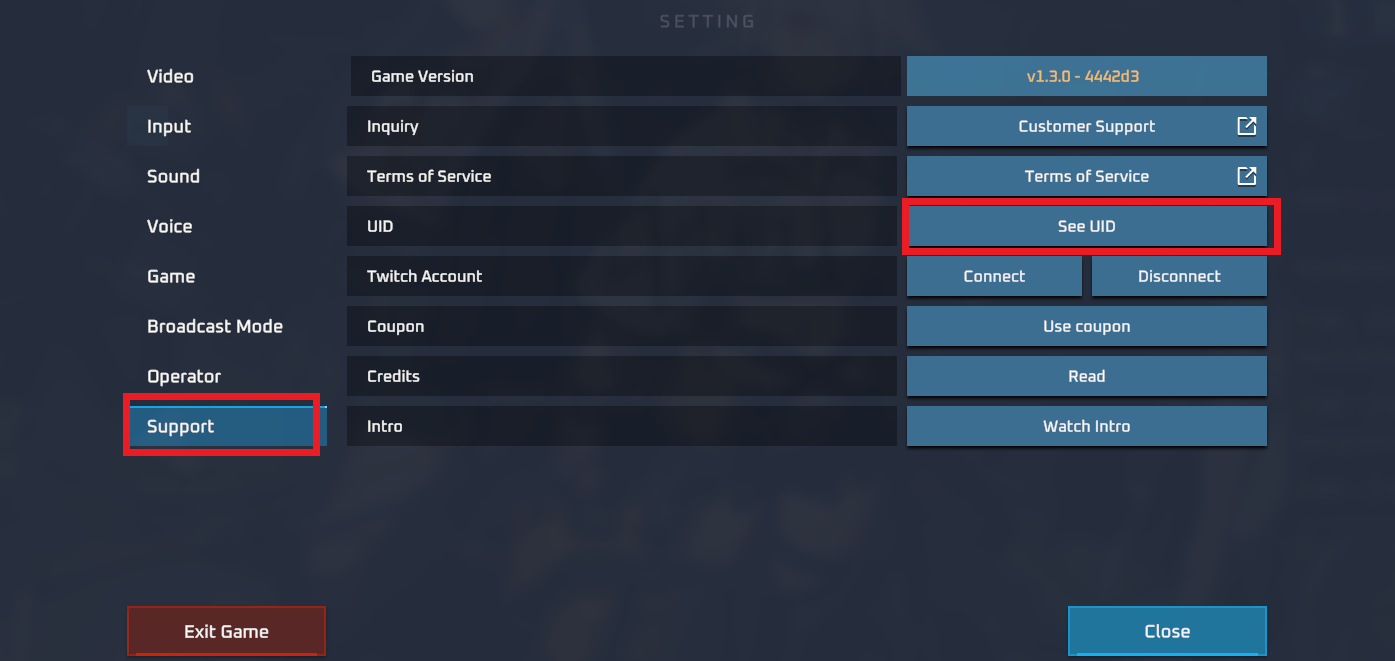
Follow this simple step-by-step guide to locate your UID inside the Eparty mobile application:
- Launch the Eparty application on your mobile device and log in to your account.
- Tap the Profile or Me icon located in the bottom navigation bar.
- Look directly beneath your avatar and display nickname at the top of your profile screen.
- You will see a field labeled UID or ID followed by a series of numbers.
- Tap the Copy icon next to your ID or carefully note the number down to enter it on XPTopup.
Always use the copy function when possible to prevent typing errors, as digital recharges credit immediately to the submitted UID.
Available Eparty Credit Packs and Denominations
XPTopup offers various credit denominations suited for different spending needs, from small top-ups for casual room interactions to large credit bundles for major event support and exclusive virtual gifting.
| Credit Tier | Recommended Use | Transfer Method | Information Required |
|---|---|---|---|
| Small Packs | Daily room interactions, basic animated gifts, and chat highlights | Direct Automated Top-Up | Eparty UID only |
| Medium Packs | Room entry effects, themed avatar decorations, and host tipping | Direct Automated Top-Up | Eparty UID only |
| Large Packs | VIP event participation, high-tier virtual gifts, and leaderboard ranking | Direct Automated Top-Up | Eparty UID only |
Live exchange rates, package sizes, and special seasonal promotional rates are clearly reflected on the live XPTopup order module. Check the current product listings above to view up-to-date pricing before completing your order.
Direct and Secure UID-Only Checkout
Account security is a top priority when purchasing digital entertainment currencies. Traditional account-sharing methods require users to hand over their phone numbers, social media logins, or passwords, exposing accounts to unnecessary risk.
XPTopup uses a direct UID-only recharge system for Eparty:- No Passwords Required: You never have to share your Eparty account password, Facebook login, Google account, or verification codes.- Zero Account Takeover Risk: Because transactions rely solely on your public User ID, your private account details remain completely protected.- Encrypted Checkout: Every transaction on XPTopup is processed through encrypted payment gateways to ensure your financial data remains safe.- Safe for Gifting: You can recharge credits for friends, family, or your favorite content creators simply by entering their UID.
Delivery Time and Checking Your In-App Balance
Orders placed through XPTopup are handled through an automated delivery pipeline. In most cases, your Eparty credits are credited to your account shortly after payment confirmation.
To verify that your recharge has arrived:1. Open the Eparty app.2. Navigate to your Profile or Wallet section.3. Refresh the wallet page by swiping down on the screen.4. View your updated credit balance.5. If you are inside a voice room during the top-up, exit the room and re-enter or restart the application to refresh the live balance display.
Troubleshooting Missing or Delayed Eparty Recharge
While top-ups on XPTopup process automatically, occasional network delays or third-party banking verifications can occur. If your balance does not update right away, follow these troubleshooting steps:
- Restart the Eparty App: Force-close the application and launch it again. A fresh session forces the app to query the server for the most recent wallet balance.
- Check Your Payment Confirmation: Verify with your payment provider that the charge was completed successfully and that you received an order confirmation email from XPTopup.
- Review Your Submitted UID: Check your XPTopup order history to confirm that the numeric UID entered during checkout matches your actual in-game profile ID.
- Allow Processing Time: During peak network hours or scheduled maintenance windows, bank authorization or server synchronization may require a short grace period.
- Contact XPTopup Customer Support: If your credits have not arrived after completing the checks above, reach out to the XPTopup customer service team. Provide your Order ID, the submitted Eparty UID, and your payment receipt for rapid manual verification and resolution.
Frequently Asked Questions About Eparty Top Up
How do I top up Eparty credits using my UID?
To top up Eparty credits on XPTopup, select your desired credit amount on the product page, enter your Eparty UID into the player ID field, choose your payment method, and complete the payment. Your credits will be delivered directly to your in-game account upon successful payment.
Where can I find my Eparty UID?
Open the Eparty mobile app, tap the Profile icon in the bottom menu, and check the area directly below your display name. Your numeric UID is listed there with a copy button next to it.
Do I need to provide my Eparty login password to top up?
No. XPTopup only requires your public Eparty UID to process credit recharges. You should never share your login credentials, passwords, or verification codes with anyone.
How long does it take for Eparty credits to be delivered?
Credit delivery is automated and typically processes shortly after your payment is verified. You can verify the updated balance directly in your in-app wallet after restarting or refreshing the app.
What should I do if my Eparty credits do not appear after purchase?
First, restart the Eparty app and check your in-app wallet balance. If the balance remains unchanged, verify that your payment was successful and double-check the UID on your XPTopup order receipt. If the issue persists, contact XPTopup customer support with your Order ID for assistance.
Can I top up an Eparty account for a friend using their UID?
Yes. Because the recharge system only requires an Eparty UID, you can send credits to any friend or host. Simply enter their numeric UID instead of your own during the checkout process on XPTopup.
Current package prices
Current package prices are shown below. Prices exclude Tax. Tax, payment fees and applicable coupons are shown at checkout.
| Package | Price |
|---|---|
| Eparty - Eparty*100000 | USD 2.86 |
| Eparty - Eparty*500000 | USD 14.32 |
| Eparty - Eparty*1000000 | USD 28.64 |
| Eparty - Eparty*5000000 | USD 143.19 |
| Eparty - Eparty*10000000 | USD 286.38 |
| Eparty - Eparty*50000 | USD 1.43 |