Growtopia Gems Top Up: Direct Grow ID Recharge Guide
Growtopia relies on Gems as the core engine for building, farming, and trading. Whether you are expanding your farm worlds, purchasing specialty item packs, or converting your wealth into World Locks, having a reliable supply of Gems keeps your progress moving forward.
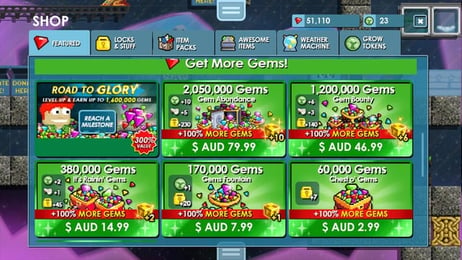
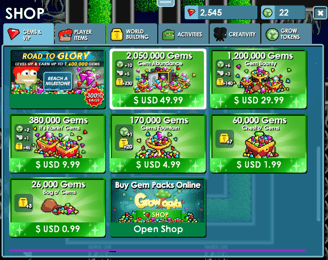
XPTopup provides a direct, password-free top-up process designed for speed and security. You do not need to share account passwords, coordinate trade-world drop times, or deal with peer-to-peer delays. Simply enter your registered Grow ID, select your package, and complete your order. Live prices and current bundle options are displayed directly on the checkout screen.
How to Top Up Growtopia Gems Using Grow ID
To complete your Growtopia Gems recharge on XPTopup, follow these four simple steps:
- Choose Your Gem Package: Review the live bundle options on the XPTopup product page and select the amount of Gems you need.
- Enter Your Grow ID: Type your exact Grow ID into the player identification field. Double-check your spelling to ensure correct crediting.
- Complete Payment: Select your preferred payment method and finalize checkout through our secure gateway.
- Receive Your Gems: Once processed, your Gems will be credited directly to your Growtopia account. Relaunch your game client to verify your updated balance.
Where to Find Your Grow ID in Growtopia
Your Grow ID is your registered account name inside the game. Unlike your temporary character nickname in guest mode, your Grow ID is permanent and tied to your account credentials.
- Launch the Growtopia app on your PC, Mac, Android, or iOS device.
- Log into your account through the main screen.
- Look at the upper-left corner of the screen where your character name appears.
- Tap the Wrench icon next to your character or open the menu to view your profile card.
- Confirm the exact text shown as your registered Grow ID.
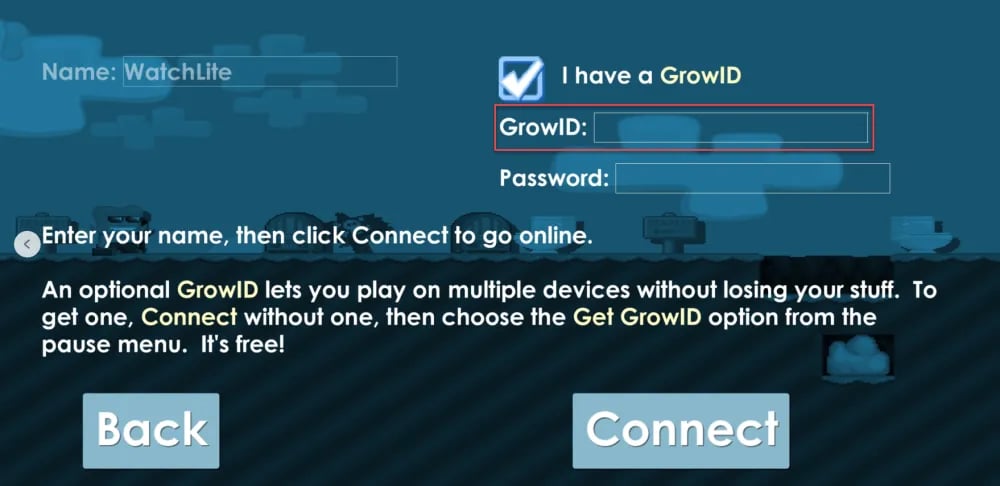
Tip: Do not include special titles, guild tags, or formatting prefixes. Enter only the base username registered to your Grow account.
What Are Growtopia Gems and How to Use Them
Gems are the primary in-game currency used to purchase essential tools, protective locks, and cosmetic upgrades from the Growtopia Store. Managing your Gem reserves efficiently allows you to expand your account capabilities in several critical areas:
- Purchasing World Locks: The in-game store allows you to buy World Locks (WL) for 2,000 Gems each. World Locks protect your creations from griefing and serve as the main trade currency among players.
- Expanding Backpack Slots: New players start with limited inventory capacity. Spending Gems on backpack upgrades allows you to carry more block types, seeds, and tools during farming sessions.
- Unlocking Specialty Packs: Essential progression items—including the Surgeon Pack for surgical roles, the Geiger Counter for radiation hunts, and Startopian supplies—can be bought directly from the official store using Gems.
- Weather Machines and Building Assets: Customize your worlds with visual weather effects, background themes, and structural assets available exclusively through gem purchases.
- Seasonal Events and Limited Items: During in-game holidays and 2026 events, limited-edition store items and booster packs require Gems to purchase.
Gems vs. World Locks (WL) vs. Blue World Locks (BGL) Comparison
Understanding the relationship between Gems and the player-driven trading economy is vital for maximizing your in-game purchasing power. The table below outlines how standard Gems compare to higher-tier economic units.
| Currency / Asset | In-Game Store Cost | Primary Function | Tradeability |
|---|---|---|---|
| Gems | Base in-game currency | Store purchases, pack unlocks, backpack upgrades, buying locks | Non-tradeable directly; bound to your account |
| World Lock (WL) | 2,000 Gems | World protection, fundamental player-to-player trade standard | Fully tradeable via trade boxes and secure menus |
| Diamond Lock (DL) | 100 World Locks | High-value player trades and medium-tier asset storage | Fully tradeable |
| Blue Gem Lock (BGL) | 100 Diamond Locks (10,000 WL) | Ultra-high-value trades, world ownership exchanges, bulk asset storage | Fully tradeable |
By topping up Gems directly, you avoid fluctuating marketplace trade ratios and can immediately acquire fresh World Locks from the store whenever needed.
Direct ID Top-Up vs. Account Sharing: Keeping Your Growtopia Account Safe
Account security is critical in Growtopia. The community frequently encounters risks associated with unauthorized access, compromised passwords, and fraudulent trade worlds. XPTopup uses a direct ID fulfillment model designed to eliminate these risks entirely.
- No Password Required: You never provide your Growtopia password, email access, or security question answers. Only your public Grow ID is required.
- Zero Risk of Session Hijacking: Because you never share login credentials, your account session remains secure on your personal device.
- No Drop-Trade Scams: Direct recharges bypass the need to meet third-party sellers in unverified game worlds, eliminating the threat of scam worlds, illegal trade traps, or broken vending machines.
- Account Integrity: Direct ID crediting operates cleanly without modifying your local game files or violating standard security guidelines.
Growtopia Delivery Troubleshooting and Checkout Checklist
Before completing your transaction on XPTopup, review this checklist to ensure smooth delivery:
- Verify ID Spelling: Confirm that your Grow ID matches your in-game account name character for character. Avoid confusing letters like uppercase
Iand lowercasel. - Check Account Registration Status: Ensure your account is a fully registered Grow ID and not a temporary guest profile.
- Client Refresh: If your Gem balance does not update within a few moments of payment completion, close the Growtopia application completely and log back in to force a server synchronization.
- Server Maintenance Windows: Occasionally, official game servers undergo maintenance or rollbacks. If your delivery is delayed during scheduled developer maintenance, your Gems will populate once servers return online.
- Save Order Details: Keep your XPTopup order confirmation number accessible in case you need assistance from customer support.
Frequently Asked Questions
How do I top up Growtopia Gems with my Grow ID?
Select your desired Gem package on XPTopup, enter your registered Grow ID in the input box, select your preferred payment option, and complete the transaction. Your Gems will be delivered directly to your account.
Do I need to provide my Growtopia password to buy Gems?
No. XPTopup only requires your Grow ID. Never share your Growtopia password or recovery details with anyone.
How long does it take for Gems to arrive after topping up?
Orders are processed promptly upon payment confirmation. After completing checkout, restart your Growtopia game client to see your updated balance.
How to get more gems in Growtopia?
Players earn Gems in-game by breaking farmable blocks (such as Laser Grids, Chandeliers, and Pepper Trees), harvesting tree seeds, recycling unwanted items, or competing in daily events. To bypass time-consuming farming routines, topping up directly via XPTopup gives you immediate access to the Gems you need.
What is the difference between Gems and World Locks in Growtopia?
Gems are the non-tradeable base currency spent in the official in-game store for packs, items, and locks. World Locks are physical, tradeable items that cost 2,000 Gems in the shop and serve as the main currency for player-to-player trading.
What should I do if I enter the wrong Grow ID at checkout?
If you realize you entered an incorrect Grow ID, contact XPTopup customer support immediately with your order number. If the order has not yet been processed by the automated dispatch system, our support team can help update your information.
Current package prices
Current package prices are shown below. Prices exclude Tax. Tax, payment fees and applicable coupons are shown at checkout.
| Package | Price |
|---|---|
| Chest O' Gems | USD 1.30 |
| Gem Fountain | USD 3.41 |
| It's Rainin' Gems | USD 6.81 |
| Royal Grow Pass | USD 6.81 |
| Gem Bounty | USD 20.46 |
| 1 Year Subscription Token | USD 34.11 |
| Gem Abundance | USD 34.11 |