Habi Coins Top Up for Voice Rooms and Live Audio
Habi is a popular group voice chat community where users connect in real-time audio rooms, host interactive discussions, play party games, and support their favorite room hosts. To participate fully in the social features of the platform, members use Habi Coins. Getting a Habi Coins top up allows you to send animated virtual gifts, unlock unique profile decorations, activate entrance banners, and increase your room prestige.
XPTopup provides a direct recharge service for Habi users worldwide. By entering your unique user ID (UID), you can top up your coin balance directly without sharing your login credentials or account passwords. All available coin bundles and live prices are displayed directly on the checkout menu so you can select the exact quantity you need for your audio room sessions.
What Are Habi Coins and How Are They Used in Group Voice Chat
Habi Coins are the official in-app virtual currency of the Habi voice chat application. Unlike standard messaging platforms, Habi centers around shared audio spaces where audience members and speakers interact dynamically. Coins provide the purchasing power for all premium interactions on the platform.
It is important to clarify that Habi Coins discussed here are strictly the digital currency used within the Habi social mobile app on iOS and Android. They are not associated with any external cryptocurrency, blockchain tokens, or financial trading assets that happen to share a similar name. These coins exist purely to enhance your experience inside Habi voice rooms and social lounges.
Inside the app, your coin balance can be spent on several interactive features:
- Virtual Gifts: Send animated gifts such as sports cars, crowns, fireworks, and customized badges to room speakers or friends on stage.
- Microphone and Room Effects: Activate special sound effects, spotlight animations, and audio room themes when hosting your own voice channels.
- Avatar Frames and Entrance Vehicles: Stand out when joining crowded voice rooms by displaying customized entrance animations and premium profile borders.
- In-Room Party Games: Use coins to enter community games and mini-events hosted within interactive voice channels.
| Feature Category | In-App Coin Application | Primary User Benefit |
|---|---|---|
| Virtual Gifting | Send 3D animated gifts to mic hosts | Show appreciation and boost room rank |
| Profile Customization | Purchase avatar frames and chat bubbles | Personalize identity across all rooms |
| Room Entrance | Trigger VIP entry banners and sounds | High visibility upon entering public rooms |
| Social Games | Join voice room mini-games and events | Win community rewards and social status |
How to Find Your Habi UID in the App
To ensure your recharge reaches your account without delay, you need to provide your exact numeric User ID (UID). Finding your UID takes only a few seconds inside the mobile application.
- Open the Habi app on your Android or iOS device.
- Tap the Profile (or Me) tab located in the bottom-right corner of the home screen.
- Locate your profile avatar at the top of the screen. Your numeric UID is displayed directly beneath your nickname.
- Tap the small Copy icon next to the ID digits to copy the number directly to your clipboard.
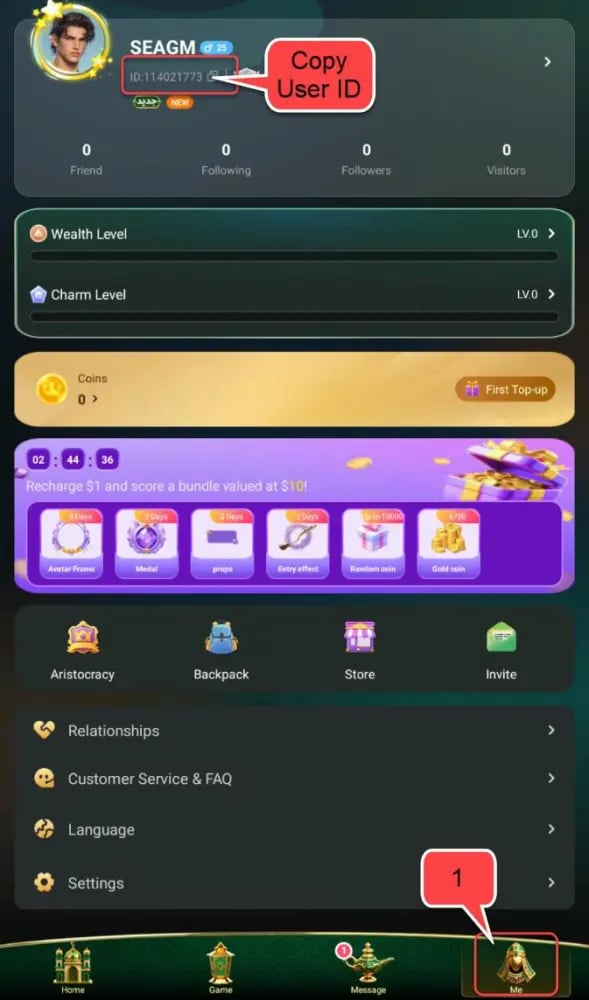
Make sure to copy the numeric UID string rather than typing your custom display name. Display names can change or share duplicate spellings, while your UID remains fixed and unique to your account.
How to Top Up Habi Coins Using Only Your UID
Recharging your Habi account on XPTopup is designed to be straightforward and fast. Follow these simple steps to complete your order:
- Select Your Coin Package: Browse the available Habi Coins amounts on the XPTopup product page. The catalog displays current coin amounts along with their live checkout prices.
- Enter Your Habi UID: Paste the numeric ID you copied from your Habi profile into the designated UID field. Double-check the digits to ensure precision.
- Proceed to Checkout: Select your preferred local or international payment method from the available options.
- Finalize the Transaction: Confirm your details and complete the secure payment.
- Check Your In-App Balance: Once payment processing finishes, open the Habi application and check your wallet to verify that your new coin balance has arrived.
In-App Benefits of Habi Coins: Virtual Gifts, Room Features, and Avatars
Active voice room participants use Habi Coins to build connections and establish their presence across the community. When you support room hosts by sending gifts, your profile gains contributor points that elevate your standing on daily, weekly, and monthly room leaderboards.
Exclusive Room Entrance Animations
When entering high-population voice rooms, standard user notifications can easily get lost in the chat feed. Using coins to acquire entrance effects ensures that a custom animation—such as a sports car, private jet, or glowing crest—plays across the room screen when you enter, alerting the host and audience to your arrival.
Supporting Content Creators and Hosts
Voice room hosts spend hours organizing community events, musical performances, and debate panels. Gifting through Habi Coins serves as direct recognition for their efforts, helping them maintain their broadcast rankings and unlock higher-tier room management tools.
Profile Frames and Chat Bubbles
Coins allow you to personalize your presence in text chats and mic queues. You can equip animated frames around your avatar and apply colorful text bubbles that make your messages stand out in fast-moving room conversations.
Account Safety: Direct ID Delivery Without Password Requirements
Account security is critical when purchasing digital currency online. A key advantage of using XPTopup for your Habi Coins recharge is our direct-to-ID fulfillment model.
- No Passwords Requested: You never need to provide your Habi password, email login, or social media credentials to complete a transaction.
- No Verification Codes: We will never ask for SMS one-time passwords (OTP) or third-party authentication codes.
- Safe for Friends and Family: Because only the public UID is required, you can easily surprise friends, family members, or favorite room hosts by sending coin recharges directly to their account IDs without needing access to their personal devices.
This method keeps your login information entirely in your hands, eliminating the risks associated with manual account sharing or credential leaks.
Troubleshooting Delivery and Checking Your Habi Coins Balance
After completing your order, your coin balance should update promptly in the Habi app. Use the following guidelines to check your balance or resolve common display issues.
How to Check Your Updated Balance
- Open Habi and go to your Profile page.
- Tap on the Wallet or Coins section.
- View your current balance. Your newly recharged coins will appear in the total.
If Coins Do Not Display Immediately
- Restart the App: Close the Habi app completely from your device's multitasking menu and reopen it to force a fresh sync with the server.
- Verify Network Connection: Ensure your phone has a stable Wi-Fi or cellular data connection so your local wallet data updates.
- Check Order History: Verify that your payment went through successfully on XPTopup and that your transaction status shows as completed.
Cross-Platform Balance Consistency
Habi Coins are linked directly to your UID on the server side. This means if you switch between an Android smartphone and an Apple iOS tablet using the same login account, your coin balance remains synchronized across both operating systems.
What Happens If You Entered an Incorrect UID?
If you realize you entered the wrong UID at checkout, contact XPTopup customer support immediately with your order number. If the order has not yet been processed by the automated fulfillment system, our support team can help correct the UID. However, once coins are delivered to an existing, valid UID on the Habi network, completed digital transfers cannot be reversed. Always verify your UID digits before confirming checkout.
Why Recharge Habi Coins on XPTopup
XPTopup offers a smooth and dependable platform for voice chat users looking for quick coin refills. Key advantages include:
- Direct UID Processing: Keep your personal account details secure by ordering with just your public User ID.
- Clear Real-Time Pricing: See exact package amounts and current checkout costs without hidden surcharges.
- Global Accessibility: Convenient payment options suited for international users across diverse regions.
- Responsive Support: Dedicated customer assistance ready to help verify orders and resolve any delivery inquiries.
Frequently Asked Questions
What are Habi Coins used for in the Habi app?
Habi Coins are the virtual currency used in the Habi group voice chat app to send animated gifts to room hosts, unlock custom avatar frames, activate premium room entrance effects, and participate in social audio games.
How do I find my Habi UID for top up?
Open the Habi app, navigate to the Profile (Me) tab in the lower-right corner, and look below your profile picture. Your numeric UID is listed there with a copy button next to it.
Do I need to share my Habi password to recharge coins?
No. Recharging on XPTopup only requires your public Habi UID. You should never share your account password, email login, or SMS verification codes with anyone.
Can I top up Habi Coins for a friend using their UID?
Yes. Because the top-up process only requires a numeric UID, you can enter your friend's UID at checkout to send coins directly to their Habi account.
How long does it take for Habi Coins to reflect in my account?
Coin recharges are processed automatically upon successful payment confirmation. Once the transaction completes, the coins are credited directly to your Habi wallet balance within minutes.
What should I do if my Habi Coins do not show up after checkout?
First, restart the Habi app to refresh your profile data. If your balance does not update, check your order confirmation email from XPTopup to verify that the submitted UID was correct, then contact XPTopup customer support with your order ID for fast assistance.
Current package prices
Current package prices are shown below. Prices exclude Tax. Tax, payment fees and applicable coupons are shown at checkout.
| Package | Price |
|---|---|
| 6,700 Habi Coins | USD 0.66 |
| 33,535 Habi Coins | USD 3.29 |
| 67,435 Habi Coins | USD 6.62 |
| 203,030 Habi Coins | USD 19.94 |
| 337,175 Habi Coins | USD 38.25 |
| 674,350 Habi Coins | USD 66.44 |
| 1,348,700 Habi Coins | USD 132.24 |