Lineage2M Top Up: Direct Diamond Delivery on XPTopup
Diamonds are the primary premium currency in Lineage2M, powering your character progression across the vast continent of Aden. Whether you are aiming to acquire high-tier Class Cards, summon powerful Agathions, secure rare crafting materials from the Exchange Market, or strengthen your gear with enhancement scrolls, having a reliable supply of Diamonds is essential for every major castle siege and world boss battle.
XPTopup provides a direct, secure Lineage2M recharge service designed for players across all server clusters. Using our direct Character ID and Server selection system, your purchases are credited straight to your character without ever requiring your account password or third-party login credentials. Check live package pricing directly on our checkout page, select your exact server, and get your Diamonds delivered promptly.
How to Top Up Lineage2M Diamonds on XPTopup
Recharging your Lineage2M account on XPTopup takes only a few quick steps:
- Select Your Diamond Package: Review the available Diamond denominations on the live product catalog and pick the amount you want to buy.
- Enter Your Character ID: Type your in-game Character ID into the designated input box.
- Choose Your Server: Select your exact server from the dropdown menu (such as Bartz01, Kain05, or Aria10).
- Proceed to Checkout: Click the purchase button to access the secure payment gateway, where current prices and local payment methods are clearly shown.
- Complete the Transaction: Finalize your payment. Once confirmed, the Diamonds are dispatched directly to your in-game account.
How to Find Your Lineage2M Character ID and Server
To ensure your Diamonds arrive at the correct character, verify your Character ID and server name inside the game client before placing an order.
- Launch Lineage2M on your mobile device or through the NCSoft Purple PC client and log in to your active character.
- Tap the Menu icon (three horizontal bars) located in the upper-right corner of the main game screen.
- Tap the Settings gear icon at the bottom of the slide-out menu.
- Select the Account tab or inspect the top of the Info screen.
- Look for your Character ID (UID) string displayed next to your character name and current server partition.
- Note down the exact ID string and verify your server name (e.g., Leona03 or Erica08).
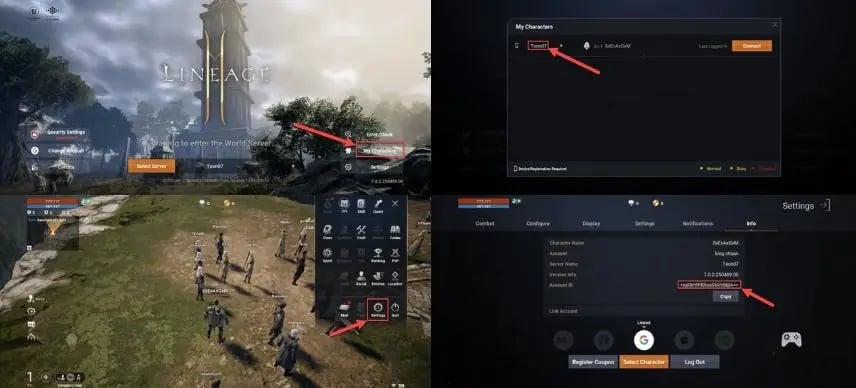
Double-check both your Character ID and Server selection before submitting your order to avoid delivery delays.
Supported Lineage2M Server List: Bartz, Kain, Teon, Leona, Erica, and Aria
Lineage2M organizes its player base into distinct server groups, each containing 10 numbered sub-servers (01 through 10). XPTopup fully supports all 60 server partitions across all major regional groups. Because Diamonds and characters are tied strictly to specific server instances, choosing the precise sub-server during checkout is mandatory for accurate delivery.
| Server Cluster | Supported Sub-Servers | Server Focus & Features |
|---|---|---|
| Bartz | Bartz01 to Bartz10 | High-population competitive siege warfare and active market hubs |
| Kain | Kain01 to Kain10 | Strategic clan territorial wars and balanced open-world hunting |
| Teon | Teon01 to Teon10 | Long-established regional economies with high-volume Exchange trading |
| Leona | Leona01 to Leona10 | Intense cross-server matchmaking and contested world boss spawns |
| Erica | Erica01 to Erica10 | Dynamic guild progression, alliance wars, and active dungeon raids |
| Aria | Aria01 to Aria10 | Fast-growing community with highly contested high-tier leveling zones |
Make sure your selected server on XPTopup matches your active character's home server exactly to prevent misrouted currency.
What Are Lineage2M Diamonds Used For
Diamonds drive almost every critical progression system in Lineage2M. Stocking up on Diamonds gives you immediate access to essential game mechanics:
- Class & Agathion Summons: Acquire rare, heroic, and legendary Class Cards to switch combat archetypes and unlock permanent stat bonuses. Agathion summons provide crucial weight capacity, bonus EXP gain, and offensive stat enhancements.
- The Exchange (Player Marketplace): Buy top-tier weapons, armor, accessories, skill books, and raw crafting materials directly from other players on your server group.
- Equipment Enhancement & Refinement: Purchase Blessed Weapon Enhancement Scrolls, Armor Scrolls, and Life Stones to safely push gear enchantment levels and trigger superior soul awakening attributes.
- Item Codex & Collection Completion: Buy surplus gear to register into your Item Codex, granting permanent account-wide bonuses such as defense, accuracy, HP, and damage reduction.
- Consumables and Growth Chests: Secure daily growth packages, soulshots, Einhasad's Grace replenishment supplies, and dungeon recharge stones to sustain 24/7 farming efficiency.
Safe Direct ID Recharge: Why No Account Password Is Needed
XPTopup uses a direct Character ID injection method for all Lineage2M Diamond top-ups. This approach provides significant security advantages over account-sharing services:
- Zero Password Sharing: You never have to disclose your NCSoft, Google, Apple, or social login credentials. Your password stays strictly in your own hands.
- No 2-Factor Authentication Hassles: You do not need to share one-time SMS or authenticator codes, eliminating the risk of temporary account lockouts or suspicious login flags.
- Complete Account Privacy: Your in-game inventory, character builds, clan positions, and private chat history remain completely secure and untouched.
- Safe and Compliant Processing: Direct UID fulfillment deposits Diamonds through standard character identification channels, protecting your account standing.
Lineage2M Top-Up Delivery Status and Payment Troubleshooting
In most cases, Diamonds reflect on your account shortly after payment confirmation. If you experience any delay, use these practical steps to verify your order:
- Check the In-Game Storage & Mail: Open the in-game Shop menu, then check your Storage tab or Mailbox. Some promotional packages and raw Diamond deliveries must be claimed manually from the storage tab before adding to your top-bar balance.
- Restart Your Game Client: Completely close Lineage2M (or the Purple PC launcher) and log back in to force a server data refresh.
- Check for Scheduled Maintenance in 2026: If NCSoft is running routine server maintenance or a version update, Diamond delivery queues will process automatically as soon as the servers reopen.
- Verify Character ID Accuracy: Review your order confirmation receipt on XPTopup to verify that the submitted Character ID and Server name match your active character. If you notice a typo, contact XPTopup customer support immediately with your order number and transaction details for assistance.