Heartopia Top Up: How to Recharge Heart Diamonds on XPTopup
To purchase Heart Diamonds for your Heartopia account, follow these quick ordering steps on XPTopup:
- Select Your Currency Denomination: Choose the amount of Heart Diamonds or bundle pack you wish to purchase from the product catalog.
- Enter Your Account ID: Type in your Heartopia Account ID into the designated field.
- Enter Your User ID: Input your exact in-game User ID.
- Select Your Server: Pick the server your character is registered on from the dropdown menu (Global, SEA, America, Asia, or TW,HK,MO).
- Proceed to Checkout: Review your entered details, select your preferred payment option, and complete the transaction.
- Receive Diamonds In-Game: Once the payment is verified, your purchased Heart Diamonds will be credited directly to your character balance.
Prices and available packs are displayed directly on the live checkout interface.
How to Find Your Heartopia Account ID, User ID, and Server
To ensure your Heart Diamonds arrive at the correct profile without delay, you must provide your exact in-game identifiers.
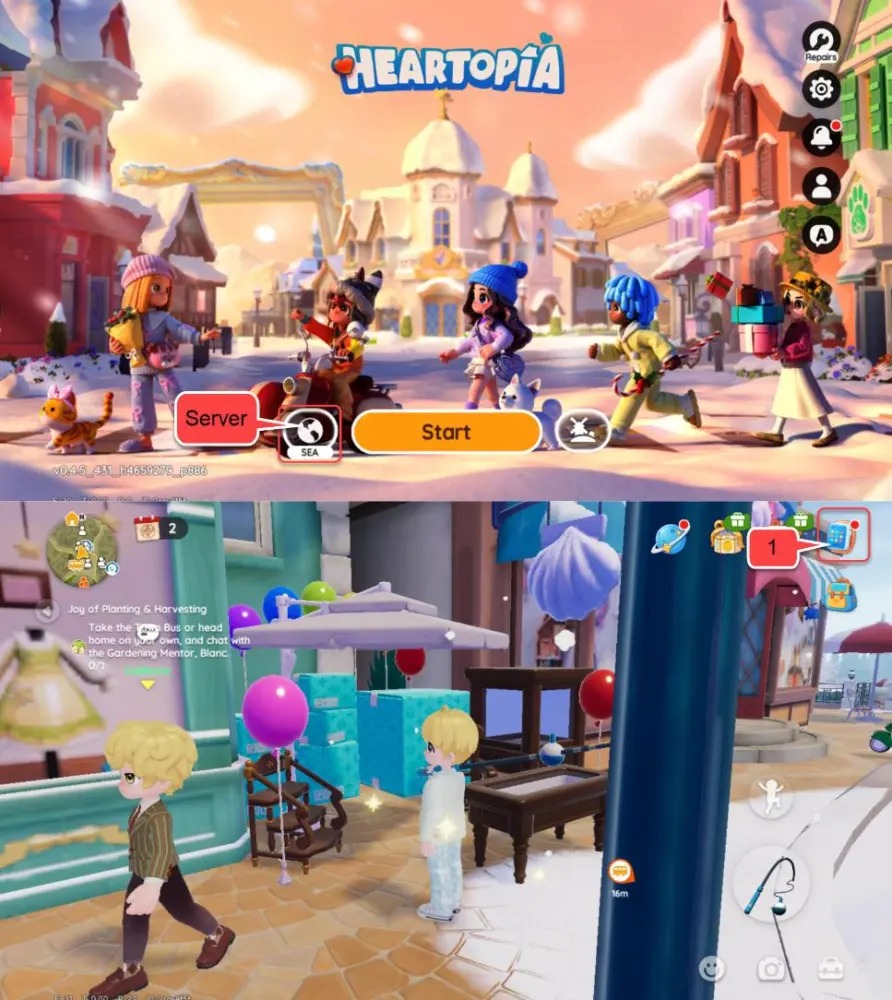
Follow these steps inside Heartopia to find your credentials:
- Launch Heartopia on your device and log in to your account.
- Tap your character Avatar located in the top-left corner of the main screen.
- Open the User Center or Profile Settings tab.
- Locate your User ID (UID) and Account ID displayed under your character nickname.
- Tap the copy icon next to each ID to avoid manual typing mistakes.
- Check the server name shown on your initial game login screen or profile banner to confirm your exact server region.
Supported Heartopia Servers: Global, SEA, America, Asia, and TW/HK/MO
Heartopia divides player data across regional game clusters. You must select the exact server matching your active character profile when submitting your order.
| Server Region | Primary Player Base | Identifier Required |
|---|---|---|
| Global | International / Multi-region | Account ID + User ID |
| SEA | Southeast Asia | Account ID + User ID |
| America | North America & South America | Account ID + User ID |
| Asia | East Asia (Japan, Korea, etc.) | Account ID + User ID |
| TW,HK,MO | Taiwan, Hong Kong, Macau | Account ID + User ID |
Cross-server transfers are not supported. If you select the wrong server during checkout, the recharge system may credit a different character or fail verification. Always verify your server prior to payment.
Safe Heartopia Recharges: Why Passwordless UID Top-Up Matters
Keeping your Heartopia account secure should always be your top priority. Direct UID-based recharge on XPTopup provides a safe transaction environment for several critical reasons:
- Zero Password Sharing: You never need to share your game password, linked email, Apple ID, Google Play credentials, or social media logins.
- No Account Handoffs: Your account stays entirely in your hands. You do not need to log out, share verification codes, or grant third-party access to your device.
- Reduced Risk of Account Penalties: Direct player-ID delivery uses standard in-game crediting channels, avoiding the suspicious IP logins and geolocation anomalies associated with credential-sharing services.
- Instant Order Verification: Because the system only checks your public Account ID, User ID, and Server, transactions are processed efficiently without account lockouts.
What Are Heart Diamonds Used for in Heartopia?
Heart Diamonds serve as the premium currency in Heartopia, allowing you to expand your town, personalize your lifestyle, and customize your character. Here is how you can use them:
- Exclusive Cosmetics & Outfits: Purchase limited-time clothing sets, hairstyles, accessories, and seasonal fashion items from the boutique.
- Home & Garden Blueprints: Unlock premium furniture sets, exterior housing themes, landscaping decorations, and architectural items to build your dream home.
- Gacha Wishes & Item Pulls: Use Heart Diamonds to buy lottery tickets for exclusive furniture collections, rare pet companions, and high-rarity wearable items.
- VIP Memberships & Growth Passes: Activate monthly privilege cards and premium season passes to gain daily login rewards, extra resource generation, and special perks.
- Stamina & Crafting Speed-ups: Replenish daily energy for farming, fishing, mining, and gathering activities, or reduce crafting times for custom building projects.
Heartopia Top-Up Delivery Troubleshooting and Order Tracking
If your Heart Diamonds do not show up immediately in your game balance after completing your order on XPTopup, follow these diagnostic steps:
- Check Your In-Game Mailbox: Some premium items, bonus rewards, or bundles arrive as attachments inside your character mailbox rather than directly updating your top-bar balance.
- Restart the Heartopia App: Close the game completely from your background applications and launch it again to force a server synchronization.
- Verify Your Order Status: Log into your XPTopup account and check the order tracking page to confirm whether the payment went through and the status shows as completed.
- Double-Check Submitted IDs: Verify that the Account ID, User ID, and Server on your receipt match your active character profile.
- Contact Support with Details: If the diamonds have not arrived after a few minutes, reach out to XPTopup customer support with your Order Number, character User ID, Account ID, and server region for swift resolution.
Frequently Asked Questions about Heartopia Top Up
How to buy heart in Heartopia?
To buy Heart Diamonds or heart currencies for Heartopia, choose your desired pack on XPTopup, enter your Account ID, User ID, and select your server. Complete your payment using any available checkout method, and the diamonds will be delivered directly to your character.
Where can I find my Heartopia User ID and Account ID?
Open Heartopia and tap your profile avatar in the upper-left corner of the screen. In the profile overview window, you will see your User ID and Account ID displayed clearly below your character name. Use the copy button to capture both strings accurately.
Do I need to give my Heartopia password to recharge?
No. Recharging through XPTopup requires only your public User ID, Account ID, and server selection. You should never share your game password or third-party login credentials with anyone.
Which server should I select for Heartopia top up?
Select the server where your active character was created: Global, SEA, America, Asia, or TW,HK,MO. You can check your server name on the game's start screen before entering the world.
Can I top up Heartopia for PC and mobile on the same account?
Yes. Heartopia uses cross-platform progression across supported devices. As long as you provide the correct User ID, Account ID, and server associated with your profile, the recharged Heart Diamonds will be available whether you play on mobile or PC.
What should I do if my Heart Diamonds do not arrive after payment?
First, restart your game client and check your in-game mailbox. If the balance remains unchanged, check your order status on XPTopup to verify completion. If you need assistance, contact XPTopup support with your order number and character details.
Current package prices
Current package prices are shown below. Prices exclude Tax. Tax, payment fees and applicable coupons are shown at checkout.
| Package | Price |
|---|---|
| 60 Heart Diamonds | USD 0.98 |
| 300 + 20 Heart Diamonds | USD 4.98 |
| 680 + 50 Heart Diamonds | USD 11.21 |
| 1280 + 90 Heart Diamonds | USD 20.49 |
| 1980 + 150 Heart Diamonds | USD 31.19 |
| 3280 + 270 Heart Diamonds | USD 50.80 |
| 6480 + 570 Heart Diamonds | USD 99.85 |