Xena Live Coins Top Up: Direct UID Balance Recharge
Xena Live is a popular interactive group voice chat and entertainment platform where users connect globally, host themed voice parties, participate in competitive PK battles, and showcase talents. Xena Live Coins serve as the primary premium currency across the entire application. With coins in your account balance, you can send animated gifts to room hosts, unlock exclusive decorative profile frames, activate dynamic room entry banners, and support your favorite creators in real-time competitions.
XPTopup provides a direct and reliable way to complete your Xena Live Coins top up online. By using only your public numeric User ID (UID), you can replenish your coin balance without sharing sensitive login details or private passwords. Select your preferred coin denomination, input your UID, complete your payment, and enjoy immediate balance updates directly in your Xena Live account.
What Are Xena Live Coins and How to Use Them
Xena Live Coins power the interactive ecosystem of the app. Voice rooms and live streams feature engaging community interactions that require coin balances to participate fully.
Interactive Virtual Gifts
Sending virtual gifts is the most direct way to show appreciation to room hosts, streamers, and fellow voice chat participants. Gifts range from simple tokens of appreciation to high-tier animated gifts such as luxury cars, crowns, yachts, and royal castles. High-value gifts trigger screen-wide visual animations and platform-wide announcement banners that spotlight your support.
Competitive PK Battles
Room hosts and creators frequently engage in live PK battles to see whose community can generate the most engagement within a timed round. Using your Xena Live Coins to send battle gifts boosts your host's score bar, helping them win rounds, climb community leaderboards, and unlock special event rewards.
VIP Badges and Room Customization
Active spenders can unlock tiered VIP statuses, special name badges, custom entry vehicles, audio wave effects on mic seats, and premium room backgrounds. These visual perks distinguish your profile whenever you enter voice rooms or speak on audio panels.
| Feature / Perk | Required Currency | Main Benefit |
|---|---|---|
| Standard Virtual Gifts | Xena Live Coins | Supports host income and increases room popularity points |
| Animated Luxury Gifts | Xena Live Coins | Triggers full-screen visual effects and broadcast banners |
| PK Battle Boosters | Xena Live Coins | Increases host battle score directly during live rounds |
| VIP Profile Frames | Xena Live Coins / VIP Tier | Customizes avatar border across chat rooms and profiles |
| Mic Seat Effects & Banners | Xena Live Coins | Highlights your profile when speaking or entering rooms |
How to Find Your Xena Live Numeric UID
To ensure your Xena Live Coins top up arrives without delay, you must provide your exact numeric UID during checkout. Xena Live profiles display both a customizable nickname, a custom Show ID (if configured), and a fixed numeric User ID. Your top-up is processed using the numeric UID.
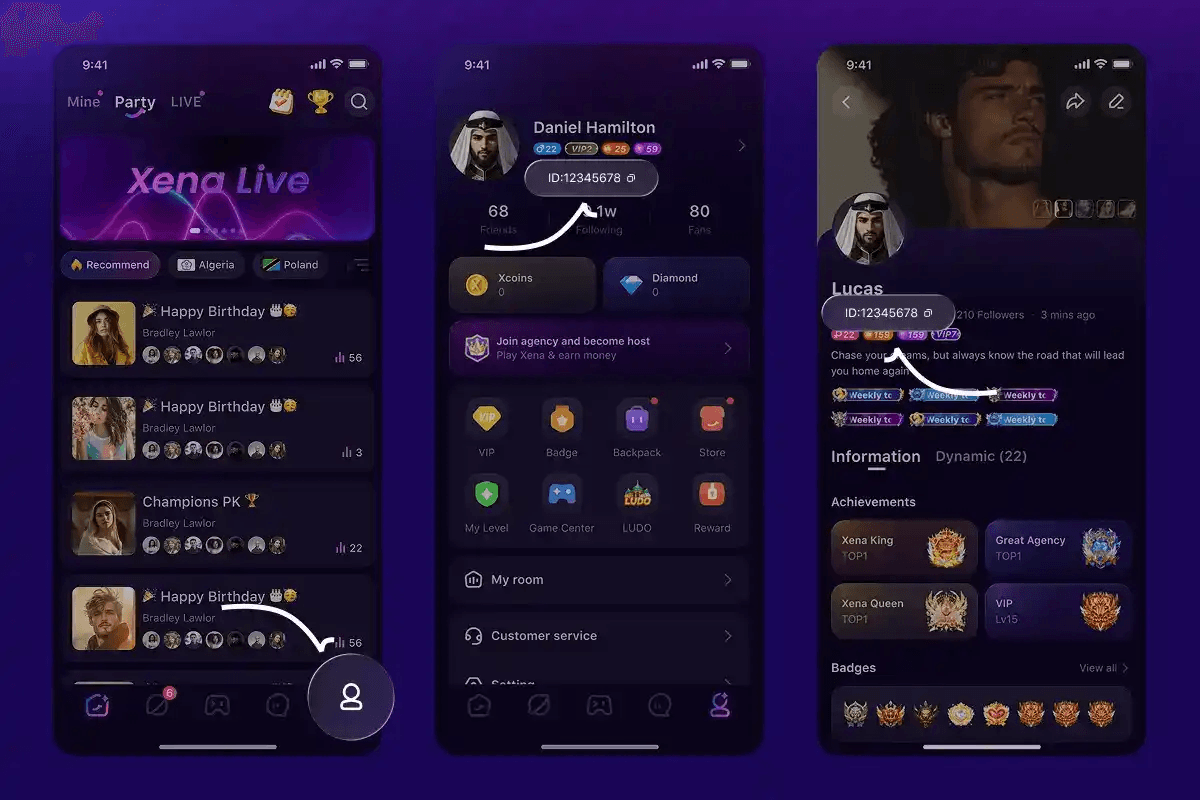
Follow these steps to locate and copy your UID inside the application:
- Launch the Xena Live app on your mobile device.
- Tap the Profile / Me icon located in the bottom navigation bar.
- Look directly beneath your profile picture and nickname at the top of the screen.
- Locate the ID field consisting of a string of numbers.
- Tap the small Copy icon next to the number to copy your numeric UID directly to your clipboard.
Note: Do not confuse your custom handle or username with your numeric UID. Always use the copied numeric sequence to prevent delivery to the wrong account.
Step-by-Step Guide: How to Recharge Xena Live Coins on XPTopup
Recharging your Xena Live balance through XPTopup is designed to be straightforward and fast:
- Select Your Pack: Review the available Xena Live Coin packages on this page and select the amount of coins you want to purchase.
- Enter Your UID: Paste your numeric Xena Live User ID into the required UID input box. Double-check the digits to ensure accuracy.
- Proceed to Checkout: Click the purchase button to view live pricing, applicable regional payment channels, and transaction details.
- Complete Payment: Select your preferred payment option and finalize the transaction through our secure payment gateway.
- Check Balance: Open Xena Live, go to your profile or wallet section, and verify your updated coin balance.
Security and Account Safety: Why Direct UID Top-Up Is Best
Keeping your account safe is essential when buying in-app currency online. XPTopup utilizes a direct ID-based fulfillment process that protects your personal data:
- No Password Required: You never need to provide your account password, email login, or third-party social media credentials. The entire process requires only your public numeric UID.
- No Account Sharing Risks: Because login credentials are not requested, your private chats, friend lists, and account ownership settings remain strictly in your control.
- Encrypted Checkout: All payments processed on XPTopup run through encrypted payment gateways, protecting your billing information during every order.
- Zero Risk of Account Lockout: Safe UID recharges follow standard top-up protocols, eliminating the security warnings triggered by third-party logins from unfamiliar IP addresses.
Troubleshooting Delayed Xena Live Coin Deliveries
While most coin recharges process immediately, occasional network latency or server synchronization delays can occur. If your balance does not update right away, follow these verification steps:
- Restart the Xena Live App: Completely close the application from your device's recent apps switcher and reopen it. This forces the app to query the server for fresh wallet balances.
- Verify the UID Provided: Check your order confirmation receipt on XPTopup to verify that the UID entered matches your in-app profile ID exactly.
- Check Network Connection: Ensure your mobile data or Wi-Fi connection is stable. Switch connections if the room interface fails to load properly.
- Inspect Order Status: Check your account order history on XPTopup to confirm the payment has successfully cleared and the order shows as completed.
- Contact Customer Support: If your balance has not updated after a few minutes, reach out to the 24/7 XPTopup customer service team with your Order ID and numeric UID for immediate assistance.
Frequently Asked Questions About Xena Live Coins Recharge
How do I recharge Xena Live Coins?
Select your desired coin package on XPTopup, enter your Xena Live numeric UID in the designated field, and proceed through the checkout system using your preferred payment method. Once the payment clears, the coins are credited directly to your in-app wallet balance.
Where do I find my Xena Live UID?
Open the Xena Live app, tap the Profile (Me) tab in the bottom right corner, and look below your avatar and nickname. You will see your ID number with a copy button next to it. Copy that numeric string and paste it into the UID field on XPTopup.
Do I need to share my Xena Live account password to top up?
No. XPTopup requires only your public numeric UID to process your order. You should never share your account password, SMS verification codes, or social login credentials with anyone.
What are Xena Live Coins used for?
Xena Live Coins are used to purchase animated virtual gifts for broadcasters and voice room hosts, participate in live PK battles, unlock custom mic effects, buy exclusive avatar frames, and access VIP room privileges across the platform.
What should I do if my Xena Live Coins do not appear after purchase?
First, force-close the Xena Live app and reopen it to refresh your wallet data. If the balance remains unchanged, check your XPTopup order status to confirm the transaction status. If completed, contact XPTopup support with your Order ID and UID so an agent can verify fulfillment with the server.
Can I top up Xena Live Coins for a friend using their UID?
Yes. Because the top-up system relies exclusively on numeric UIDs, you can easily surprise a friend or support your favorite host by entering their numeric UID instead of your own during checkout. The coins will be delivered directly to their account balance.
Current package prices
Current package prices are shown below. Prices exclude Tax. Tax, payment fees and applicable coupons are shown at checkout.
| Package | Price |
|---|---|
| 33,500 Xena Coins Bundle | USD 3.27 |
| Xena Coins * 67500 | USD 6.59 |
| 202,500 Xena Coins Bundle | USD 19.78 |
| 406,800 Xena Coins Bundle | USD 39.73 |
| 680,000 Xena Coins Bundle | USD 66.41 |
| 1,000,000 Xena Coins Bundle | USD 97.66 |
| 3,350,000 Xena Coins Bundle | USD 327.16 |
| XENA Live-33500 Coins | USD 3.92 |
| XENA Live-67500 Coins | USD 7.83 |
| XENA Live-202500 Coins | USD 23.50 |
| XENA Live-406800 Coins | USD 47.01 |
| XENA Live-680000 Coins | USD 78.35 |