Honey Jar Top Up: Voice Chat Coins and Room Privileges
Honey Jar is a popular mobile voice chat and interactive party room application where users connect across global and regional communities. Unlike physical honey jar grocery products that sometimes share similar search terms, the Honey Jar app is an online social entertainment platform centered around group voice conversations, talent broadcasting, virtual gifting, and audio games.
Honey Jar coins serve as the central in-app currency for the entire platform. When you recharge coins to your account, you can activate multiple social features and interactive tools:
- Virtual Gifts: Send static and animated gifts to room hosts, broadcasters, and mic participants to show support and climb contributor leaderboards.
- Room Entrance Effects: Display custom entrance banners, luxury vehicle animations, and special audio cues when joining active voice rooms.
- Profile Decorations: Purchase exclusive avatar frames, chat bubbles, and profile badges that showcase your status within the community.
- Mic and VIP Privileges: Unlock access to VIP room seats, priority audio interaction, and exclusive community events.
- Interactive Entertainment: Use coins to participate in room mini-games and interactive community challenges alongside your friends.
To ensure your balance is ready for active voice sessions, XPTopup provides a direct top up channel using only your account UID.
How to Find Your Honey Jar UID
Your User Identification number (UID) is the unique numerical code assigned to your Honey Jar account. You do not need to share your phone number, email, or password to purchase coins. You only need this UID.
Follow these steps inside the mobile app to locate your UID:
- Open the Honey Jar application on your mobile device.
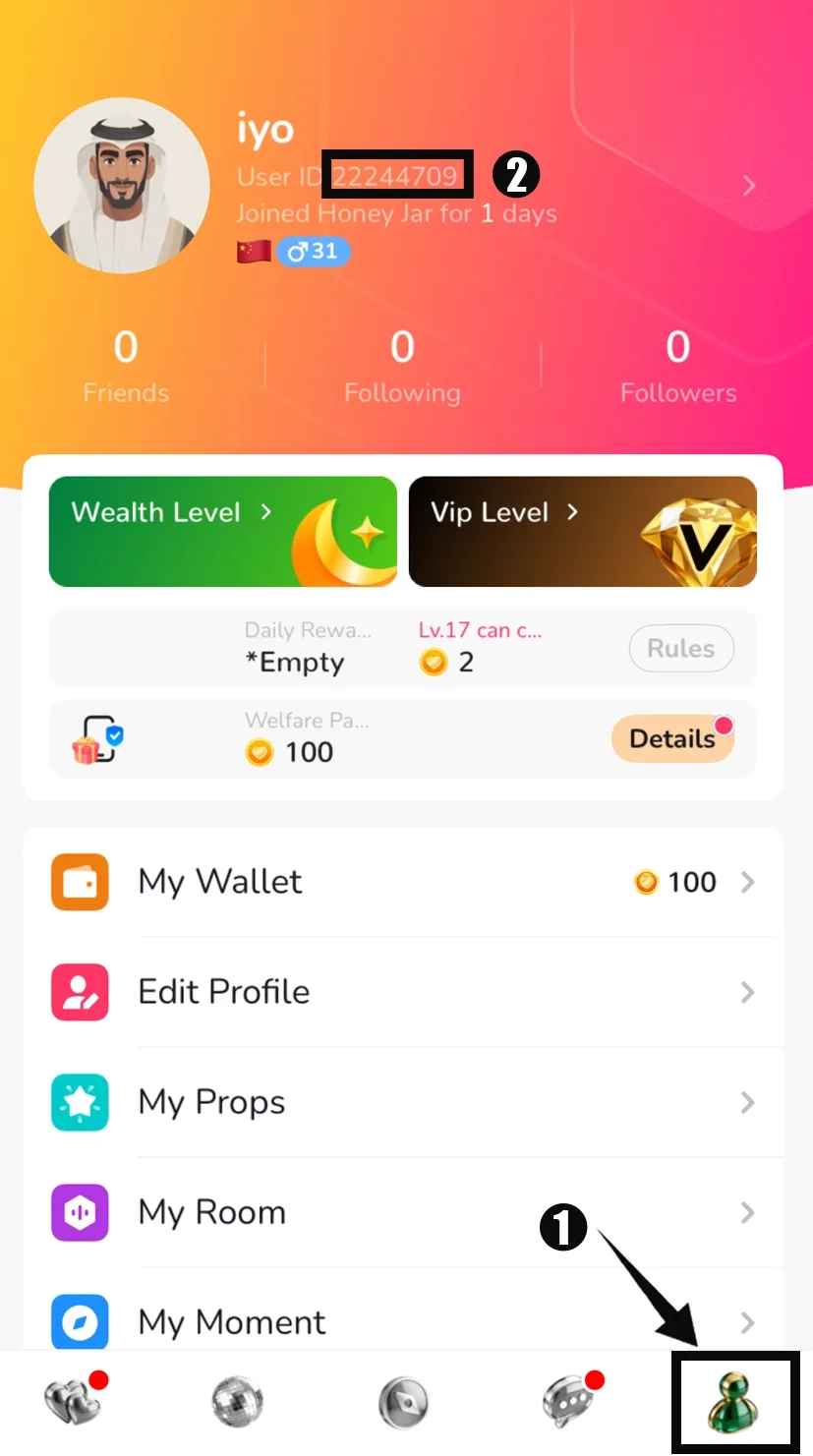
- Tap the Me or Profile icon located at the bottom right corner of the screen.
- Locate your profile avatar at the top of the page.
- Your UID is displayed directly beneath your username and profile picture.
- Tap the copy icon next to the number or write the digits down carefully.
| Profile Field | Display Location | Recharge Requirement |
|---|---|---|
| Username / Nickname | Top center of Profile screen | Not used for recharge (can be changed anytime) |
| User ID (UID) | Directly under profile avatar | Required (Static numerical identifier) |
| Password / Login Token | Security settings | Never required (Keep private at all times) |
How to Top Up Honey Jar Coins on XPTopup
Recharging your coin balance on XPTopup takes only a few simple steps. The system processes orders directly through your UID for accurate crediting.
- Select Coin Denomination: Review the available coin packages on the XPTopup product catalog and choose the quantity you wish to purchase.
- Enter Your Honey Jar UID: Paste your numeric UID into the designated account field on the page. Double-check the numbers to avoid misdirection.
- Review Order Summary: Verify your selected package and check the real-time pricing displayed on the live checkout screen.
- Select Payment Method: Pick your preferred payment option from the available global and local methods on XPTopup.
- Complete Checkout: Confirm the transaction. Once payment is authorized, your coins will be sent straight to your Honey Jar in-app wallet balance.
UID-Only Safety: Protecting Your Login Credentials
Account safety is essential when making digital purchases. Traditional third-party recharges that ask for account logins or temporary passwords expose users to potential account theft, altered profile settings, or unauthorized spending.
XPTopup operates on a strict UID-only fulfillment model for Honey Jar:
- No Passwords Requested: You never share your account login, social media binding, or verification codes.
- No Third-Party Logins: No external party logs into your device or app profile during processing.
- Safe for Friends: Because only the UID is required, you can safely send coin recharges to friends, room hosts, or family members without needing their personal account details.
Always protect your account by never revealing your login credentials or authentication codes to anyone offering coin services.
Global and MENA Server Compatibility
Honey Jar hosts a massive base of active voice rooms across the Middle East, North Africa (MENA), Southeast Asia, and international regions. Because Honey Jar assigns a unique global UID to each user profile, top-ups completed through XPTopup credit successfully across all supported regions.
Whether your account was registered in the MENA region or globally, entering your exact UID ensures your coin balance updates on the central server. The coins are immediately usable across any voice room, international live stream, or regional event regardless of your physical location.
Troubleshooting Delivery and Avoiding UID Errors
Under normal conditions, digital coin orders on XPTopup are processed immediately after payment confirmation. If you experience any delay in seeing your balance update, use the following troubleshooting checklist:
- Restart the App: Close Honey Jar completely from your background applications and reopen it. This forces the app to pull fresh wallet data from the server.
- Check the Me Tab: Go to your profile page and tap on your Wallet or Coins balance to verify the updated numerical total.
- Verify the Submitted UID: Check your XPTopup order confirmation receipt to confirm that the UID submitted matches your current in-app UID without missing or transposed digits.
- Check Transaction Status: Review your payment confirmation to ensure your transaction went through successfully.
If you entered an incorrect UID during checkout or have questions regarding your order status, reach out directly to XPTopup customer support with your order number for assistance.
Frequently Asked Questions
Where can I find my Honey Jar UID in the app?
Open the Honey Jar app, tap the Me icon in the bottom right corner, and look directly below your profile picture at the top of the screen. Your UID is the unique numerical sequence shown there.
Do I need to provide my Honey Jar password to recharge coins?
No. XPTopup requires only your numerical Honey Jar UID to complete a coin top up. You should never share your account password, SMS codes, or third-party login credentials.
How long does it take for Honey Jar coins to arrive after purchase?
Coin orders are digitally processed automatically once payment confirmation is received. Your coins typically appear in your in-app wallet shortly after checkout completion.
Can I top up Honey Jar coins for a friend using their UID?
Yes. You can purchase coins for any user by entering their specific Honey Jar UID in the account field during checkout on XPTopup. The coins will be delivered directly to their profile.
What should I do if I entered the incorrect UID during checkout?
Because digital orders process automatically through the entered UID, contact XPTopup customer support immediately with your order number. To prevent issues, always verify that your UID digits match your profile before completing payment.
What can Honey Jar coins be used for inside voice chat rooms?
Honey Jar coins can be used to send animated gifts to room speakers, unlock VIP entrance effects, buy exclusive avatar decorations, reserve special room seats, and join interactive voice room games.
Current package prices
Current package prices are shown below. Prices exclude Tax. Tax, payment fees and applicable coupons are shown at checkout.
| Package | Price |
|---|---|
| Honey Jar - Honey Jar*1000 | USD 6.94 |
| Honey Jar - Honey Jar*2000 | USD 13.89 |
| Honey Jar - Honey Jar*5000 | USD 34.71 |
| Honey Jar - Honey Jar*10000 | USD 69.43 |
| Honey Jar - Honey Jar*15000 | USD 104.14 |
| Honey Jar - Honey Jar*20000 | USD 138.85 |
| Honey Jar - Honey Jar*25000 | USD 173.57 |
| Honey Jar - Honey Jar*50000 | USD 347.13 |
| Honey Jar - Honey Jar*500 | USD 3.47 |