Likee Diamonds Top Up: Fast, Direct In-App Currency
Likee is one of the most popular global platforms for short-form video creation and interactive live broadcasting. At the center of the Likee social experience is Diamonds, the official premium currency used across the app. To support your favorite live streamers, stand out during live broadcasts, or send animated virtual gifts, a reliable Likee Diamonds top up keeps your wallet ready for every stream.
XPTopup provides a direct recharge service that sends Diamonds straight to your Likee profile using only your public Likee ID. You do not need to share passwords, link third-party social accounts, or manage complicated verification codes. Simply select your package, enter your account ID, and complete your order.
What Are Likee Diamonds and What Are They Used For?
Diamonds are the primary virtual currency in the Likee ecosystem. While regular viewing and browsing on Likee are completely free, Diamonds unlock interactive engagement features inside live streaming rooms and creator communities.
1. Sending Virtual Gifts to Live Broadcasters
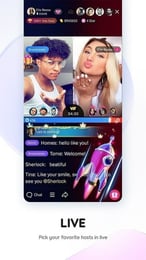
During live streams, viewers can use Diamonds to purchase a wide variety of virtual gifts from the in-app store. These range from simple tokens like flowers, hearts, and applause to high-tier animated effects such as luxury cars, yachts, fireworks, and castles. When you send a gift, it appears on screen in real time, notifying the host and everyone in the chat room.
2. Supporting Creator Earnings (Diamonds to Beans)
When a creator receives gifts purchased with Diamonds, the platform converts these gifts into "Beans." Broadcasters can accumulate Beans and exchange them for real payouts through official creator reward programs. Topping up Diamonds allows you to directly fund and motivate the content creators you enjoy following.
3. Gaining Fan Badges and Chat Recognition
Frequent gifters earn unique fan badges, chat name highlights, and entrance animations when entering a creator's live room. Higher gifting activity raises your viewer level, giving you priority placement on the stream's daily and weekly contributor leaderboards.
4. Influencing Live PK Battles
Likee hosts head-to-head live PK competitions where two creators battle for viewer support over a timed round. Gifting Diamonds during a PK battle contributes directly to your chosen creator's score bar, helping them secure victory against their opponent.
How to Find Your Likee ID in the App
To complete a Diamond recharge on XPTopup, you only need your unique Likee ID. Your Likee ID is your public profile identifier and is completely separate from your private phone number or login credentials.
Follow these quick steps on your iOS or Android device:
- Open the Likee application on your mobile device.
- Tap the Profile icon located in the top-left or bottom-right corner of the main screen.
- On your profile page, locate your profile photo and display name.
- Directly below your display name, you will see your Likee ID number.
- Tap the small Copy icon next to the ID number to copy it directly to your clipboard.
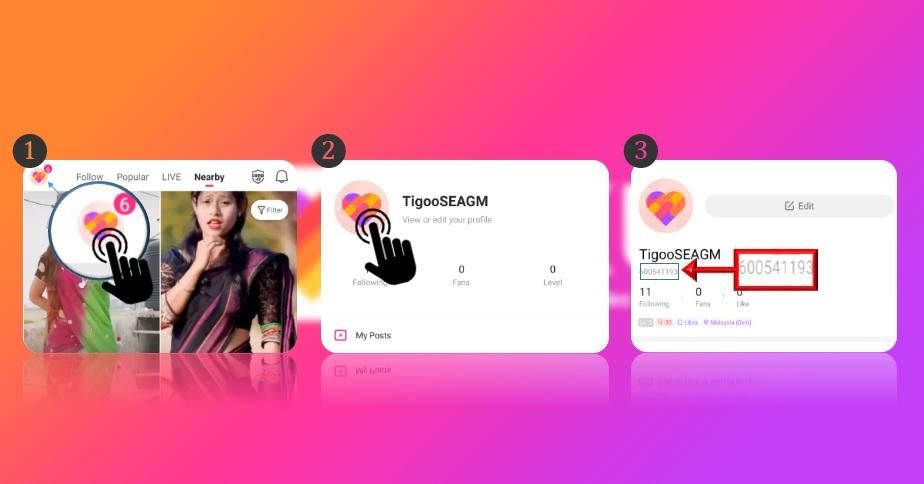
Make sure to copy the exact alphanumeric string. Avoid entering temporary display nicknames, as Diamond transfers route specifically through your permanent Likee ID.
How to Top Up Likee Diamonds on XPTopup
Recharging your Likee balance on XPTopup takes less than two minutes from start to finish. Follow this simple walkthrough:
- Select Your Diamond Package: Browse the available Diamond denominations and choose the package that fits your gifting budget.
- Enter Your Likee ID: Paste your copied Likee ID into the designated input field on the product page.
- Confirm Account Details: Check that your entered Likee ID contains no typos or trailing spaces.
- Choose Payment Method: Select your preferred payment option from the secure checkout screen.
- Complete Checkout: Authorize the transaction. Your Diamonds will process directly to your in-app Likee balance.
- Check In-App Balance: Open Likee, go to Profile > Wallet > Diamonds, and confirm your updated balance.
Safe and Direct ID-Only Recharge Without Passwords
Account safety is essential when purchasing digital items online. Traditional account-sharing methods or third-party login requests expose users to unnecessary security risks. XPTopup operates strictly on a direct-to-ID delivery model.
- No Passwords Required: You never provide your Likee password, Apple ID, Google account details, or SMS verification codes.
- No Account Sharing: Your personal messages, private clips, and profile settings remain completely private and under your control.
- Gift Friends and Broadcasters: Because our system only requires a public Likee ID, you can easily top up Diamonds directly for friends, family members, or favorite creators without ever logging into their accounts.
- Protected Transactions: All order data is transmitted over encrypted protocols to ensure your payment details remain secure.
Available Diamond Packages and Denominations in 2026
XPTopup offers a comprehensive selection of Likee Diamond packages to match every gifting style, from casual stream participation to major PK battle support.
| Diamond Tier | Target Usage | Benefits |
|---|---|---|
| Starter Packages | Casual stream visits & simple reactions | Send quick flowers, thumbs-up, and basic greeting gifts |
| Popular Packages | Regular viewer gifting & fan club support | Unlock customized chat badges and noticeable gift effects |
| Elite Packages | PK battle contributions & creator leaderboards | Trigger full-screen animations and high-tier room banners |
| Mega Packages | Major event sponsorship & VIP status | Maximum Diamond volume for large gifting sprees and top ranks |
Current package prices and real-time exchange rates are displayed directly on the live checkout interface.
Troubleshooting and Support for Likee Diamond Delivery
Diamond orders on XPTopup process automatically once your payment clears. If your balance does not reflect your new Diamonds right away, try the following troubleshooting steps:
- Restart the Likee Application: Fully close the Likee app from your phone's recent apps switcher and reopen it to force a fresh server sync.
- Inspect the Wallet Tab: Navigate to Profile > Settings > Wallet to inspect your active Diamond ledger rather than relying on cached live room displays.
- Verify the Likee ID: Check your order confirmation email to ensure the Likee ID you entered matches your active profile.
- Check Network Connectivity: Ensure your mobile data or Wi-Fi connection is stable, as weak signals can delay balance refresh rates.
- Contact Support: If your Diamonds have not arrived after completing the steps above, reach out to the XPTopup 24/7 customer support team with your Order ID and Likee ID for instant assistance.
Frequently Asked Questions
How do I find my Likee ID for top up?
Open the Likee app, tap on your profile page, and look below your profile picture and display name. Your Likee ID is displayed there along with a copy button. Tap the icon to copy your exact ID.
Do I need to provide my Likee password to buy Diamonds?
No. XPTopup only requires your public Likee ID to deliver Diamonds directly to your account. We will never ask for your password, recovery email, or login codes.
What are Likee Diamonds used for in the app?
Diamonds are used to buy animated virtual gifts for creators during live streams, unlock fan badges, rise in room rankings, and boost creators during live PK competitions.
Can I recharge Likee Diamonds for someone else using their Likee ID?
Yes. You can send Diamonds to any active user or broadcaster by entering their public Likee ID in the ID field at checkout.
How long does it take for Likee Diamonds to arrive after checkout?
Orders are fulfilled automatically upon payment confirmation. In most cases, Diamonds reflect in your Likee Wallet almost immediately.
What should I do if my Likee Diamonds do not show up immediately?
First, restart the Likee app and check your Wallet balance under your profile. If the balance remains unchanged, verify the Likee ID on your purchase receipt and contact XPTopup customer support with your Order ID for rapid resolution.
Current package prices
Current package prices are shown below. Prices exclude Tax. Tax, payment fees and applicable coupons are shown at checkout.
| Package | Price |
|---|---|
| 100 Diamonds | USD 1.63 |
| 200 Diamonds | USD 3.26 |
| 500 Diamonds | USD 8.15 |
| 1000 Diamonds | USD 16.30 |
| 1500 Diamonds | USD 24.44 |
| 2000 Diamonds | USD 32.59 |
| 2500 Diamonds | USD 40.74 |
| 3000 Diamonds | USD 48.89 |
| 3500 Diamonds | USD 57.04 |
| 4000 Diamonds | USD 65.19 |
| 4500 Diamonds | USD 73.33 |
| 5000 Diamonds | USD 81.48 |
| 10000 Diamonds | USD 162.96 |
| 20000 Diamonds | USD 325.92 |