How to Complete a Poppo Live Coins Top Up on XPTopup
Topping up your Poppo Live account takes only a few quick steps on XPTopup. Because our system connects directly to the game balance via your public User ID, you never need to share sensitive account details or log in through third-party forms.
Follow these steps to complete your transaction:
- Select Your Coin Package: Choose the desired amount of Poppo Live Coins from the available denomination list on the checkout page.
- Enter Your User ID (UID): Type or paste your 7-to-9 digit Poppo Live UID into the required input field. Double-check the digits to ensure accurate delivery.
- Review Order Details: Confirm your selected coin bundle and verify the real-time pricing listed on the screen.
- Choose Payment Method: Pick your preferred international or regional payment option.
- Complete Payment: Finalize the payment. The system processes the order instantly and routes your coins straight to your Poppo Live account balance.
Step-by-Step Guide: How to Find Your Poppo Live User ID (UID)
Your Poppo Live User ID (UID) is a unique numeric identifier assigned to your profile. You only need this number to receive coin recharges directly into your app wallet.
Here is how to locate your UID inside the Poppo Live app:
- Launch the Poppo Live app on your iOS or Android device.
- Tap the My profile tab located at the bottom-right corner of the home screen.
- Locate your profile avatar and display name near the top of the screen.
- Directly under your username, you will see the label ID: followed by a sequence of numbers.
- Tap the small Copy icon next to the number to copy your UID directly to your clipboard.
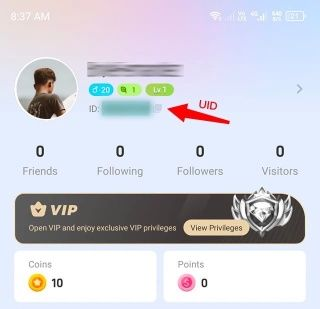
Paste this copied UID directly into the order field on XPTopup to avoid typos.
What Are Poppo Live Coins and How to Use Them
Poppo Live Coins serve as the primary premium in-app currency for the Poppo Live streaming platform. Having an active coin balance allows you to interact with hosts, participate in live events, and personalize your profile status.
1. Sending Virtual Gifts
Coins allow you to send animated virtual gifts to your favorite broadcasters during their live streams. Gifts range from standard roses and applause stickers to luxury animated full-screen gifts like supercars, private jets, and royal crowns. Sending gifts increases your intimacy level with the host and places you on the daily and weekly top contributor leaderboards.
2. Live PK Battles
During live PK (player knockout) battles between two competing broadcasters, viewers use coins to vote and send battle gifts. Gifting during a PK match directly boosts your host's battle points, helping them defeat their opponent and climb platform-wide competition rankings.
3. Lucky Boxes and Interactive Games
Poppo Live features various interactive in-room activities, including Lucky Box draws and dynamic mini-games. You can spend coins to open reward chests and participate in platform prize pools.
4. Fan Club Subscriptions and Badges
You can use coins to join exclusive host fan clubs. Subscribing gives you custom chat badges, exclusive room entrance notifications, and access to private fan-only broadcast segments.
5. Profile Customization and Entrance Effects
Stand out in busy live rooms by purchasing custom animated avatar frames, speech bubble skins, and special entrance vehicles that announce your arrival when you enter a live stream.
Poppo Live VIP Levels, Privileges, and Membership Costs
As you recharge and spend Poppo Live Coins, your account earns VIP growth points. Reaching higher VIP tiers grants distinct privileges that distinguish your profile across every live stream room.
| VIP Tier | Milestone Requirements | Key Privileges & Perks |
|---|---|---|
| Normal VIP | Entry-level coin recharge accumulation | Unique VIP name badge, exclusive standard chat bubble, custom entry text |
| Super VIP | Mid-tier coin recharge accumulation | Animated vehicle entrance, priority gift animations, expanded fan club slots |
| Diamond VIP | Advanced coin recharge accumulation | Dynamic profile frame, high-visibility bullet comments, dedicated room management perks |
| SVIP | Top-tier coin recharge accumulation | Custom full-screen entrance effect, invisible room browsing mode, priority customer assistance, top contributor badge |
All VIP points accumulate automatically with every successful coin recharge processed via your UID on XPTopup.
Safe and Password-Free Poppo Live Recharges Explained
Account security is essential when purchasing digital currencies. Traditional recharge methods that ask for account credentials, Google login details, or SMS verification codes expose your personal data to unauthorized access.
XPTopup operates strictly on a direct UID delivery model:
- No Passwords Required: You only need to supply your public Poppo Live User ID. We will never ask for your account password, email access, or social login credentials.
- Direct Balance Routing: The system credits coins straight into the official Poppo Live server balance associated with your UID.
- Encrypted Checkout: Every payment is handled through secure, encrypted checkout gateways that protect your financial information.
- Zero Risk of Account Compromise: Because no login access is granted, your account remains completely secure in your hands at all times.
Poppo Live Coins Recharge Troubleshooting and Delivery Support
Recharges on XPTopup are processed automatically 24/7. In the rare event that you experience a delay or have questions about your order, follow these troubleshooting steps:
What to Do If Coins Have Not Appeared
- Restart the Poppo Live App: Completely close the Poppo Live application from your background apps and reopen it. This forces the app to sync with the central server and refresh your coin balance.
- Verify the UID Entered: Check your XPTopup order confirmation receipt to verify that the UID submitted matches your actual Poppo Live profile number.
- Check Order Status: View your transaction status in your XPTopup account dashboard to confirm that the payment was completed successfully.
Correcting Mistyped User IDs
If you accidentally submitted the wrong UID during checkout, contact XPTopup customer support immediately with your transaction Order ID. If the order has not yet been dispatched by the automated system, support agents can update the destination ID for you.
24/7 Customer Service Assistance
If your coins do not arrive after restarting your app, our dedicated support team is available around the clock to investigate transaction records and ensure your balance is updated promptly.
Frequently Asked Questions About Poppo Live Coins
How do I top up Poppo Live Coins online?
Select your coin bundle on XPTopup, input your Poppo Live User ID (UID), choose your payment method, and complete the checkout process. The coins will be deposited directly to your in-app account.
Where do I find my Poppo Live User ID (UID)?
Open the Poppo Live app, tap the My profile icon at the bottom right, and find the numeric ID displayed underneath your profile name and avatar. Tap the copy icon next to it to copy the numbers.
Do I need to share my Poppo Live account password to recharge coins?
No. XPTopup only requires your public Poppo Live UID to credit your coins. You never need to share passwords, verification codes, or linked social media credentials.
What can I purchase with Poppo Live Coins?
Poppo Live Coins can be used to send virtual gifts to live streamers, participate in live PK battles, open Lucky Boxes, join streamer Fan Clubs, and purchase custom entrance animations and profile decorations.
Can I recharge Poppo Live Coins for another user or streamer using their UID?
Yes. You can purchase coins for friends, family members, or streamers by entering their specific Poppo Live UID in the input box during checkout. The coins will be sent directly to their account.
How quickly are Poppo Live Coins credited to my account after top up?
Coin recharges are automated and delivered to your Poppo Live balance immediately upon successful payment verification. Restarting the Poppo Live app will display your updated balance right away.
Current package prices
Current package prices are shown below. Prices exclude Tax. Tax, payment fees and applicable coupons are shown at checkout.
| Package | Price |
|---|---|
| 10000 Coins | USD 0.92 |
| 21000 Coins | USD 1.94 |
| 50000 Coins | USD 4.62 |
| 100000 Coins | USD 9.23 |
| 150000 Coins | USD 13.84 |
| 210000 Coins | USD 19.38 |
| 270000 Coins | USD 24.92 |
| 300000 Coins | USD 27.80 |
| 420000 Coins | USD 38.92 |
| 460000 Coins | USD 42.63 |
| 490000 Coins | USD 45.41 |
| 560,000 Coins | USD 51.69 |
| 700,000 Coins | USD 64.61 |
| 920,000 Coins | USD 84.92 |
| 1,250,000 Coins | USD 115.38 |
| 1,780,000 Coins | USD 164.30 |
| 2,730,000 Coins | USD 251.98 |
| 3,640,000 Coins | USD 335.97 |