Bigo Live Top Up — Recharge Diamonds for Live Streaming
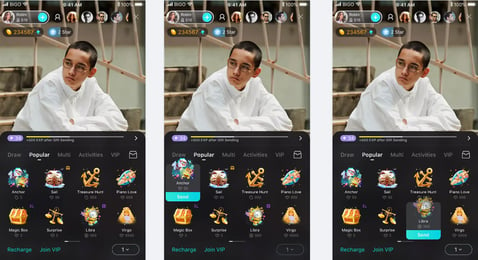
Bigo Live top up on XPTopup lets you recharge Diamonds for one of the world's largest live streaming platforms. Diamonds unlock virtual gifts for broadcasters, VIP badges, entry to premium rooms, and exclusive social features during live shows. Select a bundle from 100 to 20,000 Diamonds, enter your 8–10 digit Bigo ID, and receive your balance within minutes. No app password or login required on our checkout.
Why Top Up Bigo Live Here
- Fast auto-delivery — Diamonds credit within 1–3 minutes after payment clears.
- ID-only checkout — pay with your numeric Bigo ID only; no password or XPTopup account needed.
- Full Diamond range — bundles from 100 up to 20,000 Diamonds available on this page.
- Secure global payments — Visa, Mastercard, Apple Pay, Google Pay, crypto, and regional e-wallets accepted.
- 24/7 support — our team can trace any order by reference if your Bigo ID needs a check.
How to Top Up Bigo Live
- Pick a Diamond bundle (100, 500, 1,000, 1,400, 2,000, 3,000, 5,000, 6,000, 10,000, or 20,000 Diamonds).
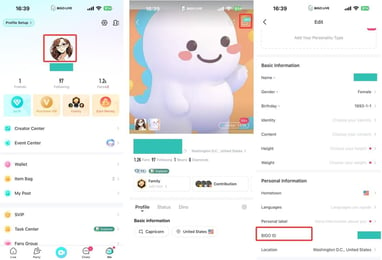
- Enter your Bigo ID — the 8–10 digit number from your profile (omit the ID: prefix).
- Choose a payment method and complete checkout. Guest checkout works — no registration required.
- Open Bigo Live and confirm your Diamond balance in your wallet. Most orders arrive within 1–3 minutes.
How to Find Your Bigo Live ID
- Open the Bigo Live app and make sure you are logged in.
- Tap the Me icon in the bottom-right corner of the main screen.
- Your Bigo ID appears below your nickname as ID: followed by 8–10 digits.
- Copy only the numerical digits — do not include the ID: prefix when entering on XPTopup.
- Double-check every digit before paying — Diamonds cannot be redirected once delivered.
Delivery and Payment
Most Bigo Live top-up orders complete within 1–3 minutes after payment confirmation. Peak live-event hours may extend delivery to 10 minutes. We accept Visa, Mastercard, Apple Pay, Google Pay, cryptocurrency, and popular regional e-wallets.
Safe, Legitimate Recharge You Can Trust
XPTopup processes Bigo Live recharges through authorized top-up channels using your public Bigo ID only — we never ask for your password or account login. Every order generates a payment confirmation, and our support team can look up delivery status by order reference.