LivU Coins Top Up: What Are Coins and How Are They Used?
LivU is a global video matching and live communication platform that connects millions of users worldwide for direct conversations. LivU Coins represent the core virtual currency within the app, allowing users to unlock premium interactive tools, start direct video calls, and customize their social discovery experience.
Having an active coin balance allows you to make the most of the application's primary features:
- Direct 1-on-1 Video Calls: Call your favorite friends or new connections directly without waiting for random match rotations.
- Smart Matching Filters: Apply regional, language, and gender filters during live discovery to connect with people who match your preferences.
- Interactive Virtual Gifts: Send colorful animated gifts during live video chats to express appreciation, support creators, and break the ice.
- VIP Profile Features: Unlock special beauty filters, customized profile frames, and priority placement in video discovery queues.
When you complete a LivU Coins top up on XPTopup, your coin balance updates directly in your account so you can continue your chats without disruption.
Step-by-Step Guide: How to Top Up LivU Coins with UID
Recharging your LivU Coins on XPTopup requires only your unique numeric User ID (UID). Follow these simple steps to complete your purchase:
- Select Your Coin Package: Browse the available LivU Coins options displayed on the product catalog and choose the quantity you need.
- Enter Your LivU UID: Input your numeric account ID in the designated UID field. Always verify the numbers carefully to ensure accurate delivery.
- Select Your Payment Method: Choose your preferred regional or international payment option from the live checkout page.
- Confirm and Pay: Review your order summary and follow the on-screen payment instructions to finalize the transaction.
- Check Your In-App Balance: Open the LivU app on your mobile device, navigate to your profile wallet, and confirm your updated coin total.
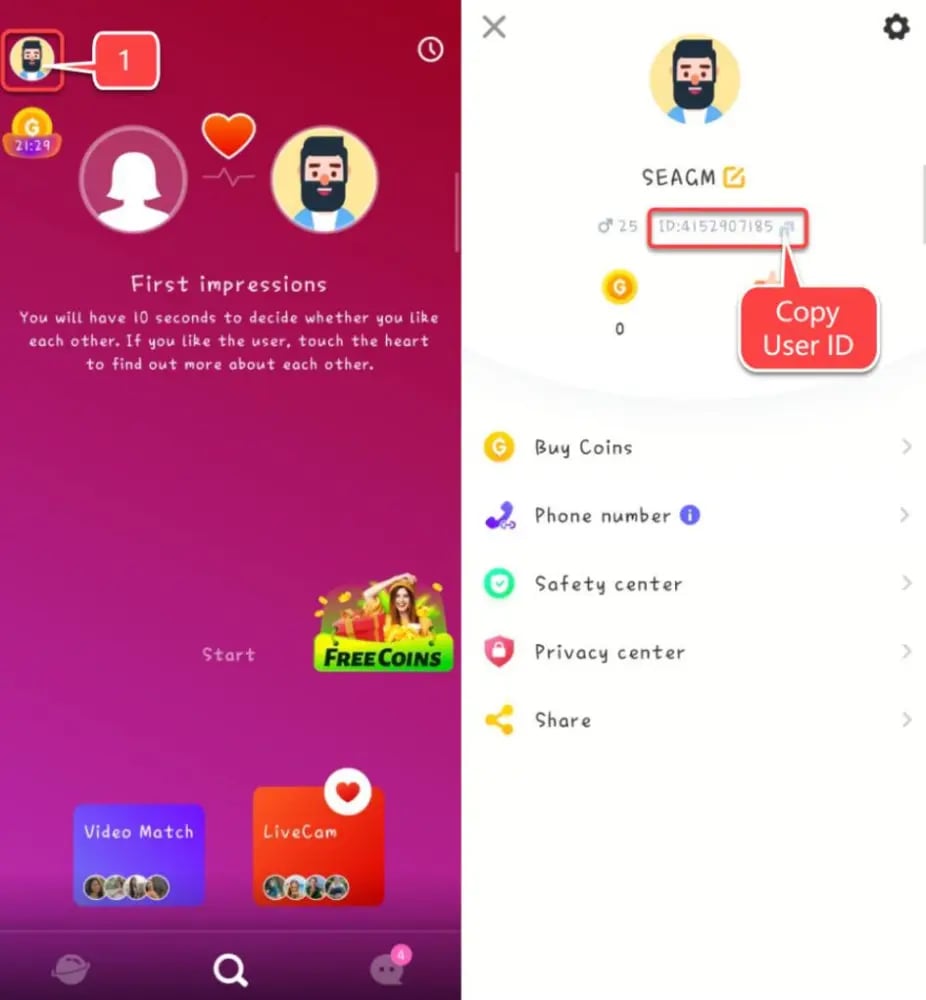
How to Find Your LivU UID in the Mobile App
Your LivU UID is a unique number assigned to your personal account profile. You do not need to share passwords or login credentials; only this numeric identifier is required for order processing.
To locate your LivU UID:
- Launch the LivU app on your iOS or Android mobile device.
- Tap the Profile icon in the bottom navigation bar to open your personal dashboard.
- Look directly beneath your profile avatar and username.
- Find the numeric code labeled ID or UID.
- Copy or record this number accurately to enter it on the XPTopup checkout page.
Available LivU Coins Packages and Usage Overview
LivU offers various coin package sizes depending on your usage habits, whether you need a quick balance boost for a few calls or a larger reserve for extended video sessions. Real-time pricing and local currency rates are dynamically updated and displayed directly on the XPTopup live checkout screen.
| Coin Usage Category | Feature Description | Core Benefit |
|---|---|---|
| 1-on-1 Video Calls | Connect directly with selected profiles on demand | Private, dedicated conversation time |
| Match Filter Activation | Set gender and regional matching criteria | Focus connections on specific areas |
| In-Chat Virtual Gifting | Send animated stickers and visual effects | Build rapport and show appreciation |
| VIP Visual Enhancements | Access premium video effects and badges | Stand out during live discovery |
Safety and Security: Why Direct UID Top-Up Protects Your Account
Keeping your personal social media accounts and chat profiles secure is critical. Traditional top-up methods that demand account passwords or third-party logins expose your profile to unauthorized access, session hijacking, or accidental account locks.
Direct UID recharging on XPTopup provides a protected alternative:
- Zero Password Sharing: You never enter your LivU password, phone verification codes, Google login, or Apple ID credentials.
- No Device Session Interruptions: Your app remains logged in on your phone throughout the recharge process without forcing security logouts.
- Direct Account Crediting: Delivery goes directly through official system pathways straight to your registered UID.
- Order Tracking: Every order generated on XPTopup includes a trackable reference number so you can verify payment completion and fulfillment status at any time.
Common LivU Coin Recharge Mistakes and How to Avoid Them
To ensure your coins arrive promptly, keep these common user mistakes in mind before placing an order:
- Entering the Wrong UID: Entering a single incorrect digit routes the coins to another account. Copy and paste your UID directly from the LivU profile page rather than typing it from memory.
- Confusing User IDs Across Multiple Accounts: If you use multiple accounts (such as a phone login and a social login), make sure you check the UID of the account you actively want to credit.
- Closing the Payment Window Early: Allow the checkout page to finish processing payment authorization before closing your mobile browser or returning to the app.
- Confusing Gift Diamonds with LivU Coins: Gift points earned from receiving gifts are stored separately from purchased LivU Coins. Check your purchased coin wallet when verifying your balance.
LivU Coins Top Up FAQs and Troubleshooting
Can you buy LivU coins safely online?
Yes, you can safely buy LivU Coins online through secure recharge platforms like XPTopup. Because the process only requires your public account UID, your private account details, chats, and passwords remain entirely secure.
How do I find my LivU UID for recharge?
Open the LivU app, tap the profile icon in the bottom navigation menu, and look directly below your profile name. Your numeric UID is listed there for you to copy.
Do I need to provide my LivU password to top up coins?
No. You will never be asked for your LivU password, security verification codes, or linked email credentials on XPTopup. All orders are processed using only your numeric UID.
How long does it take for LivU Coins to be credited to my account?
Coin orders are processed immediately once your payment is confirmed. In most cases, your coins appear in your LivU wallet right after transaction completion. If there is a minor network delay, restart the LivU app to refresh your wallet balance.
What should I do if I entered the wrong LivU UID during checkout?
Because UID-based recharges are processed automatically, deliveries sent to a valid but incorrect UID cannot be reversed once processed. If you notice an error before payment completes, cancel the transaction and re-enter the correct UID. If the payment already processed, contact XPTopup customer support with your order number for assistance.
What can I use LivU Coins for in the app?
You can use LivU Coins to start direct one-on-one video calls, apply advanced matching filters (such as location and gender preferences), send animated virtual gifts during live chats, and access exclusive visual perks.
Can I transfer LivU Coins to another user account after purchasing?
No. Once coins are credited to a specific LivU UID, they are tied to that individual account wallet and cannot be directly transferred between accounts. However, you can send in-app virtual gifts to other users during live video interactions.
Current package prices
Current package prices are shown below. Prices exclude Tax. Tax, payment fees and applicable coupons are shown at checkout.
| Package | Price |
|---|---|
| 650 LivU Coins | USD 3.35 |
| 1250 LivU Coins | USD 6.05 |
| 1800 LivU Coins | USD 8.45 |
| 3500 LivU Coins | USD 14.83 |
| 7000 LivU Coins | USD 29.65 |
| 15000 LivU Coins | USD 63.63 |
| 35000 LivU Coins | USD 148.72 |