Mixu Top Up: Coins for 1v1 Video Calls and Live Gifting
Mixu is a popular global video chat platform that connects users worldwide through instant 1v1 live video matches, real-time text translations, and interactive social features. To make the most of your conversations and connect with specific creators, you need Mixu Coins. Coins serve as the platform's primary in-app currency, enabling you to start direct video calls, maintain private sessions, send virtual gifts, and unlock specialized matching filters.
Running out of coins interrupts your conversations mid-call. With XPTopup, you can complete a fast Mixu recharge directly to your profile. You only need your Mixu Player ID to submit an order. Once payment is confirmed, your coin balance updates directly in the app so you can get right back to chatting without delay.
How to Top Up Mixu Coins on XPTopup
Recharging your account balance on XPTopup is straightforward and requires zero private login details. Follow these simple steps to buy Mixu coins:
- Select Your Coin Package: Browse the available coin bundles listed above and pick the denomination that fits your chat needs.
- Enter Your Player ID: Type your exact Mixu Player ID (UID) into the input box. Double-check your numbers to ensure smooth delivery.
- Choose Your Payment Method: Pick your preferred local or international payment option.
- Complete Checkout: Review your order summary and finalize your transaction through our secure payment gateway.
- Check Your In-App Balance: Open the Mixu app, head to your profile or coin wallet, and confirm your updated balance.
All pricing is displayed in real-time on the live checkout screen, allowing you to select the exact quantity you require at current rates.
How to Find Your Mixu Player ID (UID)
Your Player ID is the unique numeric identifier linked to your Mixu account. You do not need to share your phone number, social login, or password to purchase coins—just this ID.
Follow this visual walkthrough to locate your Player ID inside the Mixu mobile app:
- Launch the Mixu application on your mobile device.
- Tap the Profile icon located in the bottom-right corner of the main navigation bar.
- View your profile header at the top of the screen.
- Locate the numeric string labeled ID or UID beneath your display name and avatar.
- Tap the copy icon next to the number, or write it down carefully to paste directly into the checkout field on XPTopup.
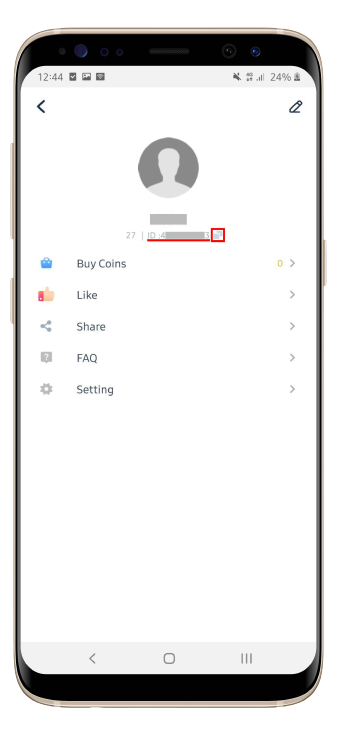
Mixu Player IDs are globally compatible across all supported server regions. Whether your account was registered in Asia, Europe, North America, or Latin America, your Player ID routes the coins directly to your account.
Mixu Coin Packs and Usage Breakdown
Mixu Coins give you full control over how you interact on the platform. Depending on whether you prefer casual browsing or extended private calls, choosing the right package ensures you never get disconnected during a live interaction.
| Coin Package Tier | Typical In-App Use Case | Best For |
|---|---|---|
| Starter Pack | Short video calls, testing connection, basic text translations | Casual users & newcomers |
| Standard Pack | Extended 1v1 video chats, medium virtual gifts, filter matching | Regular daily chatters |
| Value Pack | High-tier animated gifts, continuous private video rooms | Active community members |
| VIP Pack | Priority matching, maximum gifting tier, long-duration calling | Power users & frequent hosts |
Note: Live coin package prices and promotional bundles are displayed dynamically on the selection panel above.
Mixu coins are deducted per minute during active 1v1 calls or upon sending specific gift items. Keeping a healthy coin reserve prevents sudden call drops when connecting with friends or favorite streamers.
Account Safety: Password-Free Direct UID Recharges
Protecting your personal data and account integrity is essential when buying digital currencies online. XPTopup uses a direct-to-account top-up protocol that requires only your public Player ID.
- Zero Password Sharing: We will never ask for your account password, email access, Apple ID, Google credentials, or SMS verification codes.
- No Account Takeover Risk: Because your login credentials stay completely private, your personal profile, chat history, and linked payment accounts remain secure.
- Encrypted Transactions: All order submissions and payments are processed via standardized encrypted checkout channels to ensure full financial privacy.
- Safe & Compliant Delivery: Coins are sent straight through standard system top-up interfaces, keeping your account in good standing without risk of bans or penalties.
Troubleshooting and Payment Support
We strive to make every Mixu top up fast and hassle-free. If you experience an unexpected delay or made a typo during checkout, here is how to resolve it:
Delayed Coin Arrival
In most cases, coins appear in your account balance within moments of completed payment. If your balance does not update right away:- Fully close the Mixu application and relaunch it to refresh your local server data.- Check your payment receipt to verify that the transaction successfully processed.- Allow a few minutes during peak server traffic windows.
Incorrect Player ID Input
If you accidentally submitted an incorrect Player ID during checkout, contact XPTopup customer support immediately with your order reference number. If the order has not yet been processed by the automated fulfillment system, our support agents will assist in correcting the destination ID. Please note that once coins are successfully delivered to an active account, completed transfers cannot be reversed.
Frequently Asked Questions About Mixu Recharge
How do I find my Mixu Player ID?
Open the Mixu app, tap the profile icon in the bottom-right corner, and look below your profile picture and nickname at the top of the screen. You will see a numeric ID with a copy button next to it.
Do I need to provide my Mixu account password for top-up?
No. You never need to share your password or any login credentials. To process your Mixu top up on XPTopup, you only need to provide your public Player ID.
What can I use Mixu Coins for?
Mixu Coins are used to unlock 1v1 video calling minutes, send animated virtual gifts to content creators, use premium matching filters, and access real-time chat translation features.
How long does it take for Mixu Coins to arrive after payment?
Coin deliveries are automated and typically process directly after payment confirmation. Once the transaction clears, restart the Mixu app to see your updated balance.
What should I do if I enter the wrong Player ID during checkout?
Contact XPTopup customer support as soon as possible with your transaction details. If the order has not been fulfilled yet, our team can help update your Player ID. Be sure to verify your UID carefully before confirming your order.
Can I top up Mixu Coins for a friend using their Player ID?
Yes. Because XPTopup only requires a Player ID, you can easily surprise a friend or creator by entering their unique numeric ID at checkout and completing the payment on their behalf.
Current package prices
Current package prices are shown below. Prices exclude Tax. Tax, payment fees and applicable coupons are shown at checkout.
| Package | Price |
|---|---|
| mixu 650 coins | USD 3.26 |
| mixu 1250 coins | USD 6.26 |
| mixu 1800 coins | USD 8.58 |
| mixu 3500 coins | USD 15.53 |
| mixu 7000 coins | USD 31.67 |
| mixu 15000 coins | USD 66.30 |