Opa Live Top Up on XPTopup
Opa Live is an interactive live streaming platform where users connect with broadcasters, watch live performances, participate in real-time chats, and show appreciation through virtual gifts. Opa Live credits serve as the core in-app currency, allowing you to send dynamic animated gifts, enter exclusive broadcast rooms, boost streamer rankings, and unlock special user badges across the platform.
Running out of credits during an active stream can interrupt your interactions. XPTopup provides a direct Opa Live recharge service that credits your profile using only your User ID (UID). You do not need to share passwords or link external social accounts to complete a purchase.
How to Top Up Opa Live Credits with UID on XPTopup
Recharging your Opa Live balance takes just a few steps. Follow this guide to submit your order:
- Select Your Credit Amount: Review the available credit denominations on this page and pick the bundle that matches your streaming needs.
- Enter Your UID: Type your numeric Opa Live User ID into the input field labeled "UID". Double-check the numbers to prevent delivery errors.
- Select a Payment Method: Choose your preferred payment option from the supported global and local checkout providers.
- Review and Confirm: Confirm that your account UID and selected package details are correct, then proceed to the secure checkout.
- Receive Your Credits: Once payment confirmation is complete, the credits are routed directly to your Opa Live account balance.
How to Locate Your Opa Live User ID (UID)
Your Opa Live UID is a unique numeric identifier assigned to your account upon registration. Because top-ups on XPTopup require only this number, finding and entering the correct ID is essential.
- Launch the Opa Live application on your mobile device.
- Tap the Profile (or Me) tab located in the bottom navigation bar.
- Look beneath your profile picture and nickname to find your UID.
- Tap the copy icon next to the number, or write down the full sequence carefully.
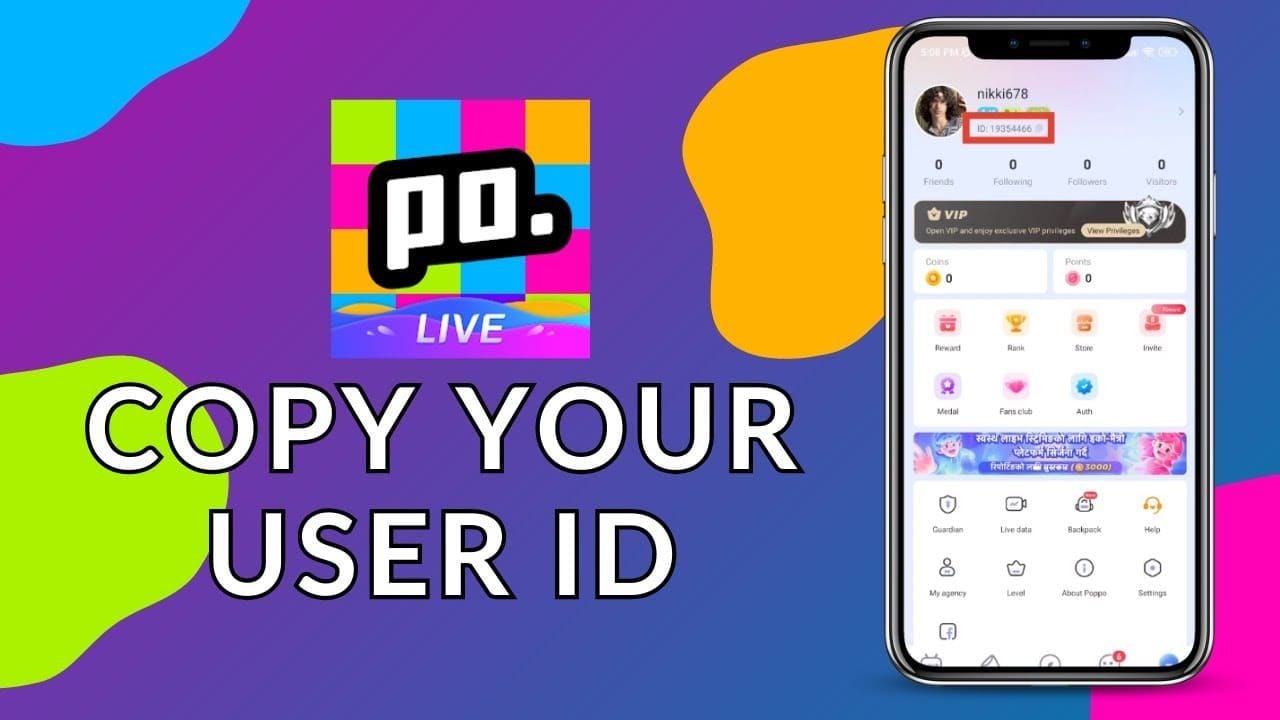
Always paste the copied UID directly into the XPTopup order box to avoid manual typo mistakes.
Available Opa Live Credit Bundles and Pricing in 2026
XPTopup lists a wide range of bundle sizes so you can buy small coin amounts for casual gifting or larger packages for special streaming events. Pricing, currency conversions, and active bundle promotions are updated dynamically on the live checkout interface.
| Package Type | Account Requirement | Delivery Method | Processing Style |
|---|---|---|---|
| Standard Starter Bundles | Opa Live UID | Direct In-App Crediting | Automated System |
| Medium Gift Bundles | Opa Live UID | Direct In-App Crediting | Automated System |
| Large Community Bundles | Opa Live UID | Direct In-App Crediting | Automated System |
| Premium Event Packs | Opa Live UID | Direct In-App Crediting | Automated System |
All final prices and local currency equivalents are clearly displayed in the product selector before you submit payment. Check the live selector above for current rates.
Security and Privacy: Why UID-Only Recharge is Safe
Account safety is a primary priority when purchasing digital currencies online. XPTopup uses a UID-only fulfillment model for Opa Live top-ups, which offers several distinct security advantages:
- Zero Password Requirements: You never have to share your Opa Live account password, email credentials, or phone verification codes.
- No Third-Party Logins: Your account remains completely under your personal control on your own device. There is no need to log in through unauthorized third-party browsers.
- Direct System Delivery: Credits are sent straight to your public account ID through standard server-side channels, keeping your personal profile details private.
- Secure Payment Processing: All transactions on XPTopup use encrypted checkout protocols to protect your financial and billing data.
Accepted Global Payment Methods for Opa Live
XPTopup accommodates international players by providing a diverse selection of trusted payment solutions. Depending on your region, you can complete your Opa Live recharge using:
- Credit and Debit Cards: Visa, Mastercard, and other major card networks.
- Digital Wallets: Leading online e-wallets for quick mobile payments.
- Local Bank Transfers & Online Banking: Regional payment gateways tailored to your country.
Available options update automatically based on your billing location during checkout, ensuring clear total pricing without unexpected conversion fees.
Troubleshooting Delivery Delays and Account Balance Refresh
Opa Live orders placed on XPTopup process promptly after payment verification. If your new credit balance does not appear immediately, follow these troubleshooting steps:
- Refresh the In-App Balance: Completely close the Opa Live app on your phone and reopen it. In-app wallet balances frequently require a fresh session to pull updated server records.
- Verify the UID on Your Invoice: Check your XPTopup order summary to confirm that the UID entered matches your actual profile ID.
- Check Payment Confirmation: Ensure your bank or payment provider marked the transaction as successful rather than pending.
- Reach Out to Support: If the credits still do not show up after a short wait, contact XPTopup customer service with your Order ID and UID. Our support team will trace the delivery and assist you.
Frequently Asked Questions
How do I top up Opa Live credits using my UID?
Select your credit pack on XPTopup, enter your numeric Opa Live UID, choose a payment method, and complete the checkout. The credits are delivered directly to your account.
Where can I find my Opa Live UID in the app?
Open the Opa Live app, tap the Profile or "Me" section at the bottom right, and locate the numeric UID shown below your username and avatar.
Do I need to share my Opa Live password for top-up?
No. XPTopup only requires your public User ID (UID). You should never share your password or temporary verification codes with anyone.
How fast are Opa Live credits added to my account?
Credits are dispatched immediately once your payment is approved. In most cases, the balance reflects in your account as soon as you refresh the app.
What should I do if I entered the wrong UID during checkout?
Because digital top-up orders are processed automatically to the ID provided, credits sent to an existing incorrect UID cannot be reversed. If you notice an error before the order completes, contact XPTopup support immediately with your order details.
What payment options are available for Opa Live recharge on XPTopup?
XPTopup supports international credit/debit cards, digital wallets, and local payment methods depending on your location. The complete list of available payment channels appears during checkout.
Current package prices
Current package prices are shown below. Prices exclude Tax. Tax, payment fees and applicable coupons are shown at checkout.
| Package | Price |
|---|---|
| Opa Live - Opa Live*20000 | USD 1.50 |
| Opa Live - Opa Live*25000 | USD 1.88 |
| Opa Live - Opa Live*50000 | USD 3.75 |
| Opa Live - Opa Live*100000 | USD 7.50 |
| Opa Live - Opa Live*500000 | USD 37.52 |
| Opa Live - Opa Live*1000000 | USD 75.04 |
| Opa Live - Opa Live*5000000 | USD 375.21 |
| Opa Live - Opa Live*15000 | USD 1.13 |