Super Sus Top Up: Golden Stars and Super Pass Overview
Super Sus: Who Is The Impostor relies on two primary premium items to customize your gameplay and expand your cosmetic inventory: Golden Stars (Goldstar) and the Super Pass.
Golden Stars represent the premium currency required to obtain character roles, roll in limited-time prize pools, and purchase exclusive legendary costumes. Acquiring Golden Stars allows you to unlock specialized roles directly rather than waiting for standard progression rotations.
The Super Pass is the game's seasonal progression system. Activating the Super Pass grants immediate cosmetic bonuses and unlocks a tiered track of rewards, including exclusive outfits, role cards, profile customizations, and bonus in-game resources as you complete seasonal quests.
XPTopup provides a direct recharge service for both Golden Stars and Super Pass packages. You only need your in-game Space ID to receive your items directly into your account inventory.
How to Top Up Super Sus Golden Stars on XPTopup
To complete a Super Sus recharge quickly, follow these direct steps:
- Select Your Item: Choose the specific Golden Stars package or Super Pass tier you want to buy.
- Enter Your Space ID: Type your Super Sus Space ID into the designated input field. Double-check your numbers to ensure correct delivery.
- Review Order & Select Payment: Check the live checkout screen for current pricing and select your preferred payment option.
- Confirm Payment: Complete the payment authorization process.
- Receive Items In-Game: Once the transaction is confirmed, your Golden Stars or Super Pass activation will be sent directly to your Super Sus account.
How to Find Your Super Sus Space ID
Your Space ID is the unique numerical identifier assigned to your account. You must provide this ID so XPTopup can credit your purchase to the correct profile without asking for private login details.
Follow these steps to locate your Space ID:
- Open the Super Sus application on your device.
- Tap your Avatar/Profile Icon in the top-left corner of the main lobby.
- Locate the numerical code displayed next to your character nickname on the profile overview screen. This is your Space ID.
- Tap the Copy icon next to the Space ID to save it directly to your clipboard.
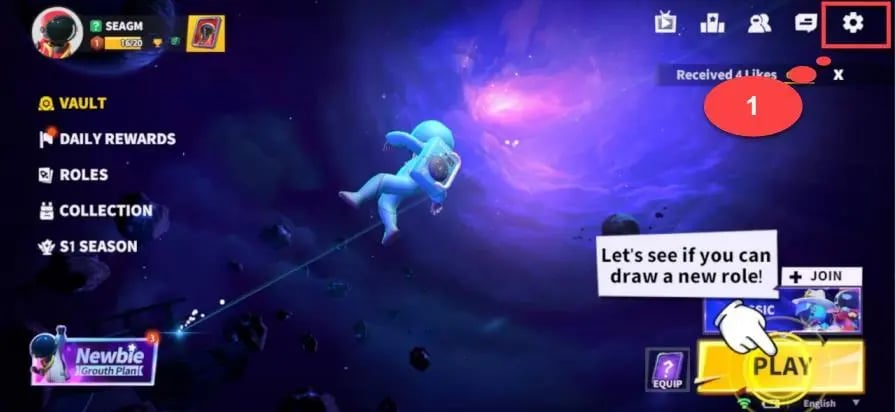
Paste this copied ID directly into the Space ID field on XPTopup during checkout.
Golden Stars vs. Super Pass: What Should You Buy?
Choosing between Golden Stars and the Super Pass depends on how you play and what rewards you want to prioritize.
| Feature / Benefit | Golden Stars (Goldstar) | Super Pass (Seasonal) |
|---|---|---|
| Purchase Type | Direct currency balance | Tiered seasonal progression pass |
| Main Use | Gacha draws, direct shop purchases, role unlocks | Earning exclusive seasonal cosmetics & materials |
| Delivery | Instant credit to balance | Instant tier unlock + daily/weekly quest rewards |
| Best For | Immediate item/role acquisitions | Active players completing daily challenges |
| Expiration | Balance remains indefinitely | Valid for the duration of the active season |
If you want a specific skin from the store or want to spin the current Lucky Wheel, buy Golden Stars. If you play daily and want to maximize the cosmetic rewards earned over a full season, activate the Super Pass.
Safe and Password-Free Top-Up Using Space ID
Account safety is a core priority when topping up mobile games. XPTopup processes your Super Sus recharge exclusively through your public Space ID.
- No Passwords Required: You never need to share your account password, email access, or linked social media credentials.
- Zero Account Sharing: The recharge process injects items directly into your game profile from the server side, eliminating any risk of third-party account tampering.
- Safe Transaction Processing: Your account stays completely in your control while the items are deposited into your game mailbox or balance.
Never provide your private login credentials or verification codes to third parties. Using only your Space ID ensures your Super Sus profile remains secure.
Super Sus In-Game Rewards: Roles, Emotes, and Exclusive Outfits
Golden Stars provide access to a wide range of content in Super Sus:
- Exclusive Roles: Unlock specialized neutral, crew, and impostor roles such as Arsonist, Joker, Spy, Doctor, and Spacecrew variants to vary your tactical choices.
- Costume Sets and Weapon Skins: Purchase outfits ranging from casual crew styles to animated themed armor and weapons.
- Gacha Wheels and Crates: Spend Golden Stars on limited-time event crates to earn rare kill animations, footprints, and dynamic lobby effects.
- Emotes and Interaction Items: Unlock expressive animations and quick-chat customizations to communicate during emergency meetings and lobby downtime.
Troubleshooting Delivery Issues and Order Status
If your Golden Stars or Super Pass do not appear immediately after purchase, use the following troubleshooting checklist:
- Restart Your Game Client: Fully close the Super Sus app from your background tasks and reopen it. This forces the client to sync with the server.
- Check Your In-Game Mail: Some items and passes require manual collection from your in-game mailbox in the lobby.
- Verify the Space ID: Confirm that the Space ID submitted on your order confirmation matches the ID shown on your in-game profile card.
- Check Order Status on XPTopup: Check your order status on XPTopup to verify that payment processing is marked as complete.
- Contact Support: If the order is confirmed but items have not updated after restarting your game, contact XPTopup customer support with your Order ID and Space ID for direct verification.
Frequently Asked Questions
How to get gold star in Super Sus?
You can acquire Golden Stars by purchasing them through XPTopup. Select the amount of Golden Stars you need, enter your Super Sus Space ID, and complete payment. The currency is deposited directly into your game account.
Where can I find my Super Sus Space ID?
Open Super Sus, tap your avatar icon in the top-left corner of the home screen, and find your Space ID listed next to your nickname. You can tap the copy icon next to it to copy the numbers.
Do I need to provide my Super Sus password to top up?
No. XPTopup only requires your Space ID. You should never share your account password or login credentials with anyone.
What is the difference between Super Sus Golden Stars and the Super Pass?
Golden Stars are the direct premium currency used for purchasing shop items, rolling gacha crates, and unlocking roles. The Super Pass is a seasonal battle pass that unlocks tiered cosmetic rewards and resources as you level up by completing in-game missions.
How quickly will Golden Stars be added to my Super Sus account?
Recharges are processed as soon as your payment is confirmed. In most cases, the currency will reflect in your balance immediately upon reopening or refreshing your game app.
What should I do if my Super Sus Golden Stars have not arrived after payment?
First, restart your Super Sus app and check your in-game mailbox. If the balance has not updated, check your XPTopup order status to ensure payment went through, then reach out to customer support with your Space ID and transaction details.
Current package prices
Current package prices are shown below. Prices exclude Tax. Tax, payment fees and applicable coupons are shown at checkout.
| Package | Price |
|---|---|
| 100 Golden Stars | USD 0.64 |
| Weekly Card | USD 0.75 |
| 310 Golden Stars | USD 1.94 |
| 520 Golden Stars | USD 3.23 |
| SUPER PASS | USD 3.23 |
| 1060 Golden Stars | USD 6.53 |
| SUPER PASS Bundle | USD 6.55 |
| Monthly Card | USD 7.05 |
| Super VIP Card | USD 7.84 |
| 2180 Golden Stars | USD 13.43 |
| 5600 Golden Stars | USD 34.45 |