Yaahlan Top Up: Fast Diamonds Recharge on XPTopup
Yaahlan is a popular social voice chat and entertainment platform where users connect in live audio rooms, compete in casual board games, and exchange animated gifts. To fully participate in room events, send exclusive virtual gifts, join multiplayer matches, and unlock special profile decorations, you need Yaahlan Diamonds.
XPTopup provides a direct, secure Yaahlan top up process. By entering your numerical User ID (UID), you can top up your balance directly without sharing your private account login or password. Check the live pricing on the checkout screen, pick your Diamond denomination, and complete your transaction securely.
What Are Yaahlan Diamonds and Their In-App Uses
Diamonds serve as the primary premium currency across the Yaahlan ecosystem. Having an active Diamond balance gives you access to multiple social and interactive features:
- Animated Room Gifting: Send luxury entrance effects, customized animations, and high-tier virtual gifts to room hosts and speakers to show appreciation and boost room rankings.
- Interactive Mini-Games: Use Diamonds to wager, enter matches, and purchase items in built-in board games like Ludo, Carrom, and Domino.
- VIP Privilege Levels: Accumulating and spending Diamonds upgrades your account VIP tier, unlocking custom chat bubbles, distinctive nameplates, exclusive room entry banners, and priority audio seating.
- Custom Room Customization: Purchase themed room wallpapers, background audio tools, and microphone slot frames to stand out in the community.
How to Top Up Yaahlan Diamonds with UID on XPTopup
Recharging your Yaahlan account on XPTopup takes only a few simple steps:
- Select the Diamond bundle you want to purchase from the product catalog above.
- Enter your numerical Yaahlan UID into the designated player input field.
- Verify that your UID is correct to ensure direct crediting to your account.
- Select your preferred payment method from the available checkout options.
- Click Buy Now and complete your payment. Diamonds will be credited directly to your Yaahlan account balance once the payment clears.
Where to Find Your Yaahlan User ID (UID)
Finding your Yaahlan UID takes just seconds inside the mobile app:
- Open the Yaahlan app on your device.
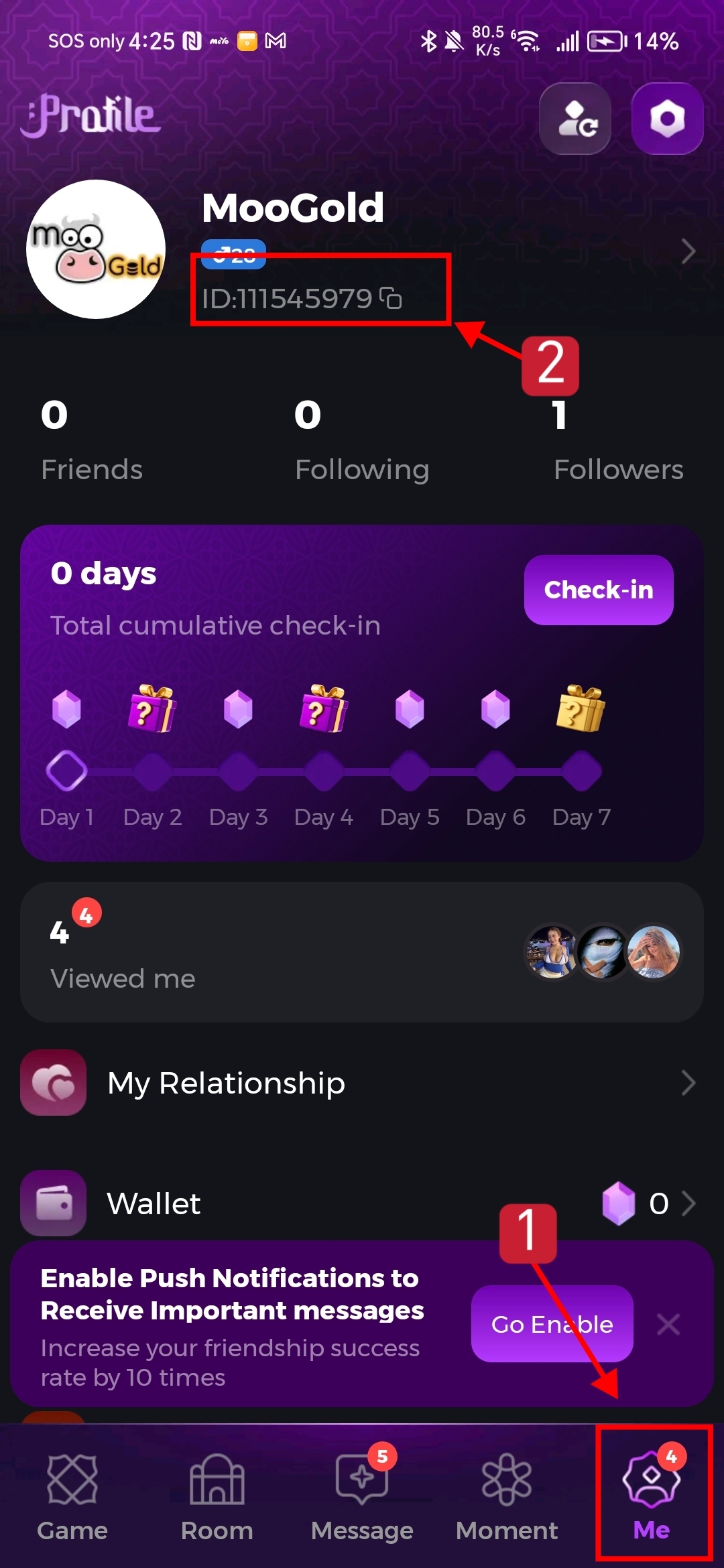
- Tap the Profile (or Me) icon located in the bottom-right corner of the main screen.
- Look directly beneath your avatar and display name.
- Locate the ID number displayed there.
- Tap the copy icon next to the number to copy your UID directly to your clipboard, avoiding typing mistakes during checkout.
Direct UID Top-Up vs Yaahlan Gift Card Voucher Redemption
Understanding the difference between direct UID recharge and digital gift card codes helps you choose the fastest method for topping up:
| Feature | Direct UID Top-Up (XPTopup) | Gift Card Voucher / PIN |
|---|---|---|
| Crediting Method | Direct automatic credit to UID | Manual alphanumeric code entry in app |
| Account Security | Requires only numerical UID; zero passwords | Requires manual redemption inside wallet menu |
| Speed | Instant delivery upon payment verification | Requires copying, pasting, and manual validation |
| Risk of Typing Errors | Minimal when copied directly from profile | Risk of mistyping long alphanumeric PINs |
| Regional Restrictions | Works universally across supported regions | Often locked to specific localized currency codes |
Direct UID recharge eliminates the extra step of entering lengthy PINs into the in-app wallet, reducing failed redemptions.
Voice Chat Rooms, Mini-Games, and VIP Tier Perks
Yaahlan combines social voice networking with real-time multiplayer gaming. Recharging Diamonds gives you continuous access to all core activities:
Live Voice Chat and Gift Battles
Voice rooms are the heartbeat of Yaahlan. Room hosts host talent showcases, themed discussions, and competitive PK battles. Gifting Diamonds during PK challenges increases the host's score and places your profile at the top of the room's supporter leaderboard.
In-App Mini-Games (Ludo & Carrom)
If you enjoy gaming alongside chatting, Yaahlan features interactive multiplayer modes for classic games like Ludo and Carrom. Diamonds allow you to enter competitive rooms, challenge friends, and acquire in-game tokens or premium dice skins.
VIP Status and Entry Effects
Spending Diamonds directly builds your account level. High-tier VIP users receive custom avatar frames, animated arrival banners when entering popular rooms, and exclusive badges that signal their status across public chats.
Why Choose XPTopup for Yaahlan Recharge
- No Passwords Required: XPTopup processes your order using only your public User ID. You never need to share passwords, verification codes, or third-party login credentials.
- Competitive Pricing: Live product rates and bundle pricing are displayed upfront on the checkout page.
- Multiple Payment Options: Choose from a wide range of secure regional and international payment methods.
- Dedicated Support: If you ever run into a question regarding an order or need help locating your ID, responsive customer support is available to assist you.
Troubleshooting Common Yaahlan Top-Up Issues
If you have completed a payment and are waiting for your Diamonds to reflect in your app, follow these troubleshooting steps:
- Restart the Yaahlan App: Close the Yaahlan app completely from your device's recent apps switcher and reopen it. This forces the client to sync with the server.
- Check the In-App Wallet Menu: Tap Me > Wallet or Diamond Balance to confirm if the updated total is visible, as the room display header can occasionally experience a temporary cache delay.
- Confirm the UID Submitted: Check your XPTopup order confirmation receipt to verify that the UID entered matches your in-app profile ID exactly.
- Verify Payment Status: Check your payment provider statement or email receipt to confirm that the transaction completed successfully.
Frequently Asked Questions About Yaahlan Top Up
What is my Yaahlan UID and where can I find it?
Your Yaahlan UID is your unique numerical account identifier. You can find it by tapping the Profile (Me) tab in the Yaahlan app. Your UID is listed right below your profile picture and nickname.
Do I need to provide my Yaahlan password for top-up?
No. Recharging on XPTopup requires only your numerical UID. You should never share your account password, email login, or SMS verification codes with anyone.
How fast are Yaahlan Diamonds credited to my account?
Once your payment is confirmed, Diamonds are sent directly to your account. In most cases, the update reflects in your in-app wallet within minutes.
What happens if I enter the wrong Yaahlan User ID during checkout?
Orders are processed automatically based on the UID submitted. If you enter an incorrect, active UID belonging to another user, completed transactions cannot be reversed. Always copy and paste your UID directly from your profile screen before submitting payment.
Is Yaahlan Diamonds recharge available for global users or only MENA?
Direct UID recharge works for all standard global accounts, including users across the MENA region and worldwide. As long as your UID is valid on the official Yaahlan platform, your recharge can be completed.
What should I do if my Yaahlan balance does not update after payment?
First, force-close and restart the app, then check your in-app wallet. If the balance still has not updated after a short period, contact XPTopup customer service with your Order ID and Yaahlan UID for prompt verification.
Current package prices
Current package prices are shown below. Prices exclude Tax. Tax, payment fees and applicable coupons are shown at checkout.
| Package | Price |
|---|---|
| 1,000 Diamonds | USD 1.61 |
| 3,000 Diamonds | USD 4.82 |
| 10,800 Diamonds | USD 17.36 |
| 29,000 Diamonds | USD 46.63 |
| 55,000 Diamonds | USD 88.43 |
| 86,200 Diamonds | USD 138.59 |
| 100,000 Diamonds | USD 160.78 |