Eggy Party Eggy Coins Top Up Guide and In-Game Value
Eggy Party is NetEase's vibrant multiplayer party game where players compete across obstacle courses, minigames, and creative custom maps. To personalize your Eggy character, draw limited-edition seasonal outfits, and grab premium battle pass items, you need Eggy Coins.
An Eggy Party Eggy Coins top up on XPTopup adds premium currency straight to your account using only your Player UID. You never have to share account passwords or sensitive login credentials. Whether you want to spin the latest Mystery Box gacha or send gifts to teammates, replenishing your balance on XPTopup is quick and reliable.
Understanding In-Game Currencies: Eggy Coins vs. Bottle Caps
Eggy Party uses several distinct currencies to manage character progression, social interactions, and cosmetic items. Knowing how Eggy Coins differ from free, farmable currencies helps you spend efficiently.
| Currency Name | How to Obtain | Primary Uses |
|---|---|---|
| Eggy Coins | Direct top up via UID on XPTopup | Premium Mystery Boxes, Season Passes, exclusive legendary outfits, and conversion to Shiny Coins |
| Shiny Coins | Converted directly from Eggy Coins (1:1 ratio) | Seasonal themed gacha events and limited-run collaboration prize draws |
| Bottle Caps | Daily quests, level-ups, active matches, and party events | Standard Bottle Cap Mystery Boxes, basic emotes, and common outfits |
| Fashion Badges | Recycling duplicate outfits or event rewards | Direct store purchases for select classic costumes and accessories |
While Bottle Caps and Fashion Badges unlock basic customization through daily play, premium seasonal collaborations and rare animated outfits require Eggy Coins. Converting Eggy Coins to Shiny Coins allows you to participate in high-tier prize wheels and secure limited-time crossover skins.
How to Find Your Eggy Party UID
To complete an order on XPTopup, you only need your unique numeric Player UID. Follow these simple steps inside the game client to locate and copy it:
- Launch Eggy Party on your mobile device or tablet.
- Tap your Avatar / Profile Icon located in the top-left corner of the main lobby screen.
- Open the Basic Info tab on your profile page.
- Find the numeric UID displayed directly beneath your player nickname.
- Tap the small Copy icon next to your UID string to copy the numbers directly to your clipboard.
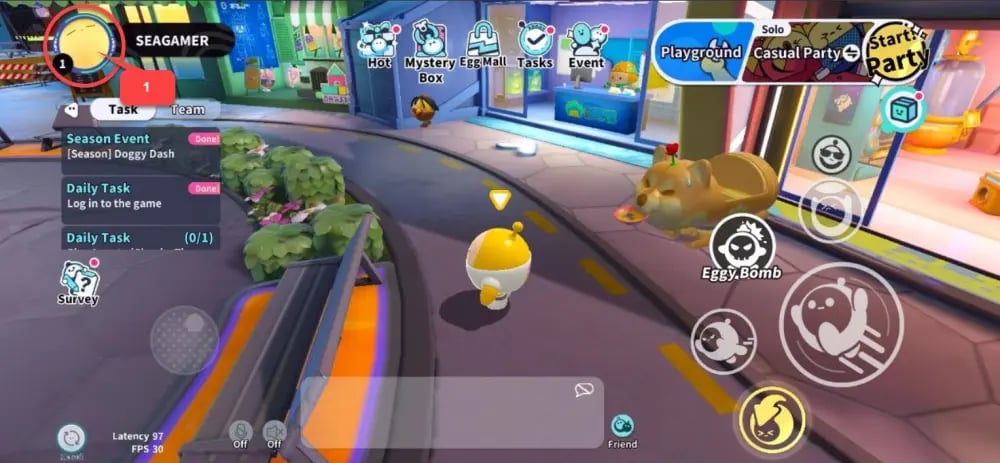
Double-check that the copied UID matches your profile before pasting it into the checkout field on XPTopup.
How to Top Up Eggy Coins on XPTopup
Recharging your account on XPTopup takes less than two minutes from package selection to delivery:
- Select Package Tier: Choose the denomination of Eggy Coins you wish to purchase from the product selector above.
- Enter Player UID: Paste your numeric Eggy Party UID into the required input field.
- Confirm Details: Review your UID carefully to avoid sending balance to an incorrect account.
- Proceed to Payment: Select your preferred regional payment method and submit the transaction. Current rates and available payment channels are displayed in real time on the checkout interface.
- Receive Your Coins: Once payment processing is verified, the Eggy Coins are credited directly to your Eggy Party balance via the NetEase game servers. Open your game app to check your updated coin count.
UID-Only Direct Recharge: Account Safety Benefits
Account security is essential when buying digital gaming credits. XPTopup utilizes an official direct UID injection method that offers distinct safety advantages:
- No Passwords Required: You never need to supply your NetEase login email, phone number, Facebook, Google, or Apple ID password.
- Zero Risk of Account Hijacking: Because no login verification codes or credentials change hands, your account remains entirely under your personal control.
- No Third-Party Device Logins: Direct UID recharges do not require another device to log into your account, preventing suspicious login flags or regional session bans.
- Simple and Transparent: You provide public profile information only (your UID number), making the purchase process straightforward and secure.
Troubleshooting Common Eggy Party Top Up Issues
If you encounter any delay or discrepancy after completing your order, follow these practical troubleshooting steps:
1. In-Game Balance Has Not Updated
- Restart the Client: Force close the Eggy Party app completely from your device's background app switcher, then relaunch it. This forces the client to sync with the server database.
- Check In-Game Mail: Certain event-related bonuses or promotional bundles may be delivered via your in-game mailbox rather than directly to the top bar wallet. Check your mailbox in the main menu.
2. Incorrect UID Submitted at Checkout
- Because UID recharges are processed automatically on the server, transactions sent to a valid, existing third-party UID cannot be reversed once processed.
- If you realize you entered an incorrect UID before receiving an order completion notice, contact XPTopup customer support immediately with your order number to check if fulfillment can be paused.
- Always use the in-game copy button to eliminate typing errors.
3. Payment Completed but Order Pending
- Bank processing times can occasionally vary depending on the chosen payment channel. Keep your transaction reference number handy.
- If your balance does not reflect your purchase after a short waiting period, reach out to XPTopup 24/7 customer service with your order ID and proof of payment for direct tracking.