Instant Hago Top Up for Diamonds and Live Party Rooms
Hago combines interactive party games, voice chat rooms, 3D avatars, and live streaming into a single social hub. Whether you are challenging friends in casual minigames like Knife Hit and Sheep Fight or hosting an interactive voice party, Hago Diamonds are the primary in-app currency required to access premium virtual items and social features.
An instant Hago top up on XPTopup sends Diamonds straight to your game account using only your public Player ID. You do not need to log in to third-party accounts or share sensitive credentials. Please note that this recharge service is specifically for the global Hago social gaming and voice room application, not for e-commerce or package forwarding services with similar names.
What Are Hago Diamonds and How Are They Used?
Diamonds represent the premium currency inside Hago. While you can play many basic minigames for free, Diamonds unlock the social and interactive features that make live rooms engaging.
| Feature | Diamond Usage | Benefit |
|---|---|---|
| Live Virtual Gifts | Send animated gifts to room hosts and streamers | Boosts host ranking, triggers screen animations, increases intimacy level |
| Party Room Effects | Custom entrance banners, voice effects, spotlight frames | Distinguishes your profile in large voice channels |
| Avatar Customization | Exclusive outfits, hairstyles, accessories, and 3D props | Personalizes your virtual identity in interactive 3D spaces |
| Minigame Upgrades | Entry tickets, revives, and exclusive item boosts | Extends play sessions and leaderboard climbing |
| VIP Privileges | Monthly status badges, chat bubbles, exclusive room perks | Premium visibility across social feeds and channels |
Recharging Diamonds gives you the flexibility to support your favorite creators, stand out in packed voice rooms, and access seasonal event rewards directly in the app.
How to Top Up Hago Diamonds on XPTopup
To recharge your Hago account on XPTopup, follow these quick steps:
- Enter Your Player ID: Input your numerical Hago Player ID in the designated account field above.
- Select Diamond Package: Choose the Diamond denomination that matches your needs. Current pricing and denominations appear on the live order module.
- Select Your Payment Method: Choose from the available secure checkout methods displayed on the payment page.
- Complete Checkout: Review your details, submit your order, and finalize payment.
- Receive Your Diamonds: The Diamonds are credited directly to your Hago balance automatically. Open or refresh the Hago app to check your updated total.
How to Find Your Hago Player ID
Your Hago Player ID is a unique numeric identifier linked to your account profile. Finding it takes just a few seconds:
- Open the Hago app on your mobile device.
- Tap the Me (profile) icon located at the bottom-right corner of the home screen.
- Tap on your profile picture or username at the top to open your full profile page.
- Locate your numeric Hago ID displayed directly beneath your profile avatar and nickname.
- Tap the copy icon next to your ID to copy it to your clipboard, then paste it into the Player ID box on XPTopup.
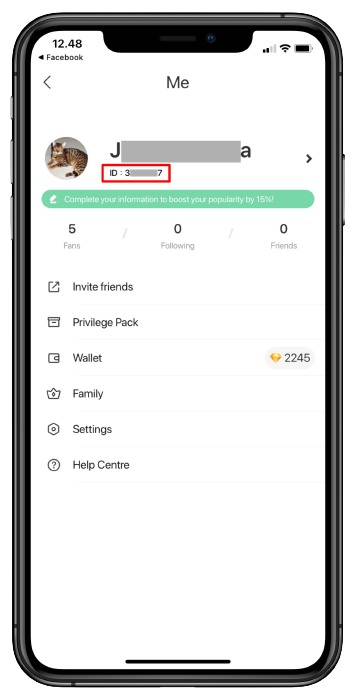
Always double-check your ID before completing your transaction to ensure the Diamonds reach the correct profile.
How to Buy Hago Diamonds for Friends
Gifting Diamonds to friends, room hosts, or family members on XPTopup is straightforward because our checkout requires only the recipient's Player ID:
- Ask your friend for their numerical Hago Player ID from their profile page.
- Paste your friend's Player ID into the account field on the XPTopup Hago top up page.
- Select the Diamond package you wish to gift them.
- Complete the checkout process.
As soon as the payment completes, the Diamonds are delivered directly to your friend's in-game wallet. You do not need their password, phone number, or login credentials, making it a safe and hassle-free way to surprise streamers and team members.
Safe Checkout and Account Security on XPTopup
Account protection is central to every order on XPTopup. We use a direct ID-based fulfillment process designed to keep your profile secure:
- Zero Password Requirements: We never ask for your account password, email access, phone OTP, or social login credentials. You only provide your public Player ID.
- Encrypted Transactions: All payment channels on XPTopup operate through encrypted gateways, safeguarding your billing information.
- Direct Wallet Crediting: Diamonds are deposited directly into the Hago balance without risky account takeovers or unauthorized third-party logins.
- Transparent Live Pricing: Live package pricing, currency selections, and available denominations are always clearly visible before you confirm your order.
Order Status and Troubleshooting Diamond Delivery
Most Hago Diamond orders process automatically after successful payment. If your balance does not update immediately, use the following troubleshooting steps:
- Restart the Hago App: Close the Hago app completely from your device task manager and reopen it to force a wallet balance refresh.
- Verify Your Player ID: Check your order confirmation receipt on XPTopup to confirm that the submitted Player ID matches your actual in-game profile number.
- Check Transaction Status: View your order status in your XPTopup account history to ensure your payment completed successfully.
- Contact Support: If your Diamonds have not arrived after refreshing your app, contact the XPTopup customer support team with your Order Number and Hago Player ID for immediate assistance.
Frequently Asked Questions About Hago Recharge
How do I find my Hago Player ID?
Open the Hago app, tap the Me icon in the bottom-right corner, and tap your avatar to open your profile. Your numeric Hago ID is listed under your profile photo. Tap the copy button to copy it accurately.
Do I need to provide my Hago password to top up?
No. XPTopup requires only your public Hago Player ID to process your Diamond recharge. You should never share your account password, verification codes, or login details with anyone.
Can I top up Hago Diamonds for a friend?
Yes. You can recharge any Hago account by entering the recipient's Player ID into the checkout field on XPTopup and completing payment.
What can I purchase with Hago Diamonds?
Diamonds can be used to send virtual gifts to live streamers and room hosts, purchase premium avatar outfits and 3D items, unlock party room visual effects, enter special minigames, and activate VIP profile privileges.
How long does it take for Hago Diamonds to appear in my account?
Diamonds are processed automatically upon payment confirmation. Once the transaction completes, your Diamonds are credited to your account balance almost immediately. A simple app refresh will display your updated total.
What should I do if my Hago Diamond top up does not arrive?
First, restart your Hago app to refresh your wallet balance. Next, verify that the Player ID on your order receipt matches your profile ID. If the issue persists, reach out to XPTopup customer support with your Order Number for rapid resolution.
Current package prices
Current package prices are shown below. Prices exclude Tax. Tax, payment fees and applicable coupons are shown at checkout.
| Package | Price |
|---|---|
| Hago - Hago*30000 | USD 2.23 |
| Hago - Hago*50000 | USD 3.72 |
| Hago - Hago*70000 | USD 5.21 |
| Hago - Hago*100000 | USD 7.45 |
| Hago - Hago*200000 | USD 14.89 |
| Hago - Hago*500000 | USD 37.23 |
| Hago - Hago*700000 | USD 52.12 |
| Hago - Hago*1000000 | USD 74.46 |
| Hago - Hago*2000000 | USD 148.91 |
| Hago - Hago*5000000 | USD 372.29 |