
Layam Chat Top Up: Instant Voice Room Coins and Credits
Layam Chat is a popular social voice platform where users gather in themed voice rooms to chat, sing karaoke, participate in interactive audio games, and share memorable moments with friends worldwide. In-app coins and credits serve as the primary currency within the application, allowing you to show appreciation to room hosts, send animated virtual gifts, activate special entrance effects, and unlock premium profile decorations.
Recharging your account balance on XPTopup is direct, secure, and user-friendly. By using your unique User ID (UID), you can top up coins straight to your Layam Chat account without handing over your personal login credentials or account passwords.
How to Top Up Layam Chat Coins on XPTopup
Follow these quick steps to complete your Layam Chat recharge on XPTopup:
- Select Your Coin Package: Browse the available coin denominations listed on the live checkout page and choose the amount that fits your social needs.
- Enter Your Layam Chat UID: Input your numeric Layam Chat UID into the designated player field. Double-check your numbers to ensure correct delivery.
- Choose Your Payment Method: Pick your preferred payment option from the available options shown on the checkout screen.
- Confirm Your Order: Complete the payment. Once your transaction is confirmed, the coins will be credited directly to your in-app Layam Chat wallet.
How to Find Your Layam Chat UID
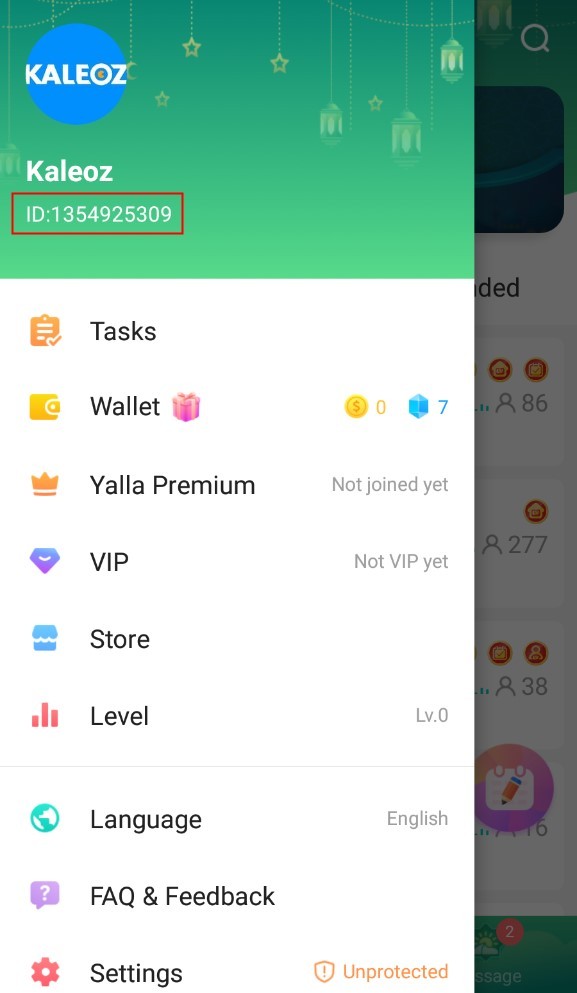
Your Layam Chat UID is a unique numeric identifier assigned to your account. You only need this UID to process coin recharges. Here is how to locate it quickly inside the app:
- Open the Layam Chat application on your mobile device.
- Tap the Profile or Me icon located at the bottom right corner of the main screen.
- Locate your profile avatar and display name at the top of the screen.
- Your numeric UID is displayed right below your nickname.
- Tap the copy icon next to your UID to copy it directly to your clipboard, then paste it into the UID field on XPTopup.
What Are Layam Chat Coins Used For?
Layam Chat coins enrich your social voice experience by granting access to an array of interactive features across voice rooms:
- Animated Virtual Gifts: Send stunning 2D and 3D animated gifts to room hosts, guest speakers, and performers during live voice broadcasts.
- Entrance Banners and Ride Effects: Stand out the moment you enter any public or private voice room with special entrance animations, luxury vehicle visual effects, and banner announcements.
- Karaoke and Mini-Games: Participate in room games, vote in community competitions, and queue your favorite tracks during karaoke sessions.
- Exclusive Avatar Frames & Badges: Customize your profile appearance with vibrant frames, noble badges, and chat bubble styles that reflect your community status.
- Room Creation and Customization: Support your own voice community by upgrading room features, boosting room visibility, and setting up special event rewards.
Secure UID-Only Top Up: Why Choose XPTopup
Recharging your Layam Chat balance through XPTopup offers dedicated security and convenience tailored for global voice chat enthusiasts:
- 100% Password-Free Process: We never ask for your account password, email login, or verification codes. All coin recharges require only your public numeric UID.
- Transparent Live Checkout: All coin quantities and real-time prices are clearly displayed on the product page. You always see the exact cost before completing payment.
- Reliable Customer Assistance: If you have questions regarding your order status or need help finding your ID, our dedicated support team is available to assist you.
- Fast Account Crediting: Transactions are processed swiftly so you can get back to your favorite voice rooms and send gifts without interruption.
Layam Chat Top Up Package Guide and Delivery Verification
Whether you need a modest coin bundle for daily chat greetings or a larger package for hosting room events, XPTopup provides options across multiple tiers.
| Package Tier | Best Suited For | Common In-App Uses |
|---|---|---|
| Starter Packs | Casual chatters & daily greetings | Small animated gifts, room tipping, daily interactions |
| Popular Packs | Active room guests & karaoke singers | Medium gift combos, chat bubbles, avatar frames |
| Elite Packs | Room hosts, event sponsors & VIPs | Luxury entrance effects, grand room gifts, high-tier status badges |
How to Verify Coin Delivery
After completing your purchase on XPTopup, open the Layam Chat app and tap the Me or Wallet tab. Your total coin balance will update to reflect the newly purchased credit. If your app was already open during checkout, refresh your profile page or restart the app to see the updated total.
Troubleshooting UID Errors
- Mistyped UID: Always copy and paste your UID directly from the Layam Chat app rather than typing it manually. If you submit an incorrect UID that belongs to another active user, delivered coins cannot be reversed.
- Delayed Balance Refresh: If your coins do not appear immediately, check your order confirmation on XPTopup, wait 1 to 2 minutes, and restart the Layam Chat app.
- Need Order Help: Keep your XPTopup order number ready and contact customer support for fast verification.






























