Mico Live Coins Top Up: Fast, Secure & Direct Recharge
Mico Live Coins represent the primary premium currency used across the global Mico Live social streaming platform. Whether you want to send virtual gifts to your favorite broadcasters, unlock VIP status privileges, trigger special entrance animations, or participate in competitive live room PK battles, having an adequate coin balance ensures you stay active in every stream.
XPTopup provides a direct, secure channel for your Mico Live Coins top up. You can recharge your account within seconds using only your numerical User ID (UID), with no password required and zero risk to your personal profile.
What Are Mico Live Coins and What Are They Used For?
Mico Live is an international live-streaming, video chat, and social discovery platform connecting millions of users worldwide. Inside the app, coins serve as the engine for all interactive and premium social features.
Here is what you can do with Mico Live Coins:
- Send Virtual Gifts: Support content creators, hosts, and performers by sending animated gifts ranging from simple roses to luxury supercars and custom full-screen effects.
- Enter Live PK Battles: Back your favorite streamer during head-to-head live battles against other creators to help them secure victory on daily and weekly leaderboards.
- Unlock VIP and Aristocracy Perks: Gain exclusive profile badges, special comment bubble colors, room entry announcements, and priority customer privileges.
- Private Video & Audio Chats: Use coins to initiate private one-on-one connections and join premium group voice chat rooms.
- Interactive Mini-Games: Play in-app social games with stream hosts and fellow viewers directly inside live broadcast rooms.
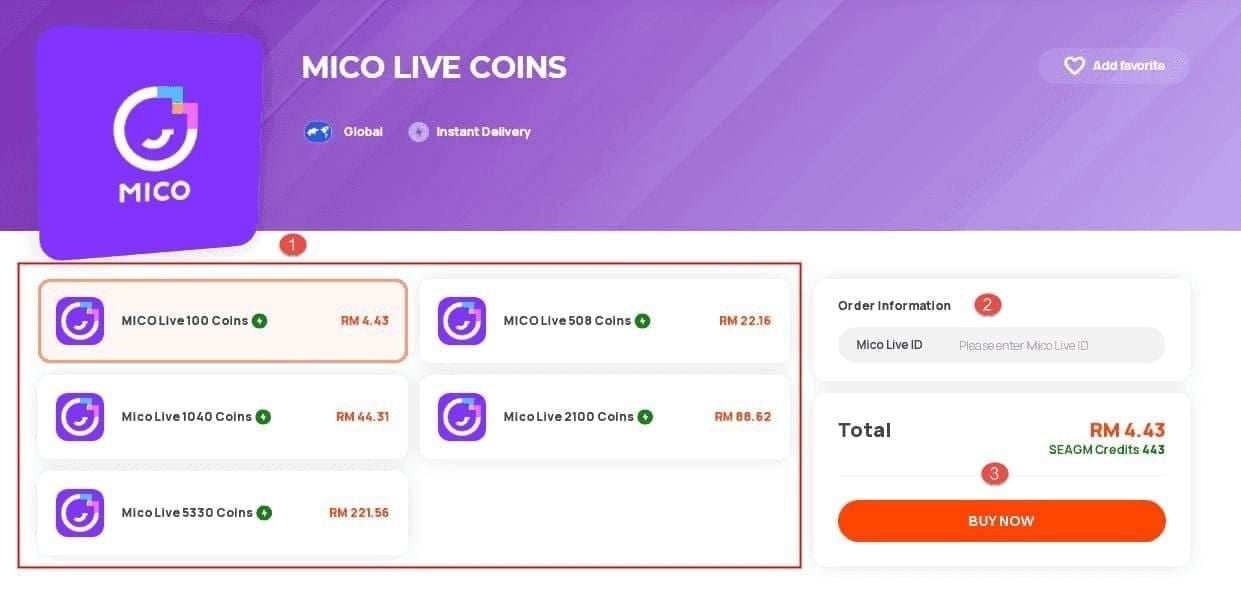
Step-by-Step Guide: How to Top Up Mico Live Coins on XPTopup
Recharging your Mico account on XPTopup takes less than a minute. Follow these simple steps to complete your purchase:
- Select Your Coin Package: Browse the available Mico Live Coin denominations on the product page and choose the amount that fits your needs.
- Enter Your Mico User ID: Type your numerical Mico Live User ID into the designated field. Double-check the numbers to ensure accurate crediting.
- Proceed to Checkout: Click the buy button and select your preferred local payment method.
- Complete Payment: Finalize the transaction through the secure payment gateway.
- Check Your In-App Balance: Open the Mico Live app, head to your profile or wallet section, and verify your updated coin balance immediately.
How to Find Your Mico Live User ID Quickly
To ensure your coins reach the correct account, you must enter your numerical User ID rather than your display name or custom nickname.
Follow this quick process to locate your ID in the app:
- Launch the Mico Live app on your mobile device.
- Tap the Profile / Me tab located in the bottom-right corner of the home screen.
- Look directly beneath your profile avatar and display name.
- Locate the line labeled ID: followed by a unique string of numbers (usually 6 to 10 digits).
- Tap the copy icon next to your ID to copy it directly to your clipboard.
Account Identifier Reference Table
| Account Field | Example Format | Suitable for Recharge? | Where to Find |
|---|---|---|---|
| Mico User ID (UID) | 108392841 | YES (Required) | Under profile photo on the "Me" page |
| Display Nickname | StarStreamer_99 | NO | Top line of the profile screen |
| Connected Email / Phone | user@example.com | NO | Account settings & security menu |
| Live Room ID | 984210 | NO | Top left corner of active broadcast |
Regional Compatibility and Account Rules for Mico Live Recharge
Mico Live operates across global server regions, including Southeast Asia, the Middle East, North America, Europe, and Latin America.
Key rules to keep in mind before recharging on XPTopup:
- Global UID Support: The UID top-up system on XPTopup supports active Mico Live accounts across international regions.
- No Account Region Restrictions: Coins credited via User ID function universally inside the app regardless of your current physical location or VPN settings.
- Active Account Requirement: Ensure your Mico account is in good standing and not temporarily suspended or restricted by platform moderators.
- Third-Party Guest Accounts: If you registered as a guest, make sure to bind your account to an email, phone number, or social login before making top-up purchases to prevent accidental loss of balance.
Account Security: Why UID-Only Top Up Keeps Your Mico Profile Safe
Account safety is a top priority when purchasing digital currencies online. XPTopup operates strictly via direct ID injection, meaning you never need to hand over sensitive account credentials.
- Zero Password Sharing: You will never be asked for your Mico password, SMS verification codes, or linked social media login details.
- No Account Takeover Risks: Because no login session is shared, your personal chat logs, private photos, and linked payment methods remain untouched.
- Safe for Gifting Friends: Because only the public User ID is required, you can surprise friends, family members, or favorite creators by topping up coins directly into their accounts.
Troubleshooting Common Mico Coin Delivery and Balance Refresh Issues
While top-ups on XPTopup process automatically, occasional network delays can occur. If your balance does not update immediately, use the following troubleshooting checklist:
- Refresh the Mico Application: Completely close the Mico Live app from your device background apps and reopen it. Check your in-app wallet under Me > My Coins.
- Check Your Order History on XPTopup: Review your transaction status in your XPTopup account dashboard to confirm that payment cleared successfully.
- Verify Your Input UID: Check your purchase receipt to ensure the numerical ID entered matches your actual profile ID. If you made a typo, contact customer support promptly with your transaction ID.
- Clear Mobile App Cache: Navigate to your phone settings, locate Mico Live, and clear cached data to force a real-time data sync with the server.
- Contact 24/7 Support: If your balance has not reflected after several minutes, reach out to the XPTopup customer service team with your order number for fast resolution.
Why Choose XPTopup for Your Mico Live Recharge
XPTopup delivers a streamlined recharge experience built specifically for mobile live-streaming enthusiasts:
- Transparent Pricing: Check real-time rates directly on the live checkout screen with zero hidden processing charges.
- Multiple Secure Payment Methods: Pay using convenient local payment channels, digital wallets, credit cards, or online banking.
- Speed and Automation: Automated backend processing deposits coins straight to your Mico balance without manual intervention.
- Dedicated Support: Access responsive customer support ready to assist you around the clock with order verification and delivery inquiries.
Frequently Asked Questions
Where can I buy Mico Live coins online safely?
You can safely buy Mico Live coins on XPTopup. The platform uses secure payment encryption and requires only your public Mico User ID to deliver coins directly to your profile.
How do I find my Mico Live User ID for top up?
Open the Mico Live app, tap the Me profile icon in the bottom right corner, and look below your profile picture. Your numerical ID is listed next to the label ID:.
Do I need to provide my Mico password during top up?
No. You never need to share your password, phone number, or verification code. XPTopup only requires your numerical User ID to process the transaction safely.
What are Mico Live Coins used for?
Mico Live Coins are used to purchase virtual gifts for streamers, unlock VIP badges and profile frames, trigger broadcast entry effects, participate in live PK battles, and join private video or voice chats.
What should I do if my Mico coins do not appear after checkout?
Restart the Mico Live app and check your balance under Me > My Coins. If the balance has not updated, verify your transaction status on XPTopup or contact customer support with your order number for instant assistance.
Can I top up Mico Live coins for another user using their User ID?
Yes. Because the top-up process only requires a numerical User ID, you can enter any valid user's ID at checkout to send coins directly to their Mico account.
Current package prices
Current package prices are shown below. Prices exclude Tax. Tax, payment fees and applicable coupons are shown at checkout.
| Package | Price |
|---|---|
| 352 Coins | USD 0.56 |
| 88 Coins | USD 0.68 |
| 445 Coins | USD 0.68 |
| 100 Coins | USD 0.77 |
| 102 Coins | USD 0.79 |
| 605 Coins | USD 0.93 |
| 900 Coins | USD 1.38 |
| 1,760 Coins | USD 2.69 |
| 2,500 Coins | USD 3.82 |
| 500 Coins | USD 3.85 |
| 510 Coins | USD 3.92 |
| 2,730 Coins | USD 4.17 |
| 3,520 Coins | USD 5.37 |
| 1,000 Coins | USD 7.70 |
| 5,200 Coins | USD 7.94 |
| 1,100 Coins | USD 8.46 |
| 5,580 Coins | USD 8.51 |
| 1,140 Coins | USD 8.77 |
| 6,500 Coins | USD 9.92 |
| 7,500 Coins | USD 11.44 |
| 8,550 Coins | USD 13.04 |
| 10,560 Coins | USD 16.11 |
| 2,200 Coins | USD 16.92 |
| 2,260 Coins | USD 17.38 |
| 15,600 Coins | USD 23.80 |
| 3,300 Coins | USD 25.38 |
| 3,390 Coins | USD 26.07 |
| 21,120 Coins | USD 32.21 |
| 4,400 Coins | USD 33.83 |
| 26,250 Coins | USD 40.04 |
| 5,500 Coins | USD 42.29 |
| 5,700 Coins | USD 43.83 |
| 31,500 Coins | USD 48.04 |
| 31,680 Coins | USD 48.32 |
| 6,600 Coins | USD 50.75 |
| 7,700 Coins | USD 59.21 |
| 8,700 Coins | USD 66.90 |
| 8,800 Coins | USD 67.66 |
| 9,040 Coins | USD 69.51 |
| 47,700 Coins | USD 72.75 |
| 53,000 Coins | USD 80.83 |
| 11,000 Coins | USD 84.58 |
| 11,100 Coins | USD 85.35 |
| 11,500 Coins | USD 88.43 |
| 108,000 Coins | USD 164.71 |
| 22,000 Coins | USD 169.16 |
| 22,200 Coins | USD 170.69 |
| 22,800 Coins | USD 175.31 |
| 162,000 Coins | USD 247.06 |
| 33,000 Coins | USD 253.74 |
| 33,900 Coins | USD 260.66 |
| 275,000 Coins | USD 419.39 |
| 55,000 Coins | USD 422.89 |
| 56,500 Coins | USD 434.42 |